This is the multi-page printable view of this section. Click here to print.
Ateliere Live 8.0.0 developer reference
- 1: System controller config
- 2: REST API v3
- 3: Rendering Engine config
- 4: Operational Control API
- 5: C++ SDK
- 5.1: Classes
- 5.1.1: Acl::AclLog::FileLocationFormatterFlag
- 5.1.2: Acl::AclLog::ThreadNameFormatterFlag
- 5.1.3: Acl::AlignedAudioFrame
- 5.1.4: Acl::AlignedFrame
- 5.1.5: Acl::ControlDataAddress
- 5.1.6: Acl::ControlDataCommon::ConnectionEvent
- 5.1.7: Acl::ControlDataCommon::Response
- 5.1.8: Acl::ControlDataCommon::StatusMessage
- 5.1.9: Acl::ControlDataSender
- 5.1.10: Acl::ControlDataSender::Settings
- 5.1.11: Acl::DeviceMemory
- 5.1.12: Acl::IControlDataReceiver
- 5.1.13: Acl::IControlDataReceiver::IRequest
- 5.1.14: Acl::IControlDataReceiver::RequestData
- 5.1.15: Acl::IControlDataReceiver::Settings
- 5.1.16: Acl::IMediaStreamer
- 5.1.17: Acl::IMediaStreamer::Configuration
- 5.1.18: Acl::IMediaStreamer::Settings
- 5.1.19: Acl::IngestApplication
- 5.1.20: Acl::IngestApplication::Settings
- 5.1.21: Acl::ISystemControllerInterface
- 5.1.22: Acl::ISystemControllerInterface::Callbacks
- 5.1.23: Acl::ISystemControllerInterface::Response
- 5.1.24: Acl::MediaReceiver
- 5.1.25: Acl::MediaReceiver::CustomSystemControllerCallResponse
- 5.1.26: Acl::MediaReceiver::NewStreamParameters
- 5.1.27: Acl::MediaReceiver::Settings
- 5.1.28: Acl::SystemControllerConnection
- 5.1.29: Acl::SystemControllerConnection::Settings
- 5.1.30: Acl::TimeCommon::TAIStatus
- 5.1.31: Acl::TimeCommon::TimeStructure
- 5.1.32: Acl::UUID
- 5.1.33: fmt::formatter< Acl::AudioChannelLayout >
- 5.1.34: fmt::formatter< Acl::ControlDataAddress >
- 5.1.35: fmt::formatter< Acl::ControlDataCommon::EventType >
- 5.1.36: fmt::formatter< Acl::FieldOrder >
- 5.1.37: fmt::formatter< Acl::ISystemControllerInterface::StatusCode >
- 5.1.38: fmt::formatter< Acl::SystemControllerConnection::ComponentType >
- 5.1.39: fmt::formatter< Acl::UUID >
- 5.2: Files
- 5.2.1: include/AclLog.h
- 5.2.2: include/AlignedFrame.h
- 5.2.3: include/Base64.h
- 5.2.4: include/ControlDataAddress.h
- 5.2.5: include/ControlDataCommon.h
- 5.2.6: include/ControlDataSender.h
- 5.2.7: include/DeviceMemory.h
- 5.2.8: include/IControlDataReceiver.h
- 5.2.9: include/IMediaStreamer.h
- 5.2.10: include/IngestApplication.h
- 5.2.11: include/IngestUtils.h
- 5.2.12: include/ISystemControllerInterface.h
- 5.2.13: include/MediaEnumerations.h
- 5.2.14: include/MediaReceiver.h
- 5.2.15: include/SystemControllerConnection.h
- 5.2.16: include/TimeCommon.h
- 5.2.17: include/UUID.h
- 5.3: Namespaces
- 5.3.1: Acl
- 5.3.2: Acl::AclLog
- 5.3.3: Acl::ControlDataCommon
- 5.3.4: Acl::IngestUtils
- 5.3.5: Acl::TimeCommon
- 5.3.6: fmt
- 5.3.7: spdlog
1 - System controller config
This page describes the configuration settings possible to set via the acl_sc_settings.json file.
| Expanded Config name | Config name | Description | Default value |
|---|---|---|---|
| psk | psk | The Pre-shared key used to authorize components to connect to the System Controller. Must be 32 characters long | "" |
| client_auth.enabled | enabled | Switch to enable basic authentication for clients in the REST API | true |
| client_auth.username | username | The username that will grant access to the REST API | “admin” |
| client_auth.password | password | Password that will grant access to the REST API | “changeme” |
| https.enabled | enabled | Switch to enable encryption of the REST API as well as the connections between the System Controller and the connected components | true |
| https.certificate_file | certificate_file | Path to the certificate file. In pem format | "" |
| https.private_key_file | private_key_file | Path to the private key file. In pem format | "" |
| logger.level | level | The level that the logging will produce output, available in ascending order: debug, info, warn, error | info |
| logger.file_name_prefix | file_name_prefix | The prefix of the log filename. A unique timecode and “.log” will automatically be appended to this prefix. The prefix can contain both the path and the prefix of the log file. | "" |
| site.port | port | Port on which the service is accessible | 8080 |
| site.host | host | Hostname on which the service is accessible | localhost |
| rate_limit.requests_per_sec | RateLimit.RequestsPerSec | The average number of requests that are handled per second, before requests are queued up. (Number of tokens added to the token bucket per second 1) | 300 |
| rate_limit.burst_limit | RateLimit.BurstLimit | The number of requests that can be handled in a short burst before rate limiting kicks in (Maximum number of tokens in the token bucket 1). | 10 |
| response_timeout | response_timeout | The maximum time of a request between the System Controller and a component before the request is timed out | 5000ms |
| cors.allowed_origins | allowed_origins | Comma-separated list of origin addresses that are allowed | ["*"] |
| cors.allowed_methods | allowed_methods | Comma-separated list of HTTP methods that the service accepts | [“GET”, “POST”, “PUT”, “PATCH”, “DELETE”] |
| cors.allowed_headers | allowed_headers | Comma-separated list of headers that are allowed | ["*"] |
| cors.exposed_headers | exposed_headers | Comma-separated list of headers that are allowed for exposure | [""] |
| cors.allow_credentials | allow_credentials | Allow the xKHR to set credentials cookies | false |
| cors.max_age | max_age | How long the preflight cache is stored before a new must be made | 300 |
| custom_headers.[N].key | key | Custom headers, the key of the header, e.g.: Cache-Control | None |
| custom_headers.[N].value | value | Custom headers, the value to the key of the header, e.g.: no-cache | None |
| allow_any_version | allow_any_version | Allow components of any version to connect. When set to false, components with another major version than the System Controller will be rejected | false |
2 - REST API v3
The following is a rendering of the OpenAPI for the Ateliere Live System Controller using Swagger. It does not have a backend server, so it cannot be run interactively.
This API is available from the server at the base URL /api/v3.
3 - Rendering Engine config
This page describes how to configure the Rendering Engine. This topic is closely related to this page on the control command protocol for the video and audio mixers.
Rendering Engine components
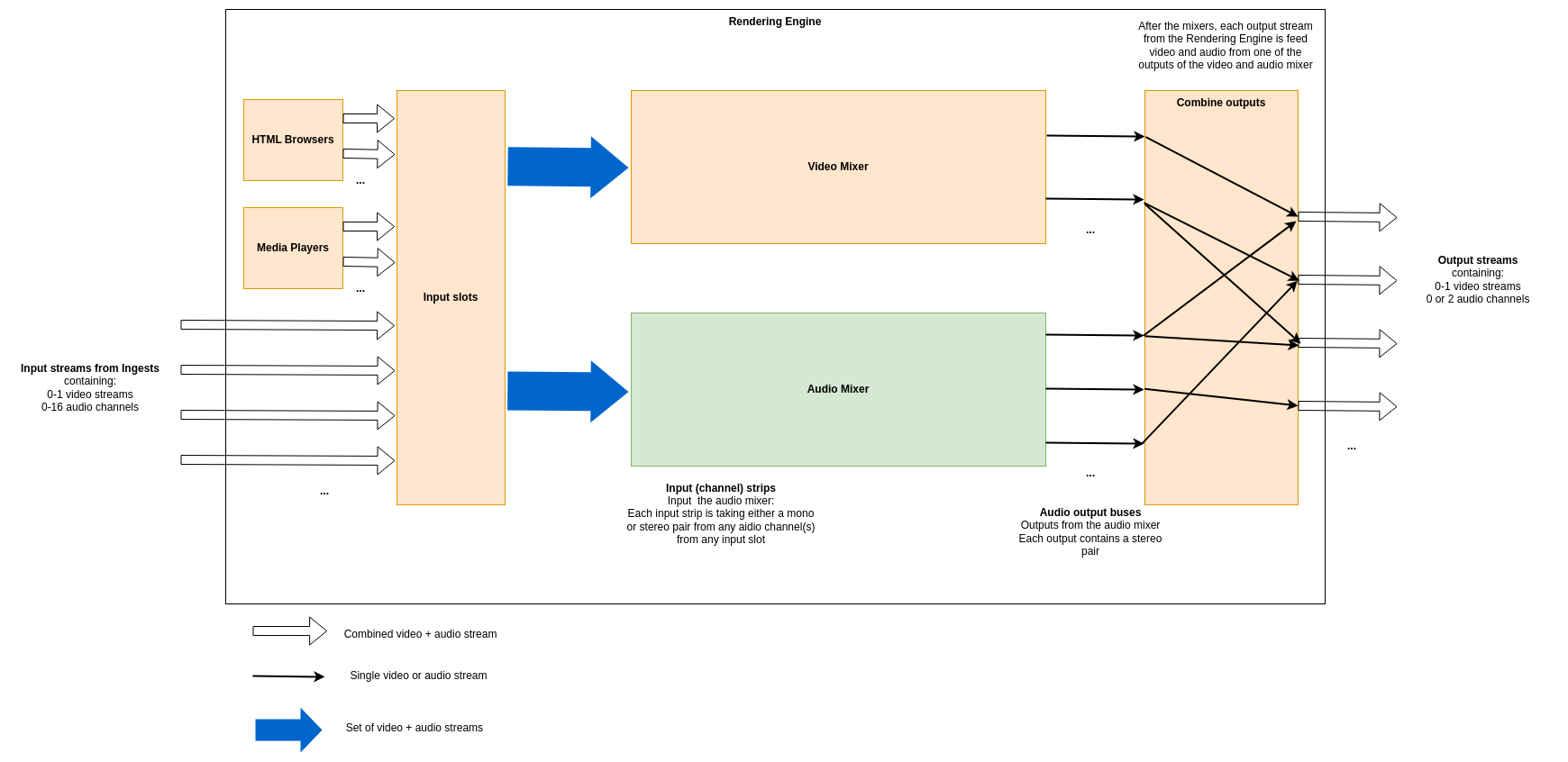
The Rendering Engine is an application that uses the Production Pipeline library in the base platform for transport, and adds to that media file playback, HTML rendering, a full video mixer and an audio mixer. The figure below shows a schematic of the different components and an example of how streams may transition through it.
HTML Renderers
Multiple HTML renderers can be instantiated in runtime by control panels, and in each an HTML page can be opened. Each HTML renderer produces a video stream, but no audio.
Media Players
Multiple media players can be instantiated in runtime by control panels, and in each a media file can be opened. Each media player produces a stream containing a video stream and all audio streams from the file.
Video Mixer
The Video mixer receives all video inputs into the system, i.e. streams from ingests, from HTML renderers and from media players. It outputs one or more named video output streams. The internal structure of the video mixer is defined at startup (as decribed in detail below), and controlling the video mixer is done in runtime by control panels.
Audio Mixer
Note
The audio mixer can be either our internal audio mixer or an integration towards an external third party audio mixer. The rest of the documentation here is valid for the internal audio mixer.The audio mixer takes a number of mono or stereo pair streams as inputs that we call input strips. It outputs a number of named output streams in stereo. The outputs of the audio mixer are defined at startup, and the audio mixer is controlled in runtime by control panels.
Combine outputs
The combination of video and audio outputs into full output streams from the rendering engine is configured at startup.
Configuring the Rendering Engine
Some aspects of the rendering engine can be configured statically at startup through the use of a configuration file in JSON format. Specifically, the video mixer node graph, the audio mixer outputs and the combination of video and audio outputs can be configured. Exactly how the configuration file is specified at startup is covered in this guide.
As an example, here is the contents of such a JSON configuration file that we will refer to throughout this guide:
{
  "version": "1.0",
  "video": {
    "nodes": {
      "transition": {
        "type": "transition"
      },
      "chroma_key_select": {
        "type": "select"
      },
      "chroma_key": {
        "type": "chroma_key"
      },
      "chroma_key_alpha_over": {
        "type": "alpha_over"
      },
      "fade_to_black": {
        "type": "fade_to_black"
      },
      "program": {
        "type": "output"
      },
      "chroma_key_preview": {
        "type": "output"
      },
      "preview": {
        "type": "output"
      }
    },
    "links": [
      {
        "from_node": "transition",
        "from_socket": 0,
        "to_node": "chroma_key_alpha_over",
        "to_socket": 1
      },
      {
        "from_node": "transition",
        "from_socket": 1,
        "to_node": "preview",
        "to_socket": 0
      },
      {
        "from_node": "chroma_key_select",
        "from_socket": 0,
        "to_node": "chroma_key",
        "to_socket": 0
      },
      {
        "from_node": "chroma_key",
        "from_socket": 0,
        "to_node": "chroma_key_alpha_over",
        "to_socket": 0
      },
      {
        "from_node": "chroma_key_alpha_over",
        "from_socket": 0,
        "to_node": "fade_to_black",
        "to_socket": 0
      },
      {
        "from_node": "fade_to_black",
        "from_socket": 0,
        "to_node": "program",
        "to_socket": 0
      },
      {
        "from_node": "chroma_key",
        "from_socket": 0,
        "to_node": "chroma_key_preview",
        "to_socket": 0
      }
    ]
  },
  "audio": {
    "outputs": [
      {
        "name": "main",
        "channels": 2
      },
      {
        "name": "aux1",
        "channels": 2
      },
      {
        "name": "aux2",
        "channels": 2
      }
    ]
  },
  "output_mapping": [
    {
      "name": "program",
      "video_output": "program",
      "audio_output": "main",
      "feedback_input_slot": 1001,
      "stream": true
    },
    {
      "name": "preview",
      "video_output": "preview",
      "audio_output": "",
      "feedback_input_slot": 1002,
      "stream": false
    },
    {
      "name": "aux1",
      "video_output": "program",
      "audio_output": "aux1",
      "feedback_input_slot": 0,
      "stream": true
    },
    {
      "name": "chroma_key_preview",
      "video_output": "chroma_key_preview",
      "audio_output": "aux2",
      "feedback_input_slot": 100,
      "stream": true
    }
  ]
}
Video Mixer node graph
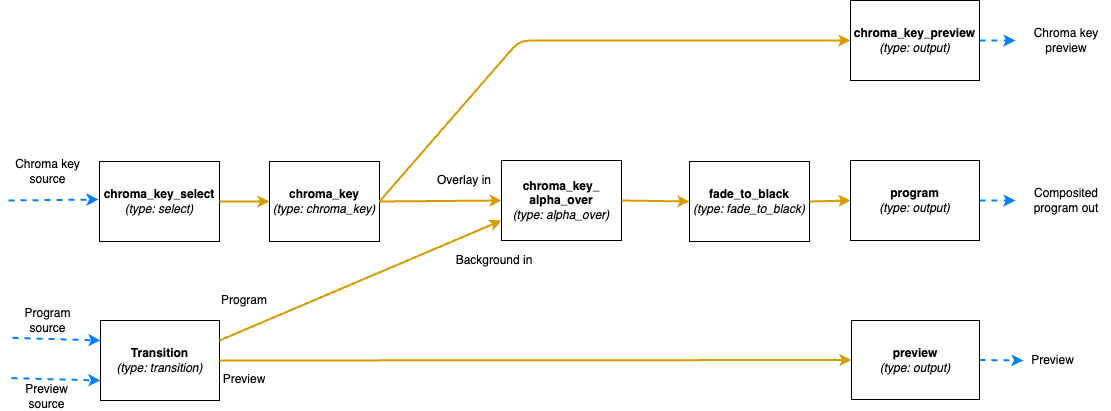
The video mixer is defined as a tree graph of nodes that work together in sequence to produce one or several video outputs. Each node performs a specific action, and has zero or more input sockets and zero or more output sockets. Links connect output sockets on one node to input sockets on other nodes. Each node is named and the name is used to control the node in runtime. The node tree configuration is specified in the video section of the JSON file, which contains two parts: the list of nodes and the list of links connecting the nodes.
The following is a graphical representation of the video mixer node graph configuration in the JSON example file above, with two input nodes, three processing nodes and three output nodes, and links in between:
Video nodes block
The nodes object of the video block is a JSON object where the names/keys in the object is the unique name of the
node. The name is used to refer to the node when operating the mixer later on, so names that are easy to
understand what they are supposed to be used for in the production is recommended.
The name can only contain lower case letters, digits, _ and -. Space or other special characters are not allowed.
Each node is an JSON object with parameters defining the node properties.
Here the parameter type defines which type of node it is.
The supported types are listed below. They can be divided into three groups depending on if they provide input to the
graph, output from the graph or is a processing node, placed in the middle of the graph.
Input nodes
The input nodes take their input from the input slots of the Rendering Engine, which contains the latest frame for all connected sources (this includes connected cameras, HTML graphics, media players etc.) The nodes in this group does not have any input sockets, as they take the input frames from the input slots of the Rendering Engine. Which slot to take the frames from is dynamically controlled during runtime.
Alpha combine node (alpha_combine)
Input sockets: 0 (Sources are taken from the input slots of the mixer)
Output sockets: 1
The alpha combine node takes two inputs and combines the color from one of them with the alpha from the other one. The
node features multiple modes that can be set during runtime to either pick the alpha channel of the second video input,
or to take any of the other R, G and B channels, or to average the RGB channels and use as alpha for the output.
This node is useful in case videos with alpha is provided from SDI sources, where the alpha must be sent as a separate
video feed and then combined with the fill/color source in the mixer.
Select node (select)
Input sockets: 0 (Source is taken from the input slots of the mixer)
Output sockets: 1
The select node simply selects an input slot from the Rendering Engine and forwards that video stream.
Which input slot to forward is set during runtime.
The node is a variant of the transition node, but does not support the transitions supported by the transition node.
Transition node (transition)
Input sockets: 0 (Sources are taken from the input slots of the mixer)
Output sockets: 2 (One with the program output and one with the preview output)
The transition node takes two video streams from the Rendering Engine’s input slots, one to use as the program and one
as the preview output stream.
These are output through the two output sockets.
During runtime this node can be used to make transitions such as wipes and fades between the selected program and
preview.
Output nodes
This group only contains a single node, used to mark a point where processed video can exit the graph and be used in output mappings.
Output node (output)
Input sockets: 1
Output sockets: 0 (Output is sent out of the video mixer)
The output node marks an output point in the video mixer’s graph, where the video stream can be used by the output
mapping to be included in the Rendering Engine’s Output streams, or as streams to view in the multi-viewer.
The node takes a single input and makes it possible to use that video feed outside the video mixer.
Output nodes can be used both to output the program and preview feeds of a video mixer, but also to mark auxiliary
outputs, as in the example above, where chroma_key_preview is output to be included in the graph to be able to view
the result of the chroma keying, without the effect being keyed on to the program output.
Processing nodes
The processing nodes take their input from another node’s output and outputs a result that is sent to another node’s input. They are therefore placed in the middle of the graph, after nodes from the input group and before output nodes.
Alpha over node (alpha_over)
Input sockets: 2 (Index 0 for overlay video and index 1 for background video)
Output sockets: 1
The alpha over node composites the overlay video input on top of the background video input. The alpha of the overlay
video input is taken into consideration. During runtime, this node can be controlled to show or not to show the overlay,
and to fade the overlay in or out. This node is useful to composite things such as graphics or chroma keyed video onto a
background video.
Chroma key node (chroma_key)
Input sockets: 1
Output sockets: 1
The chroma key node takes an input video stream and performs chroma keying on it based on parameters set during runtime.
The video output will have the alpha channel (and in some cases also the color channels) altered. The result of this
node can then be composited on top of a background using an Alpha over node.
Crop node (crop)
Input sockets: 1
Output sockets: 1
The crop node takes an input video stream and crops the video based on parameters set during runtime. The parts of the video outside of the cropped area will be fully transparent.
Fade to black node (fade_to_black)
Input sockets: 1
Output sockets: 1
The fade to black node takes a single input video stream and can fade that video stream to and from black.
This node is normally used as the last node before the main program output node, to be able to fade to and from black at
the beginning and end of the broadcast.
Transform node (transform)
Input sockets: 1
Output sockets: 1
The transform node takes an input video stream and transform the result inside the visible canvas. This node can be
configured during runtime to scale and move the input video. This node is useful for picture-in-picture effects, or to
move a chroma key node output to the lower corner of the frame.
Video delay node (video_delay)
Input sockets: 1
Output sockets: 1
The video delay node is used to delay the video by a given number of frames. The number of frames to delay is controlled
during runtime. This node is useful whenever the need for dynamically delay a video stream arises, for example in
case an external audio mixer is used, which comes with a delay of some frames.
Video links block
The links array in the video block is a list of links between video nodes. The video frames are fed in one direction
from node to node via these links.
An input socket on a node can only have one connected link.
The output sockets on a node can have multiple connected links.
Each block contains the following keys:
from_node- The name of the node in thenodesobject, from which the link is receiving frames fromfrom_socket- The index of the output socket in the node from which this link originatesto_node- The name of the node in thenodesobject, to which the link is sending frames toto_socket- The index of the input socket in the node to which this link connects
Some examples
The simplest video mixer node graph imaginable would be a select node feeding an output node. This mixer would only be able to select one of the inputs and output it unaltered, like a video router would do:
The JSON file section for this is:
"video": {
  "nodes": {
    "input_select": {
      "type": "select"
    },
    "program": {
      "type": "output"
    }
  },
  "links": [
    {
      "from_node": "input_select",
      "from_socket": 0,
      "to_node": "program",
      "to_socket": 0
    }
  ]
}
A slightly more advanced node graph would be to use a transition node and two outputs, one for the program out and one for the preview: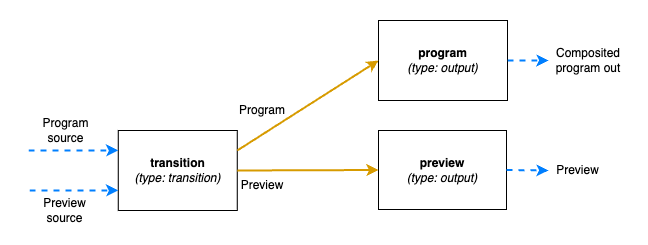
The JSON file section for this is:
"video": {
  "nodes": {
    "transition": {
      "type": "transition"
    },
    "program": {
      "type": "output"
    },
    "preview": {
      "type": "output"
    }
  },
  "links": [
      {
        "from_node": "transition",
        "from_socket": 0,
        "to_node": "program",
        "to_socket": 0
      },
      {
        "from_node": "transition",
        "from_socket": 1,
        "to_node": "preview",
        "to_socket": 0
      },
  ]
}
Audio outputs
The audio block of the configuration file defines the properties of the audio mixer.
The JSON object contains a list called outputs which lists the outputs of the audio mixer and the configuration of
each output.
Each output has these parameters:
name- The unique name of this audio output, used to refer to if from theoutput_mappingblockchannels- The number of audio channels of this output
The input routing and configuration of the strips is made via the control command API.
Combine outputs
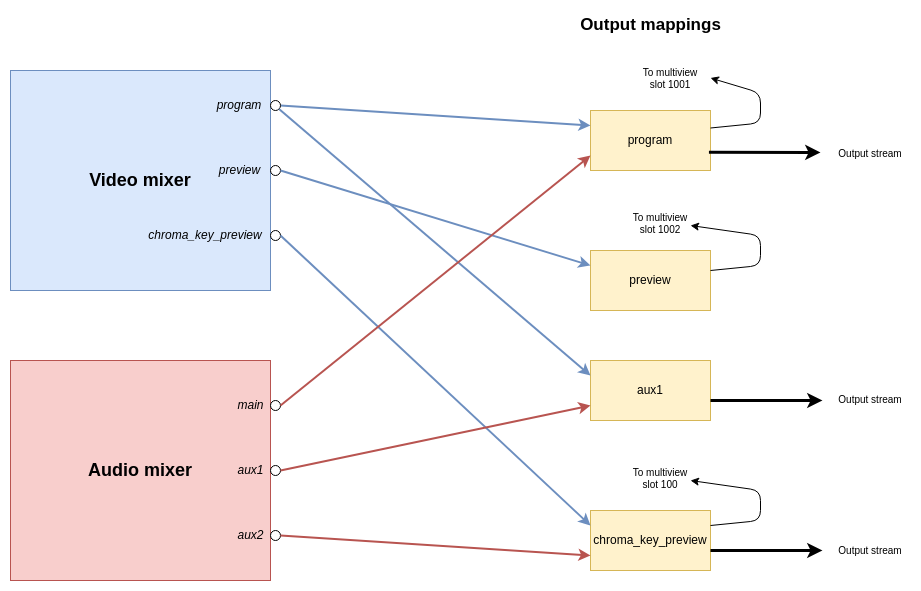
The output_mapping block is used to define outputs of the entire Rendering Engine, by combining outputs from the video
and audio mixers and configuring where those should be sent.
The output mapping is an array of output mappings. Each mapping has the following parameters:
name- The unique name of the output mapping. This will be displayed in the REST API both for sources being streamed and sources with feedback streams that can be included in the multi-viewvideo_output- The name of the video mixer node of typeoutputto get the video stream from. Leave empty, or omit the key to create an audio-only outputaudio_output- The name of the audio output to get the audio stream from. Leave empty, or omit the key to create a video-only outputfeedback_input_slot- The input slot to use to feed this output back to the multi-view. The REST API may then refer to this input slot to include this output in a multi-view view. Value must be >= 100 as input slots up to 99 are reserved for “regular” sources. Use 0 to disable feedback of this stream.stream- Boolean value to tell if the output should be streamable and visible as an output in the REST API. If set to false the output will not turn up as anPipeline Outputin the REST API.
The following is a graphical visualisation of the output mappings in the JSON example configuration file above:
The default Rendering Engine config
If no Rendering Engine configuration file has been supplied by the user, a default configuration will be used. The following is the video node graph in the default configuration: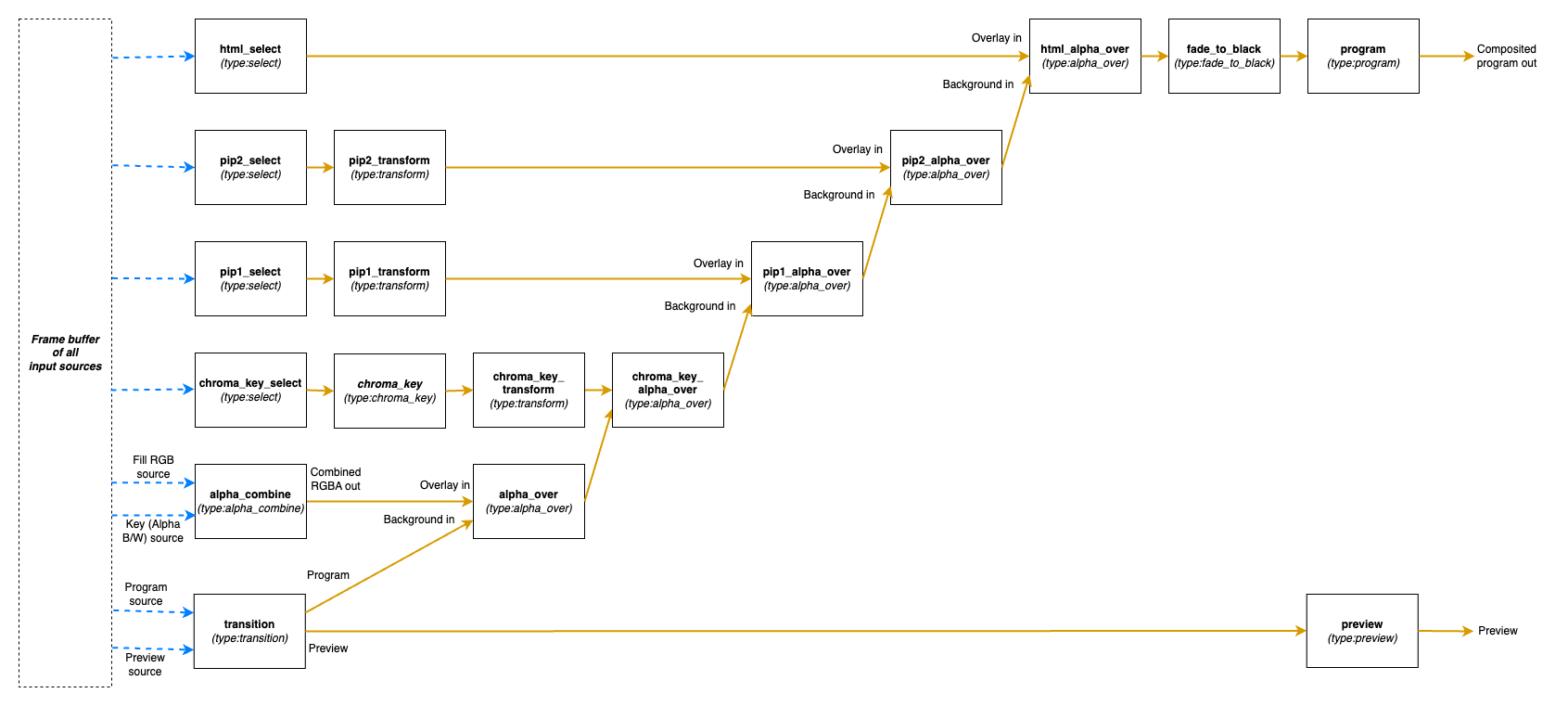
The full JSON for this default configuration is:
{
  "version": "1.0",
  "video" : {
    "nodes":{
      "transition": {"type":"transition"},
      "alpha_combine": {"type":"alpha_combine"},
      "chroma_key_select": {"type":"select"},
      "chroma_key": {"type":"chroma_key"},
      "chroma_key_transform": {"type":"transform"},
      "pip1_select": {"type":"select"},
      "pip1_transform": {"type":"transform"},
      "pip2_select": {"type":"select"},
      "pip2_transform": {"type":"transform"},
      "html_select": {"type":"select"},
      "alpha_over": {"type":"alpha_over"},
      "chroma_key_alpha_over": {"type":"alpha_over"},
      "pip1_alpha_over": {"type":"alpha_over"},
      "pip2_alpha_over": {"type":"alpha_over"},
      "html_alpha_over": {"type":"alpha_over"},
      "fade_to_black": {"type":"fade_to_black"},
      "program": {"type":"output"},
      "preview": {"type":"output"}
    },
    "links":[
      {"from_node":"transition", "from_socket":0, "to_node":"alpha_over", "to_socket":1},
      {"from_node":"alpha_combine", "from_socket":0, "to_node":"alpha_over", "to_socket":0},
      {"from_node":"alpha_over", "from_socket":0, "to_node":"chroma_key_alpha_over", "to_socket":1},
      {"from_node":"chroma_key_select", "from_socket":0, "to_node":"chroma_key", "to_socket":0},
      {"from_node":"chroma_key", "from_socket":0, "to_node":"chroma_key_transform", "to_socket":0},
      {"from_node":"chroma_key_transform", "from_socket":0, "to_node":"chroma_key_alpha_over", "to_socket":0},
      {"from_node":"chroma_key_alpha_over", "from_socket":0, "to_node":"pip1_alpha_over", "to_socket":1},
      {"from_node":"pip1_select", "from_socket":0, "to_node":"pip1_transform", "to_socket":0},
      {"from_node":"pip1_transform", "from_socket":0, "to_node":"pip1_alpha_over", "to_socket":0},
      {"from_node":"pip1_alpha_over", "from_socket":0, "to_node":"pip2_alpha_over", "to_socket":1},
      {"from_node":"pip2_select", "from_socket":0, "to_node":"pip2_transform", "to_socket":0},
      {"from_node":"pip2_transform", "from_socket":0, "to_node":"pip2_alpha_over", "to_socket":0},
      {"from_node":"pip2_alpha_over", "from_socket":0, "to_node":"html_alpha_over", "to_socket":1},
      {"from_node":"html_select", "from_socket":0, "to_node":"html_alpha_over", "to_socket":0},
      {"from_node":"html_alpha_over", "from_socket":0, "to_node":"fade_to_black", "to_socket":0},
      {"from_node":"fade_to_black", "from_socket":0, "to_node":"program", "to_socket":0},
      {"from_node":"transition", "from_socket":1, "to_node":"preview", "to_socket":0}
    ]
  },
  "audio" : {
    "outputs": [
      {"name": "main", "channels": 2}
    ]
  },
  "output_mapping" : [
    {"name":"program", "video_output":"program", "audio_output":"main", "feedback_input_slot":1001, "stream":true},
    {"name":"preview", "video_output":"preview", "feedback_input_slot":1002, "stream":false}
  ]
}
4 - Operational Control API
Ateliere Live Control API.
4.1 - Overview of JSON protocol
This is a description of the network protocol used to control, monitor and explore the components in a running Ateliere Live production.
The JSON protocol is used when connected to the Websocket Control Panel
(acl-websocketcontrolpanel) and has multi-client support, making it
possible for clients that are connected to the same production to mirror
each other’s controls.
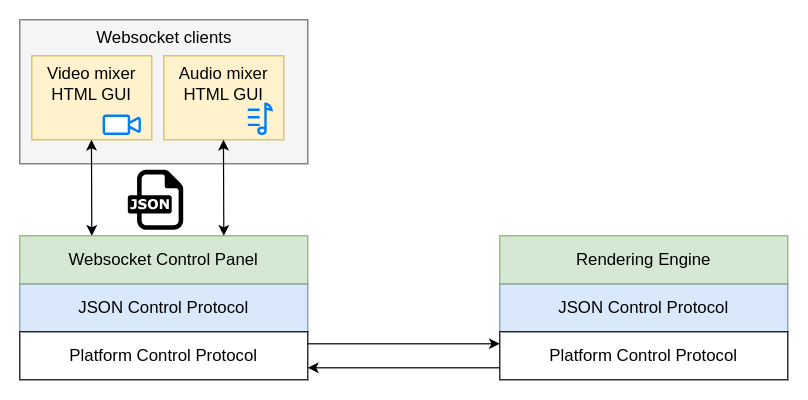
The JSON protocol sits on top of an application-independent platform protocol which transports the JSON payload between the clients and the production.
Control Panel implementation
Note: This section is mainly needed if you plan on implementing a new control panel for the Atelier Live Rendering Engine using the C++ SDK.
Most of the JSON messages described in this document are sent and received by the Websocket Control Panel using the ControlDataSender interface. The interface encapsulates the packing and unpacking of messages to and from the application-agnostic platform protocol. The platform protocol includes the addresses for the sender and receiver(s) of the messages but is unaware of the contents of the packages.
The ControlDataSender interface defines the callbacks that should be used for
handling messages coming from the production.
Response and status messages are received from the production by setting the
mResponseCallback and mStatusMessageCallback, respectively. The data
received in these callbacks are complete JSON messages conforming to the
specification in this document and can be forwarded without changes to the
connected clients. There are however some exceptions to this.
Events
Messages of the type event currently signals that a connection was opened or
closed in the production. Event messages originate in the control panel meaning
that implementing support for this message type is part of making a control
panel using the C++ SDK.
The control panel gets the events from the underlying platform through the
ControlDataSender::Settings::mConnectionEventCallback. By inspecting the
ConnectionEvent provided in the callback, clients connected to the control
panel can be informed about the event. This can be used by other control
panels, implemented using the C++ SDK.
Please see the section about the event message type under “Message types” for
information about the message syntax.
Hop count
Messages of different types need to propagate to different depth of the
production. A hop count in each message determines if it will be relayed
from one Rendering Engine to a possibly chained one behind it.
When receiving a JSON message from a client, the Websocket Control Panel will select a hop count based on the content of the message, before sending the message to the production.
The hop count is marked in the platform layer of the protocol when sending a
message using ControlDataSender::sendRequestToReceivers. It is not visible
in the JSON message.
For each type of message, the hop count used by the Websocket Control Panel is specified in a “Hop count” section within “Message types” below. This hop count should be used when implementing a new C++ control panel.
The state tree
The control API is based around a state tree that makes up the hierarchy of parameters and entities in the Rendering Engine that can be controlled or monitored. The tree is expressed as a JSON structure.
An entity in the tree is addressed by a path consisting of the names of each enclosing object surrounding the entity.
For instance, in the structure below, the path to the g-field of the
rgb_filter would be /video/nodes/rgb_filter/g:
{
    "video": {
        "nodes": {
            "rgb_filter": {
                "r": 0.5,
                "g": 0.4,
                "b": -0.2
            }
        }
    }
}
Message format
JSON syntax is used for all messages. The type and resource fields are
present in all messages and define the type of message and what resource that
is affected by this message.
{
    "type": "...",
    "resource": "..."
}
Message types
All changes that can be made to a production are available in the JSON API
through messages of type set or command.
A parameter that can be changed immediately, without side effects, and that
will keep its state until the next change can be accessed directly with a
set message. In other cases a command is necessary to initiate the change.
A set message might for instance be used for controlling the layer opacity
in an alpha-over node or the gain for an input to the audio mixer whereas a
command is needed to initiate the loading of a media file or a transition
effect spanning over a period of time.
To get the current state of a resource, a get message can be used. A resource
can also be monitored for changes using a subscribe message. When a
sub-resource is added or removed from the monitored resource, a state-add or
state-remove message is sent to the subscriber. Other changes result in a
state-change message.
Parameters that change continuously without any user input, such as the play
position of a media player or the loudness in an audio output, are referred to
as streaming parameters. Streaming parameters are monitored by sending a
sampling-start message to the resource path of the streaming parameter and
providing a time interval stating how often sampling-update messages should
be sent.
Table of message types
| Message type | Description |
|---|---|
get | Get the value of a resource |
get-response | The response to a get message |
set | Change the value of a resource |
set-response | The response to a set message |
subscribe | Subscribe to state changes within a resource |
subscribe-response | The response to a subscribe message |
unsubscribe | Stop monitoring state changes within a resource |
unsubscribe-response | The response to an unsubscribe message |
command | Execute a command in a resource |
command-response | The response to a command message |
state-change | Describes the new state of a resource |
state-add | A sub-resource was added to a resource |
state-remove | A sub-resource was removed from a resource |
subscription-list | List own subscriptions |
subscription-list-response | The response to a subscription-list-response message |
describe | Get a description of a resource |
describe-response | The response to a describe message |
sampling-start | Start sampling a streaming parameter |
sampling-start-response | The response to a sampling-start message |
sampling-stop | Stop sampling a streaming parameter |
sampling-stop-response | The response to a sampling-stop message |
sampling-list | List own streaming parameter subscriptions |
sampling-list-response | The response to a sampling-list message |
sampling-list-all | List all streaming parameter subscriptions |
sampling-list-all-response | The response to a sampling-list-all message |
sampling-update | Describes the latest sampled state of a streaming parameter |
event | Various information. Only sent to clients of the Websocket Control Panel |
All response messages contain the field timestamp. This is the time when the
request message was handled, i.e. the timestamp of the frame processed on that
time.
Each type of message is described in detail below.
get and get-response
A message of type get is used to retrieve the current state of a given
resource within the production.
Required fields for get messages:
| Parameter | Description |
|---|---|
| type | Must be “get” |
| resource | The path to get the current state from |
For instance:
{
    "type": "get",
    "resource": "/video/nodes"
}
The response is a get-response. A successful response contains a body
object with the current state of the resource:
{
    "type": "get-response",
    "resource": "/video/nodes",
    "timestamp": 1731073800720000,
    "body": {
        ...
    }
}
The body has its root where the resource URI points.
An unsuccessful get has no body and contains an error message, for
instance:
{
    "type": "get-response",
    "resource": "/video/nodes",
    "error": "No such resource: /video/nodes",
    "timestamp": 1731073800720000
}
NOTE: Repeatedly calling get is a very inefficient way of monitoring the
state of a production. Please see the subscribe and state-change message
sections for a better way.
Hop count
In a proxy-editing setup, i.e. when there is one pipeline behind another one,
get messages will stop at the first one and the state for that pipeline
will be returned. This is applicable when using a Websocket Control Panel.
When implementing a new control panel using the C++ SDK, set the hop count
to 1 (one) for get messages.
set and set-response
A message of type set is used to change the state of one or more components
located at a specified resource path in the production. This can for instance
be to change the currently selected video source of a transition node or to
change the gain of an audio strip.
set messages are generally only available for changes which are immediate.
Please see the command message section for details about changes that
occur over a period of time.
Required parameters for set messages:
| Parameter | Description |
|---|---|
| type | Must be “set” |
| resource | The path to apply the changes to |
| body | The set of changes to apply |
The body of a set request contains the new values of the fields to change
within the resource path. The structure of the body does not need to be
complete - only the fields that should be updated need to be included.
Example of a set request that changes program and preview within a
node named my_transition_node:
{
    "type": "set",
    "resource": "/video/nodes/my_transition_node",
    "body": {
        "preview": 3,
        "program": 8
    }
}
The body does not need to be an object when setting a single item, just the
value. Here is an example:
{
    "type": "set",
    "resource": "/audio/strips/1/filters/gain/value",
    "body": 8.6
}
The set-response does not contain a body with the set values - instead changes
in the production need to be monitored by subscribing to the affected
resources.
Please see the subscribe message section for details about subscriptions.
If there is an error, a set-response is returned containing an error
message. In this case none of the parameters in the
body of the set message will be applied. If the set was successful the
response will contain a result ok key/value.
Hop count
In a proxy-editing setup, i.e. when there is one pipeline behind another one,
set messages will propagate all the way to the last pipeline while following
the configured alignment delay of each step. This is applicable when using a
Websocket Control Panel.
When implementing a new control panel using the C++ SDK, set the hop count
to -1 (negative one) for set messages.
command and command-response
Commands are used to initiate events in the production which are not immediate
or that do not have a direct relationship to one specific field of the
production state tree. For instance, when starting playback of a media file
there might be a play command. This will start the actual playback but also
change the player state (e.g. from paused to playing) and also start to
periodically update the current playback position field.
Required parameters for command messages:
| Parameter | Description |
|---|---|
| type | Must be “command” |
| resource | The resource receiving the command |
| body/command | The name of the command to execute |
| body/parameters | The set of parameters to the command. If the command takes no parameters, this can be skipped, or passed empty |
Example of a command that starts a fade command on a transition node:
{
    "type": "command",
    "resource": "/video/nodes/my_transition_node",
    "body": {
        "command": "fade",
        "parameters": {
          "duration_ms": 120
        }
    }
}
Example of a command that takes no parameters:
{
    "type": "command",
    "resource": "/video/nodes/my_transition_node",
    "body": {
        "command": "cut"
    }
}
As for set-response messages, the command-response has no body - instead changes in
the production need to be monitored by subscribing to one or more resources.
Please see the subscribe message section for details about subscriptions.
If there is an error, a command-response is returned containing an error
message. If the command was successful the response will contain a result
ok key/value.
Hop count
In a proxy-editing setup, i.e. when there is one pipeline behind another one,
command messages will propagate all the way to the last pipeline while
following the configured alignment delay of each step. This is applicable when
using a Websocket Control Panel.
When implementing a new control panel using the C++ SDK, set the hop count
to -1 (negative one) for command messages.
subscribe and subscribe-response
Subscriptions are used to monitor changes in the production. This can e.g. be useful in order to mirror the controls of different control surfaces that are connected to the same production, detect when new resources appear, or to otherwise visualize different parts of the system.
Required parameters for subscribe messages:
| Parameter | Description |
|---|---|
| type | Must be “subscribe” |
| resource | The path to monitor for changes |
Example of a subscribe message for tracking changes of the resource
/audio/strips/3/compressor:
{
    "type": "subscribe",
    "resource": "/audio/strips/3/compressor"
}
The response is a subscribe-response. A successful response contains a body
object with the current state of the resource, for instance:
{
    "type": "subscribe-response",
    "resource": "/audio/strips/3/compressor",
    "body": {
        "attack": 30,
        "gain": 1,
        "knee": 3.5,
        "ratio": 3.3,
        "release": 2000,
        "threshold": -24,
        "type": "compressor"
    },
    "timestamp": 1731073800720000
}
If there is an error, a subscribe-response is returned containing an error
message instead of a body.
Whenever a monitored resource changes, a state-change, state-add or
state-remove message is sent to all subscribers of that resource. Please see
the state-change, state-add and state-remove message sections for details
about this.
Websocket Control Panel
In a proxy-editing setup, i.e. when there is one pipeline behind another one,
subscribe messages will stop at the first one and it is from this pipeline
that state changes will be reported. This is applicable when using a Websocket
Control Panel.
When implementing a new control panel using the C++ SDK, set the hop count
to 1 for subscribe messages.
unsubscribe and unsubscribe-response
To stop receiving updates when a monitored resource changes, an unsubscribe
message can be used.
Required parameters for unsubscribe messages:
| Parameter | Description |
|---|---|
| type | Must be “unsubscribe” |
| resource | The resource path to stop monitor for changes |
If the unsubscribe message is successful, an unsubscribe-response is
returned:
{
    "type": "unsubscribe-response",
    "resource": "/audio/strips/3/compressor",
    "timestamp": 1731073800720000
}
If there is an error, an unsubscribe-response is returned containing an
error message instead of a body.
Hop count
In a proxy-editing setup, i.e. when there is one pipeline behind another one,
unsubscribe messages will stop at the first receiver of the message. This is
applicable when using a Websocket Control Panel.
When implementing a new control panel using the C++ SDK, set the hop count
to 1 for unsubscribe messages.
state-change
A state-change message describes the new state for a number of fields within
a specified resource. state-change messages are sent from the production
side, i.e. they are only received, never sent, by clients.
state-change messages are sent whenever the internal state of the production
changes, for instance when:
- a client has issued a
setmessage - a command that changes the state is being executed
- an automation changes the state over a period of time
- a component, such as a metering device, has new data to report
To avoid loops or unnecessary updates on the client side, the message includes
an actor field stating whether the receiver of the message or some other
entity caused the change to happen.
actor value | Meaning |
|---|---|
| “self” | The receiver of the message caused the change |
| “other” | Another client caused the change |
| “system” | A change from within the system |
Format of the state-change message:
| Parameter | Description |
|---|---|
| type | Must be “state-change” |
| resource | The resource path that has changed |
| body | The fields that have changed within the resource |
| actor | The entity responsible for the change |
Below is an example state-change message where the client receiving the
message also caused the change to happen:
{
    "type": "state-change",
    "resource": "/audio/strips/3/compressor",
    "actor": "self",
    "body": {
        "gain": 2.5,
        "ratio": 4.0
    }
}
state-add and state-remove
The state-add and state-remove messages are similar to the state-change
message. The top level resource field is the resource the client subscribes to.
In the body of the message there is another resource field telling what
sub-resource has been added or removed.
Examples:
{
  "type": "state-add",
  "resource": "/audio",
  "actor": "system",
  "body": {
    "resource": "/strips/2"
  }
}
{
  "type": "state-remove",
  "resource": "/audio",
  "actor": "system",
  "body": {
    "resource": "/strips/2"
  }
}
subscription-list and subscription-list-response
The subscription-list message is used to list own subscriptions. The response
message shows the client’s subscriptions, located under a given resource point
in the tree.
Required fields for subscription-list messages:
| Parameter | Description |
|---|---|
| type | Must be “subscription-list” |
| resource | The resource path to start looking for subscriptions from |
For instance:
{
    "type": "subscription-list",
    "resource": "/video"
}
The response is a subscription-list-response. A successful response contains a
body object with the current state of the resource:
{
  "type": "subscription-list-response",
  "resource": "/video",
  "timestamp": 1731414140040000,
  "body": {
    "subscriptions": [
      "/nodes/alpha_combine",
      "/nodes/alpha_over"
    ]
  }
}
The body has its root where the resource URI points.
An unsuccessful request has no body and contains an error message, for
instance:
{
  "type": "subscription-list-response",
  "resource": "/video/nodes/over",
  "timestamp": 1731414382900000,
  "error": "Failed to find resource with name 'over'"
}
Hop count
In a proxy-editing setup, i.e. when there is one pipeline behind another one,
subscription-list messages will stop at the first one, and the subscriptions
for that pipeline will be returned. This is applicable when using a Websocket
Control Panel.
When implementing a new control panel using the C++ SDK, set the hop count
to 1 for subscription-list messages.
describe and describe-response
The purpose of these messages is to get a description of some resource in the state tree, like a node in the video mixer component for example. The descriptions will list all commands and parameters which are valid for the resource.
Required fields for describe messages:
| Parameter | Description |
|---|---|
| type | Must be “describe” |
| resource | The path to resource to describe |
This is the description for /video/nodes/fade_to_black:
{
  "type": "describe-response",
  "resource": "/video/nodes/fade_to_black",
  "timestamp": 1731480819600000,
  "body": {
    "children": [],
    "commands": [
      {
        "command": "fade_from",
        "optional_parameters": [],
        "required_parameters": [...],
        ...
      },
      ...
    ],
    "parameters": [
    ...
    ]
  }
}
Hop count
In a proxy-editing setup, i.e. when there is one pipeline behind another one,
describe messages will stop at the first receiver of the message. This is
applicable when using a Websocket Control Panel.
When implementing a new control panel using the C++ SDK, set the hop count
to 1 for describe messages.
sampling-start and sampling-start-response
The sampling-start message is used to start sampling a streaming parameter.
If successful, sampling-update messages will be sent to the subscriber
periodically at the specified time inteval.
Required parameters for sampling-start messages:
| Parameter | Description |
|---|---|
| type | Must be “sampling-start” |
| resource | An expression describing the streaming parameter(s) to start sampling |
| body/interval_ms | The update interval |
An asterisk (*) can be used at any level of the resource expression to
indicate “all components at this level”. If an asterisk is used, no other
characters are allowed at that level of the path.
For instance, "resource": "/audio/mixes/*/input_meter/*" can be used to start
sampling all streaming parameters under input_meter for all audio mixes.
The interval_ms parameter must be greater than or equal to 40.
Example:
{
  "type": "sampling-start",
  "resource": "/audio/mixes/*/input_meter/*",
  "body": {
    "interval_ms": 100
  }
}
If there is an error, a sampling-start-response is returned containing an
error message. If the sampling-start was successful the response will
contain a result ok key/value.
sampling-stop and sampling-stop-response
The sampling-stop message is used to stop sampling a streaming parameter.
Required parameters for sampling-stop messages:
| Parameter | Description |
|---|---|
| type | Must be “sampling-stop” |
| resource | An expression used to start sampling one or more streaming parameters |
The resource parameter must match one used to start sampling exactly.
Example:
{
  "type": "sampling-stop",
  "resource": "/audio/mixes/*/input_meter/*"
}
If there is an error, a sampling-stop-response is returned containing an
error message. If the sampling-stop was successful the response will
contain a result ok key/value.
sampling-list and sampling-list-response
The sampling-list message is used to list the streaming parameter
subscriptions that are registered to the client sending the message.
Required parameters for sampling-stop messages:
| Parameter | Description |
|---|---|
| type | Must be “sampling-list” |
| resource | Must be “/” |
Example:
{
  "type": "sampling-list",
  "resource": "/"
}
If there is an error, a sampling-list-response is returned containing an
error message. If the sampling-stop was successful the response will
contain a list of all the sender’s streaming parameter subscriptions.
Example:
{
    "type": "sampling-list-response",
    "resource": "/",
    "body": {
        "samplings": [
            "/audio/strips/1/pre_filter_meter/*",
            "/audio/mixes/0/input_meter/*"
        ]
    },
    "timestamp": 1736860857880000
}
sampling-update
A sampling-update message describes the latest sampled state of one or more
streaming parameters matching a subscription. The message is sent periodically
to clients that have started subscriptions using sampling-start.
The message contains the resource expression used in sampling-start. If
necessary this can be used to identify the subscription in the client.
The body of the message contains the updated state for all of the streaming
parameters matching the subscription. Note that the body starts at the root of
the state tree, which is different from e.g. get responses or subscriptions
for non-streaming parameters.
Example:
{
    "type": "sampling-update",
    "resource": "/audio/strips/*/pre_filter_meter/*",
    "body": {
        "audio": {
            "strips": {
                "1": {
                    "pre_filter_meter": {
                        "peak": -0.439775225995602234
                    }
                },
                "2": {
                    "pre_filter_meter": {
                        "peak": -0.982362873895602837
                    }
                }
            }
        }
    },
    "timestamp": 1736861180080000
}
event
When connected to a Websocket Control Panel it will act as a proxy in front of
the Rendering Engine. This introduces a message of type event, which is only
used between the Websocket Control Panel and its clients.
Messages of type event contain an event field specifying the type of event.
All clients connected to the Websocket Control Panel will receive events of type
connect whenever a new connection is established between the Websocket Control
Panel and a Rendering Engine. Such a message might look like:
{
    "type": "event",
    "connected_node": "<uuid>",
    "address": "<uuid>:<uuid>:...",
    "event": "connect"
}
where connected_node is the UUID of the newly connected node (Rendering Engine) and
address is a colon separated list of UUIDs, which is the address to the node that
discovered the connection. For connect events this is currently only the Websocket
Control Panel itself, meaning the address is always the Websocket Control Panel’s.
When a connection between a client and a Websocket Control Panel is established,
the client will receive connect events for all Rendering Engines that where
already connected to the Websocket Control Panel, to let the client know it
is connected to a production.
If the connection between the Websocket Control Panel and the Rendering Engine
breaks, whether it is disconnected on purpose or gets disconnected due to a network
outage, the Websocket Control Panel will send an event message to all its clients.
{
    "type": "event",
    "disconnected_node": "<uuid>",
    "address": "<uuid>:<uuid>:...",
    "event": "disconnect"
}
A similar message is also sent to the clients in case the connection between two
Rendering Engines/Pipelines is torn down or lost, such as between a Low Delay
and a High Quality Pipeline. In that case the address parameter will be the UUID
of the Websocket Control Panel followed by the UUID of the LD Pipeline and the
disconnected_node is the UUID of the HQ Pipeline.
4.2 - Rendering Engine components
This page describes the parameters and commands that is used for controlling the video mixer, audio mixer, HTML renderers and media players in the Ateliere Live Rendering Engine. This topic is closely related to this page on how to configure the rendering engine at startup.
Control command protocol
All commands to the Ateliere Live Rendering Engine are sent as human readable JSON objects and are listed below.
Each subsystem of the rendering engine has their own set of parameters and commands, and can be reached using:
/videofor the video mixer/audiofor the audio mixer (if using the built-in mixer)/ndi_audiofor the NDI audio mixer/htmlfor the html renderer instances/mediafor the media playback instances
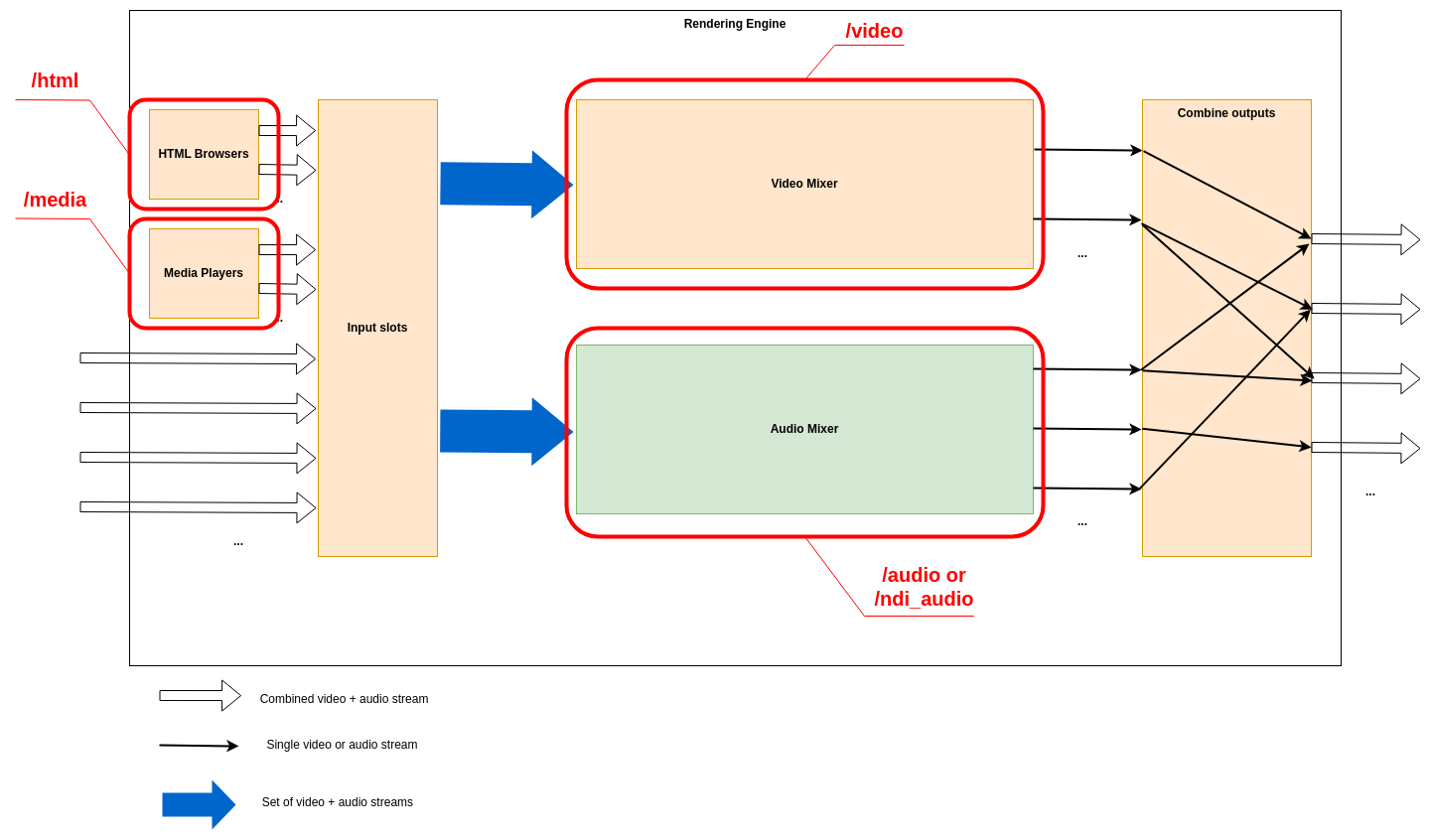
Video mixer resources
Background
The video mixer is built as a tree graph of processing nodes, please see this page for further information on the video mixer node graph. The names of the nodes defined in the node graph are used as part of the resources: /video/nodes/{node_name} and they all have the parameter type which describes which type of video node it is.
There are 10 different node types.
- The
Transitionnode is used to pick which input slots to use for the program and preview output. The node also supports making transitions between the program and preview. - The
Selectnode simply forwards one of the available sources to its output. - The
Alpha combinenode is used to pick two input slots (or the same input slot) to copy the color from one input and combine it with some information from the other input to form the alpha. The color will just be copied from the color input frame, but there are several modes that can be used to produce the alpha channel in the output frame in different ways. This is known as “key & fill” in broadcasting. - The
Alpha overnode is used to perform an “Alpha Over” operation, that is to put the overlay video stream on top of the background video stream, and let the background be seen through the overlay depending on the alpha of the overlay. The node also features fading the graphics in and out by multiplying the alpha channel by a constant factor. - The
Transformnode takes one input stream and transforms it (scaling and translating) to one output stream. - The
Chroma Keynode takes one input stream, and by setting appropriate parameters for the keying, it will remove areas with the key color from the incoming video stream both affecting the alpha and color channels - The
Fade to blacknode takes one input stream, which it can fade to or from black gradually, and then outputs that stream. - The
Outputnode has one input stream and will output that stream out from the video mixer, back to the Rendering Engine. It has no control commands - The
Cropnode takes one input stream and can crop a video stream to a new size - The
Video delaynode takes one input stream and will hold the frames for a configured amount of time before forwarding the frames, causing a delay of the video output
To reset the runtime configuration of all video nodes to their default state use the reset command of the /video resource.
Transition
The transition node picks a program and a preview video source from the input slots and forward these to other nodes. The node also features auto transitions between the program and the preview sources. Some transition commands last over a duration of time, for example wipes. These can be performed either automatically or manually. The automatic mode works by the operator first selecting the type of transition, for instance a fade, setting the preview to the input slot to fade to and then trigger the transition at the right time with a auto command with the duration for the transition. In manual mode the exact position of the transition is set by the control panel by setting the factor parameter. This is used for implementing T-bars, where the T-bar repeatedly sends the current position of the bar. In the manual mode, the transition type is set before the transition begins, just as in the automatic mode. Note that an automatic transition will be overridden in case the transition position/factor is manually set, by interrupting the automatic transition and jumping to the manually set position.
resource: /video/nodes/{node name} type: transition
Parameters
| Name | Type | Access Mode | Default | Description |
|---|---|---|---|---|
| factor | float | read-write | 0 | The mix factor between the program and the preview input source, in the range 0.0 to 1.0. For example 0.3 means 30% transition from program to preview. The visible effect is dependent on the transition mode used. |
| mode | string | read-write | fade | The transition mode to use (fade, wipe_left, wipe_right) |
| preview | uint32 | read-write | 0 | The currently used input slot for the preview |
| program | uint32 | read-write | 0 | The currently used input slot for the program |
| type | string | read-only | transition | The video node type |
Example `set` message
Below is a JSON example that includes all writable parameters for this resource. A `set` message may have a subset of these parameters, so exclude the ones you don't need to set.
In the "resource" path, replace sections enclosed by braces "{}" with the name or id of the resource.
{
    "type": "set",
    "resource": "/video/nodes/{node name}",
    "body": {
        "factor": 0.0,
        "mode": "fade",
        "preview": 0,
        "program": 0
    }
}
Commands
auto
Start an auto transition with the currently selected transition type over a given time period
Parameters
| Name | Type | Required/optional | Description |
|---|---|---|---|
| duration_ms | uint32 | required | The duration in milliseconds of the automatic transition |
Command template
In the "resource" path, replace sections enclosed by braces "{}" with the name or id of the resource.
Replace parameter values, enclosed by "<>", according to their data type.
{
   "type": "command",
   "resource": "/video/nodes/{node name}",
   "body": {
       "command": "auto",
       "parameters": {
           "duration_ms": <uint32>
       }
   }
}
cut
Make a cut by swapping the program and preview inputs
Command template
In the "resource" path, replace sections enclosed by braces "{}" with the name or id of the resource.
{
   "type": "command",
   "resource": "/video/nodes/{node name}",
   "body": {
       "command": "cut"
   }
}
Select
A node to select a video source from the input slots and send it on to the next node.
resource: /video/nodes/{node name} type: select
Parameters
| Name | Type | Access Mode | Default | Description |
|---|---|---|---|---|
| input | uint32 | read-write | 0 | Which input slot the video stream is currently picked from |
| type | string | read-only | select | The video node type |
Example `set` message
In the "resource" path, replace sections enclosed by braces "{}" with the name or id of the resource.
{
    "type": "set",
    "resource": "/video/nodes/{node name}",
    "body": {
        "input": 0
    }
}
Alpha combine
A node to combine the color channels of one video stream with the alpha from another. This node is useful for video sources where the alpha channel is provided as a separate black and white video source that must be combined with the color source. The node supports multiple modes of obtaining the alpha, either by copying a specific color or alpha channel of some input slot, or by taking the average of the R, G and B channels of the video from some input slot.
resource: /video/nodes/{node name} type: alpha_combine
Parameters
| Name | Type | Access Mode | Default | Description |
|---|---|---|---|---|
| alpha | uint32 | read-write | 0 | The input slot to get the alpha input source from |
| color | uint32 | read-write | 0 | The input slot to get the color input source from |
| mode | string | read-write | average-rgb | The mode to use for combining the color and alpha input sources (copy-r, copy-g, copy-b, copy-a, average-rgb) |
| type | string | read-only | alpha_combine | The video node type |
Example `set` message
Below is a JSON example that includes all writable parameters for this resource. A `set` message may have a subset of these parameters, so exclude the ones you don't need to set.
In the "resource" path, replace sections enclosed by braces "{}" with the name or id of the resource.
{
    "type": "set",
    "resource": "/video/nodes/{node name}",
    "body": {
        "alpha": 0,
        "color": 0,
        "mode": "average-rgb"
    }
}
Alpha over
A node to combine two video streams using alpha over compositing, overlaying the foreground stream on the background stream. The node will keep the transparency of both layers. The overlay stream can be faded in and out of the background stream.
resource: /video/nodes/{node name} type: alpha_over
Parameters
| Name | Type | Access Mode | Default | Description |
|---|---|---|---|---|
| factor | float | read-write | 0 | The compositing factor. Range 0.0 to 1.0, where 0.0 means that the overlay is not composited on to the background and 1.0 means the overlay is fully visible on top of the background input. |
| type | string | read-only | alpha_over | The video node type |
Example `set` message
In the "resource" path, replace sections enclosed by braces "{}" with the name or id of the resource.
{
    "type": "set",
    "resource": "/video/nodes/{node name}",
    "body": {
        "factor": 0.0
    }
}
Commands
fade_from
Fade away the overlay over a given time period
Parameters
| Name | Type | Required/optional | Description |
|---|---|---|---|
| duration_ms | uint32 | required | The duration of the automatic transition in milliseconds. |
Command template
In the "resource" path, replace sections enclosed by braces "{}" with the name or id of the resource.
Replace parameter values, enclosed by "<>", according to their data type.
{
   "type": "command",
   "resource": "/video/nodes/{node name}",
   "body": {
       "command": "fade_from",
       "parameters": {
           "duration_ms": <uint32>
       }
   }
}
fade_to
Fade to fully visible overlay over a given time period
Parameters
| Name | Type | Required/optional | Description |
|---|---|---|---|
| duration_ms | uint32 | required | The duration of the automatic transition in milliseconds. |
Command template
In the "resource" path, replace sections enclosed by braces "{}" with the name or id of the resource.
Replace parameter values, enclosed by "<>", according to their data type.
{
   "type": "command",
   "resource": "/video/nodes/{node name}",
   "body": {
       "command": "fade_to",
       "parameters": {
           "duration_ms": <uint32>
       }
   }
}
Transform
A node to transform an incoming video stream, by scaling and transposing it. The canvas size of the input will be kept and all surrounding area in case the source video is shrunk, is filled with transparent black.
resource: /video/nodes/{node name} type: transform
Parameters
| Name | Type | Access Mode | Default | Description |
|---|---|---|---|---|
| scale | float | read-write | 1 | The relative scale of the video stream. Use 1.0 for original scale. |
| type | string | read-only | transform | The video node type |
| x | float | read-write | 0 | The X position of the upper left corner of the image as a fraction of the canvas’ width. For example use 0.0 to snap it to the left edge, or 0.5 to the center of the image |
| y | float | read-write | 0 | The Y position of the upper left corner of the image as a fraction of the canvas’ height. For example use 0.0 to snap it to the top edge, or 0.5 to the center of the image |
Example `set` message
Below is a JSON example that includes all writable parameters for this resource. A `set` message may have a subset of these parameters, so exclude the ones you don't need to set.
In the "resource" path, replace sections enclosed by braces "{}" with the name or id of the resource.
{
    "type": "set",
    "resource": "/video/nodes/{node name}",
    "body": {
        "scale": 1.0,
        "x": 0.0,
        "y": 0.0
    }
}
Chroma key
A node to perform chroma keying on an incoming video stream. The output video stream will have the alpha and possibly the color channels modified, according to the parameter values in this node. To remove a color from the incoming video stream, first enable the node and then select the key color to remove. The key color can be selected in two ways, either by manually setting the color with the R, G and B channel values, or by using the color picker. When using the color picker, the color picker command will define the position and size of the color picker square to sample the incoming video stream. The R, G and B color parameters will be updated according to the average color of the area when the command was received by the Rendering Engine. The currently selected color can be shown in the upper left hand corner in the output video stream of the node by setting the parameter show_key_color to true. Also, the latest sampled color picker area can be drawn in the node’s output by setting show_color_picker to true. When a suitable color has been chosen, adjust the distance and falloffparameters to get a clear mask. To aid the tweaking of the parameters, set the show_alpha parameter to true. This will make the node output the black and white mask instead of the keyed result, which makes it easier to see which parts are masked away and not. Remember to turn this off before going on air. As a last step, any remaining fringes of the key color around the subject can be desaturated with the color_spill parameter. But remember this will desaturate colors close to the key color even in parts of the frame fully visible.
resource: /video/nodes/{node name} type: chroma_key
Parameters
| Name | Type | Access Mode | Default | Description |
|---|---|---|---|---|
| color_spill | float | read-write | 0.1 | Desaturation factor of colors that are close to the key color, without changing the alpha. Range 0.0 to 1.0, where 0.0 keeps the current saturation. |
| distance | float | read-write | 0.1 | The maximum deviation from the selected key color that is also considered part of the color to mask away. Range 0.0 to 1.0, where 0.0 means only the exact key color will be removed and greater values means more colors further away from the key color are removed. |
| enabled | bool | read-write | false | When set to true the node will be enabled, false will just bypass the node. |
| falloff | float | read-write | 0.08 | The falloff factor used to smooth out the edge in the mask between which colors are fully removed and which are fully kept, by making the colors in between semi-transparent. Range 0.0 to 1.0, where 0.0 means sharp edges. |
| show_alpha | bool | read-write | false | Switch on to show the resulting alpha channel as output instead of the keyed result, useful to easier see which parts are masked away and which are not. Make sure to turn this off before going on air. |
| show_color_picker | bool | read-write | false | Controls the visibility of the color picker area in the output video. The marker will show the latest sampled area in the video stream. Make sure to turn this off before going on air. |
| show_key_color | bool | read-write | false | Controls the visibility of the currently used key color as a small square in the upper left corner of the image. Make sure to turn this off before going on air. |
| type | string | read-only | chroma_key | The video node type |
Example `set` message
Below is a JSON example that includes all writable parameters for this resource. A `set` message may have a subset of these parameters, so exclude the ones you don't need to set.
In the "resource" path, replace sections enclosed by braces "{}" with the name or id of the resource.
{
    "type": "set",
    "resource": "/video/nodes/{node name}",
    "body": {
        "color_spill": 0.1,
        "distance": 0.1,
        "enabled": false,
        "falloff": 0.08,
        "show_alpha": false,
        "show_color_picker": false,
        "show_key_color": false
    }
}
Commands
pick_color
Given a size and location, pick a color in the current video frame. The picked color will be the average color in the square defined by the parameters.
Parameters
| Name | Type | Required/optional | Description |
|---|---|---|---|
| size | uint32 | required | Size in pixels of the color picker square |
| x | float | required | X position of the center of the color picker square as a fraction of the frame’s width. Range 0.0 to 1.0 |
| y | float | required | Y position of the center of the color picker square as a fraction of the frame’s width. Range 0.0 to 1.0 |
Command template
In the "resource" path, replace sections enclosed by braces "{}" with the name or id of the resource.
Replace parameter values, enclosed by "<>", according to their data type.
{
   "type": "command",
   "resource": "/video/nodes/{node name}",
   "body": {
       "command": "pick_color",
       "parameters": {
           "size": <uint32>,
           "x": <float>,
           "y": <float>
       }
   }
}
Chroma key / Key color
The key color
resource: /video/nodes/{node name}/key_color type: chroma_key
Parameters
| Name | Type | Access Mode | Default | Description |
|---|---|---|---|---|
| b | float | read-write | 0 | The blue channel, in range 0.0 to 1.0 |
| g | float | read-write | 0 | The green channel, in range 0.0 to 1.0 |
| r | float | read-write | 0 | The red channel, in range 0.0 to 1.0 |
Example `set` message
Below is a JSON example that includes all writable parameters for this resource. A `set` message may have a subset of these parameters, so exclude the ones you don't need to set.
In the "resource" path, replace sections enclosed by braces "{}" with the name or id of the resource.
{
    "type": "set",
    "resource": "/video/nodes/{node name}/key_color",
    "body": {
        "b": 0.0,
        "g": 0.0,
        "r": 0.0
    }
}
Fade to black
A node to fade the incoming video stream to and from black.
resource: /video/nodes/{node name} type: fade_to_black
Parameters
| Name | Type | Access Mode | Default | Description |
|---|---|---|---|---|
| factor | float | read-write | 0 | The factor, where 1.0 means the output will be fully black and 0.0 means the input will be passed through unmodified. |
| type | string | read-only | fade_to_black | The video node type |
Example `set` message
In the "resource" path, replace sections enclosed by braces "{}" with the name or id of the resource.
{
    "type": "set",
    "resource": "/video/nodes/{node name}",
    "body": {
        "factor": 0.0
    }
}
Commands
fade_from
Fade from a fully black frame to the input video stream over a given time period
Parameters
| Name | Type | Required/optional | Description |
|---|---|---|---|
| duration_ms | uint32 | required | The duration of the automatic transition in milliseconds. |
Command template
In the "resource" path, replace sections enclosed by braces "{}" with the name or id of the resource.
Replace parameter values, enclosed by "<>", according to their data type.
{
   "type": "command",
   "resource": "/video/nodes/{node name}",
   "body": {
       "command": "fade_from",
       "parameters": {
           "duration_ms": <uint32>
       }
   }
}
fade_to
Fade to a fully black frame over a given time period
Parameters
| Name | Type | Required/optional | Description |
|---|---|---|---|
| duration_ms | uint32 | required | The duration of the automatic transition in milliseconds. |
Command template
In the "resource" path, replace sections enclosed by braces "{}" with the name or id of the resource.
Replace parameter values, enclosed by "<>", according to their data type.
{
   "type": "command",
   "resource": "/video/nodes/{node name}",
   "body": {
       "command": "fade_to",
       "parameters": {
           "duration_ms": <uint32>
       }
   }
}
Crop
A node to crop the incoming video stream. The node can crop the left, right, top and bottom edge of the incoming video stream. The areas outside of the cropped area will be transparent in the output.
resource: /video/nodes/{node name} type: crop
Parameters
| Name | Type | Access Mode | Default | Description |
|---|---|---|---|---|
| bottom | float | read-write | 1 | Position of the bottom crop edge, in percent of the image’s height |
| left | float | read-write | 0 | Position of the left crop edge, in percent of the image’s width |
| right | float | read-write | 1 | Position of the right crop edge, in percent of the image’s width |
| top | float | read-write | 0 | Position of the top crop edge, in percent of the image’s height |
| type | string | read-only | crop | The video node type |
Example `set` message
Below is a JSON example that includes all writable parameters for this resource. A `set` message may have a subset of these parameters, so exclude the ones you don't need to set.
In the "resource" path, replace sections enclosed by braces "{}" with the name or id of the resource.
{
    "type": "set",
    "resource": "/video/nodes/{node name}",
    "body": {
        "bottom": 1.0,
        "left": 0.0,
        "right": 1.0,
        "top": 0.0
    }
}
Video delay
A node to delay the video stream a given number of frames.
resource: /video/nodes/{node name} type: video_delay
Parameters
| Name | Type | Access Mode | Default | Description |
|---|---|---|---|---|
| delay | uint32 | read-write | 0 | The number of frames to delay the video |
| type | string | read-only | video_delay | The video node type |
Example `set` message
In the "resource" path, replace sections enclosed by braces "{}" with the name or id of the resource.
{
    "type": "set",
    "resource": "/video/nodes/{node name}",
    "body": {
        "delay": 0
    }
}
Audio mixer resources
Overview
The audio mixer has the following data path:
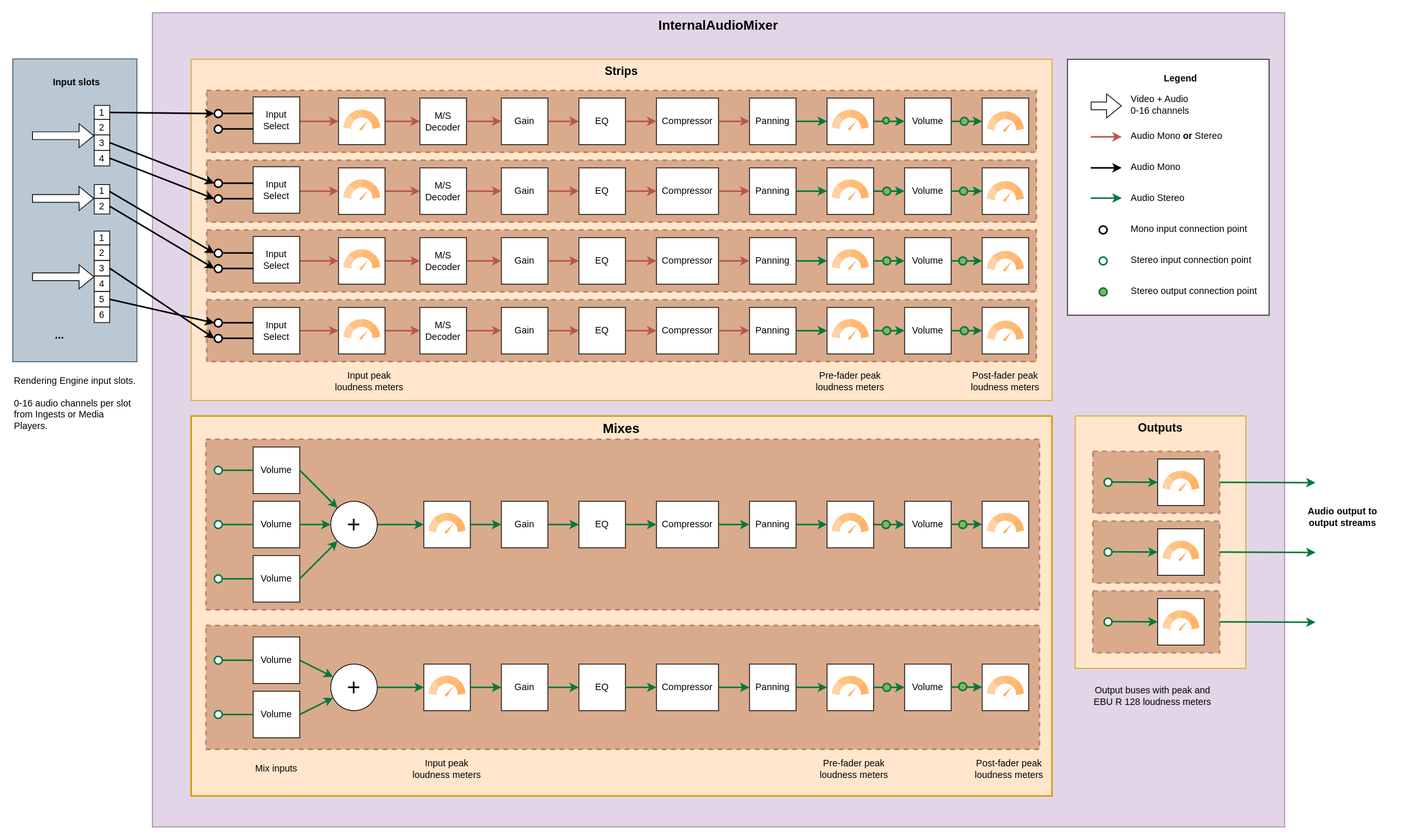
The three main elements of the audio mixer are the Input strips, the Mixes, and the Outputs.
Input strips
Audio enters the audio mixer through the input strips. When a strip has been created, the audio for the strip is selected among the available channels in the Rendering Engine’s input slots.
In the example picture above, three sources are connected to the input slots. The slots have four, two, and six channels respectively. In the illustration we can see that the first strip uses a single channel from the first slot, the second strip uses channel three and four from the second slot and so on. Several input strips may select the same input slot channels.
Each input strip has two stereo output connection points ( ), one
before the volume fader (pre fader) and one after the volume fader (post fader). When a mix or
an output is connected to the output of a strip, which of these two locations to take the audio from
can be selected using the
), one
before the volume fader (pre fader) and one after the volume fader (post fader). When a mix or
an output is connected to the output of a strip, which of these two locations to take the audio from
can be selected using the origin parameter.
Mixes
Mixes are used to combine the output from input strips, or other mixes, and also allows for further
filtering of the audio signal. When a mix has been created, the input strips and other mixes contributing
to the mix can be controlled in the /inputs/strips and /inputs/mixes sections of the mix.
Just like an input strip a mix has two stereo output connection points
() that can be used when connecting the output of the mix to another
mix or an output.
Outputs
Each output corresponds to an audio output in the Rendering Engine configuration. An output takes
audio from a single location, either directly from an input strip or from a mix. In both cases
it can be specified whether to take the audio pre_fader or post_fader.
Note: The audio mixer is completely separate from the video mixer, so switching image in the video mixer will not change the audio mixer in any way.
Audio mixer root
The internal audio mixer consists of input strips (/strips), mixes (/mixes) and output buses (/outputs). The strips are the inputs of the audio mixer, taking audio from the inputs of the Rendering Engine. The mixes mix audio from strips and other mixes. Finally the output buses are the outputs of the audio mixer, taking audio from a single strip or a mix.
resource: /audio
Commands
reset
Reset this audio mixer to its initial state. This will remove all input strips and mixes and reset all outputs.
Command template
{
   "type": "command",
   "resource": "/audio",
   "body": {
       "command": "reset"
   }
}
To reset the audio mixer to the default state, including removal of all configured input strips, use the reset command of the /audio resource.
Input strips
An input strip in the audio mixer, which takes audio from the input slots of the Rendering Engine (/input). Audio is either taken as a mono channel or as a stereo pair. The audio is sent through a filter chain (/filters). After the filter chain the output loudness of the strip is controlled by a main fader. There are peak meters placed before (/pre_fader_meter) and after (/post_fader_meter) the fader, as well as before the filter chain, measuring the raw audio input (/input_meter).
resource: /audio/strips/{strip index}
Parameters
| Name | Type | Access Mode | Default | Description |
|---|---|---|---|---|
| label | string | read-write | A user defined label describing this input strip. |
Example `set` message
In the "resource" path, replace sections enclosed by braces "{}" with the name or id of the resource.
{
    "type": "set",
    "resource": "/audio/strips/{strip index}",
    "body": {
        "label": ""
    }
}
Input strip input configuration
Input settings for a strip.
resource: /audio/strips/{strip index}/input
Parameters
| Name | Type | Access Mode | Default | Description |
|---|---|---|---|---|
| first_channel | uint32 | read-write | 0 | The index of the first audio channel. This is the left channel for stereo. For mid/side stereo, this is the mid channel. The index refers to the channel index in the referenced input_slot. |
| input_slot | uint32 | read-write | 0 | The input slot of the Rendering Engine that audio is taken from. |
| is_stereo | bool | read-write | false | True if the input audio should be treated as stereo, false for mono. For mono only first_channel will be used. For stereo first_channel will be left and second_channel will be right. |
| second_channel | uint32 | read-write | 1 | The index of the second audio channel. This is the right channel for regular stereo and for mid/side stereo, this is the side channel. The index refers to the channel index in the referenced input_slot. Only used in stereo mode. |
Example `set` message
Below is a JSON example that includes all writable parameters for this resource. A `set` message may have a subset of these parameters, so exclude the ones you don't need to set.
In the "resource" path, replace sections enclosed by braces "{}" with the name or id of the resource.
{
    "type": "set",
    "resource": "/audio/strips/{strip index}/input",
    "body": {
        "first_channel": 0,
        "input_slot": 0,
        "is_stereo": false,
        "second_channel": 1
    }
}
Input loudness meter
Peak loudness meter for incoming audio, measured before the filters of this input strip. This meter will either have one streaming parameter called ‘peak’ in case the strip is in mono mode, else two streaming parameters ‘peak_left’ and ‘peak_right’ will replace the ‘peak’ parameter when in stereo mode.
resource: /audio/strips/{strip index}/input_meter
Streaming parameters
| Name | Type | Description |
|---|---|---|
| peak | float | The peak loudness for a mono channel |
Mid side stereo
Filter for controlling the mid and side amount of an audio signal. The input can either be Mid-Side (MS) or Left-Right (LR) stereo. Mono input will be passed through unaltered. If the input is LR, it is converted to MS with the mid channel being the average of the input channels and the side channel being half the difference of the channels. With the signal in MS format the mid and the side amount can be controlled using the mid_amount, side_amount, and invert_polarity parameters.
resource: /audio/strips/{strip index}/filters/mid_side
Parameters
| Name | Type | Access Mode | Default | Description |
|---|---|---|---|---|
| enabled | bool | read-write | false | Set to true to enable this filter. |
| input_format | string | read-write | lr_stereo | The input signal’s format. The available options are: lr_stereo: Input is left-right (LR) stereo ms_stereo: Input is mid-side (MS) stereo Mono input will always be bypassed. |
| invert_polarity | bool | read-write | true | Phase-invert the side channel when applying it to the right channel of the LR output. If input_format is lr_stereo this is usually the right thing to do. If input_format is ms_stereo it is a matter of taste. |
| mid_amount | float | read-write | 1 | The amount of the mid channel to include in the output. Floating point value from 0.0 to 1.0. |
| side_amount | float | read-write | 1 | The amount of the side channel to include in the output. Floating point value from 0.0 to 1.0. |
Example `set` message
Below is a JSON example that includes all writable parameters for this resource. A `set` message may have a subset of these parameters, so exclude the ones you don't need to set.
In the "resource" path, replace sections enclosed by braces "{}" with the name or id of the resource.
{
    "type": "set",
    "resource": "/audio/strips/{strip index}/filters/mid_side",
    "body": {
        "enabled": false,
        "input_format": "lr_stereo",
        "invert_polarity": true,
        "mid_amount": 1.0,
        "side_amount": 1.0
    }
}
Pre-gain
Gain filter
resource: /audio/strips/{strip index}/filters/gain
Parameters
| Name | Type | Access Mode | Default | Description |
|---|---|---|---|---|
| value | float | read-write | 0 | Signal gain in decibels (dB) |
Example `set` message
In the "resource" path, replace sections enclosed by braces "{}" with the name or id of the resource.
{
    "type": "set",
    "resource": "/audio/strips/{strip index}/filters/gain",
    "body": {
        "value": 0.0
    }
}
Parametric equalizer
Equalizer filter
resource: /audio/strips/{strip index}/filters/eq
Commands
reset
Reset this equalizer to its initial state, disabling all bands.
Command template
In the "resource" path, replace sections enclosed by braces "{}" with the name or id of the resource.
{
   "type": "command",
   "resource": "/audio/strips/{strip index}/filters/eq",
   "body": {
       "command": "reset"
   }
}
Parametric equalizer bands
A filter/band in the equalizer
resource: /audio/strips/{strip index}/filters/eq/bands/{band index}
Parameters
| Name | Type | Access Mode | Default | Description |
|---|---|---|---|---|
| freq | float | read-write | 1000 | The center or corner frequency in Hz. For peak, notch, and band_pass filters this is the center frequency. For low_pass, high_pass, low_shelf, and high_shelf filters this is the corner frequency. |
| gain | float | read-write | 0 | The gain in decibels (dB). The gain parameter only has effect on peaking and shelving filters. |
| q | float | read-write | 0.707 | The Q-factor shaping the falloff of the filter. A higher value means a more pointy curve. |
| type | string | read-write | none | The type of this filter. The available types are: none: Bypass audio without any changes low_pass: Low-pass filter at the current frequency. Gain has no effect. high_pass: High-pass filter at the current frequency. Gain has no effect. band_pass: Band-pass filter at the current frequency. Gain has no effect. low_shelf: Low-shelf filter. Audio frequencies below the currently set value are modified by the current gain value. high_shelf: High-shelf filter. Audio frequencies above the currently set value are modified by the current gain value. peak: Peak filter. Frequencies around the currently set value are modified by the current gain value. notch: Notch filter. Frequencies around the currently set value are reduced greatly. |
Example `set` message
Below is a JSON example that includes all writable parameters for this resource. A `set` message may have a subset of these parameters, so exclude the ones you don't need to set.
In the "resource" path, replace sections enclosed by braces "{}" with the name or id of the resource.
{
    "type": "set",
    "resource": "/audio/strips/{strip index}/filters/eq/bands/{band index}",
    "body": {
        "freq": 1000.0,
        "gain": 0.0,
        "q": 0.707,
        "type": "none"
    }
}
Dynamic range compressor
Dynamic range compressor
resource: /audio/strips/{strip index}/filters/compressor
Parameters
| Name | Type | Access Mode | Default | Description |
|---|---|---|---|---|
| attack | float | read-write | 50 | The attack time of the compressor in milliseconds. The attack time determines how long it takes to reach the full compression after the threshold has been exceeded. |
| gain | float | read-write | 0 | The make-up gain in decibels. Since the compression filter lowers the volume of louder audio sections it can be desirable to increase the gain after the filtering. The gain value increases the audio volume with the specified number of decibels. |
| knee | float | read-write | 0 | The width of the soft knee in decibels. Instead of simply turning the compression completely on or off at the threshold, the knee defines a volume range in which the compression ratio follows a curve, the “knee”. |
| ratio | float | read-write | 1 | Maximum compression ratio for audio exceeding the loudness threshold. The value is the numerator in the compression ratio |
| release | float | read-write | 200 | The release time of the compressor in milliseconds. The release time determines how long it takes to return to zero compression when the volume is below the compression threshold. |
| threshold | float | read-write | 0 | The threshold for activation of the compressor in decibels. The volume of audio which is above the threshold value will be reduced (compressed). The default value is 0 dB, i.e. only compression if the audio signal is overloaded. |
Example `set` message
Below is a JSON example that includes all writable parameters for this resource. A `set` message may have a subset of these parameters, so exclude the ones you don't need to set.
In the "resource" path, replace sections enclosed by braces "{}" with the name or id of the resource.
{
    "type": "set",
    "resource": "/audio/strips/{strip index}/filters/compressor",
    "body": {
        "attack": 50.0,
        "gain": 0.0,
        "knee": 0.0,
        "ratio": 1.0,
        "release": 200.0,
        "threshold": 0.0
    }
}
Panning
Panning filter
resource: /audio/strips/{strip index}/filters/pan
Parameters
| Name | Type | Access Mode | Default | Description |
|---|---|---|---|---|
| value | float | read-write | 0 | The panning value in the range -1.0 to 1.0. For example -1.0 means fully panned left, 0.0 means center panned, 1.0 means fully panned right. |
Example `set` message
In the "resource" path, replace sections enclosed by braces "{}" with the name or id of the resource.
{
    "type": "set",
    "resource": "/audio/strips/{strip index}/filters/pan",
    "body": {
        "value": 0.0
    }
}
Pre-fader loudness meter
Peak loudness meter for filtered audio, measured after the filters of this input strip, but before the fader. This meter will always have two streaming parameters called ‘peak_left’ and ‘peak_right’, since the output of the strip is stereo.
resource: /audio/strips/{strip index}/pre_fader_meter
Streaming parameters
| Name | Type | Description |
|---|---|---|
| peak_left | float | The peak loudness for the left stereo channel |
| peak_right | float | The peak loudness for the right stereo channel |
Input strip fader
Volume fader controlling the output loudness of this strip
resource: /audio/strips/{strip index}/fader
Parameters
| Name | Type | Access Mode | Default | Description |
|---|---|---|---|---|
| muted | bool | read-write | false | Set to true if this fader should be muted. This will not affect the volume parameter. |
| volume | float | read-write | 0 | The volume multiplication factor for this fader. For example 0.0 is silence, 1.0 is original volume, values higher than 1.0 amplifies the audio. This is also the current volume during auto transitions. |
Example `set` message
Below is a JSON example that includes all writable parameters for this resource. A `set` message may have a subset of these parameters, so exclude the ones you don't need to set.
In the "resource" path, replace sections enclosed by braces "{}" with the name or id of the resource.
{
    "type": "set",
    "resource": "/audio/strips/{strip index}/fader",
    "body": {
        "muted": false,
        "volume": 0.0
    }
}
Commands
fade
Automatically fade the volume to a given target volume over a period of time.
Parameters
| Name | Type | Required/optional | Description |
|---|---|---|---|
| volume | float | required | The target volume of the fade in a fraction where 0.0 means no volume and 1.0 means original volume. |
| duration_ms | uint32 | required | The duration of the automatic fade in milliseconds. |
Command template
In the "resource" path, replace sections enclosed by braces "{}" with the name or id of the resource.
Replace parameter values, enclosed by "<>", according to their data type.
{
   "type": "command",
   "resource": "/audio/strips/{strip index}/fader",
   "body": {
       "command": "fade",
       "parameters": {
           "volume": <float>,
           "duration_ms": <uint32>
       }
   }
}
Post-fader loudness meter
Peak loudness meter for filtered audio, measured after the fader and after the filters of this input strip. This meter will always have two streaming parameters called ‘peak_left’ and ‘peak_right’, since the output of the strip is stereo.
resource: /audio/strips/{strip index}/post_fader_meter
Streaming parameters
| Name | Type | Description |
|---|---|---|
| peak_left | float | The peak loudness for the left stereo channel |
| peak_right | float | The peak loudness for the right stereo channel |
Mixes
A mix in the audio mixer, which takes audio from selected input strips and possibly other mixes to mix to a single stereo pair. After mixing the inputs (/inputs) of the mix, the audio is sent through a filter chain (/filters), similar to that of an input strip. After the filter chain the output loudness of the mix is controlled by a main fader. The inputs of a mix can either be taken pre- or post-fader from the strips and other mixes included in the mix. There are peak meters placed before (/pre_fader_meter) and after (/post_fader_meter) the fader, as well as before the filter chain, after the inputs has been mixed down to a single stereo pair (/input_meter).
resource: /audio/mixes/{mix index}
Parameters
| Name | Type | Access Mode | Default | Description |
|---|---|---|---|---|
| label | string | read-write | A user defined label describing this mix. |
Example `set` message
In the "resource" path, replace sections enclosed by braces "{}" with the name or id of the resource.
{
    "type": "set",
    "resource": "/audio/mixes/{mix index}",
    "body": {
        "label": ""
    }
}
Mixes inputs
The inputs to this mix.
resource: /audio/mixes/{mix index}/inputs
Mixes inputs from input strips
Volume fader for controlling the contribution of the result of the other mix to this mix
resource: /audio/mixes/{mix index}/inputs/strips/{strip index}
Parameters
| Name | Type | Access Mode | Default | Description |
|---|---|---|---|---|
| muted | bool | read-write | false | Set to true if this fader should be muted. This will not affect the volume parameter. |
| origin | string | read-write | post_fader | Where in the input strip or the mix the audio is taken from, can be either ‘pre_fader’ or ‘post_fader’. |
| volume | float | read-write | 0 | The volume multiplication factor for this fader. For example 0.0 is silence, 1.0 is original volume, values higher than 1.0 amplifies the audio. This is also the current volume during auto transitions. |
Example `set` message
Below is a JSON example that includes all writable parameters for this resource. A `set` message may have a subset of these parameters, so exclude the ones you don't need to set.
In the "resource" path, replace sections enclosed by braces "{}" with the name or id of the resource.
{
    "type": "set",
    "resource": "/audio/mixes/{mix index}/inputs/strips/{strip index}",
    "body": {
        "muted": false,
        "origin": "post_fader",
        "volume": 0.0
    }
}
Commands
fade
Automatically fade the volume to a given target volume over a period of time.
Parameters
| Name | Type | Required/optional | Description |
|---|---|---|---|
| volume | float | required | The target volume of the fade in a fraction where 0.0 means no volume and 1.0 means original volume. |
| duration_ms | uint32 | required | The duration of the automatic fade in milliseconds. |
Command template
In the "resource" path, replace sections enclosed by braces "{}" with the name or id of the resource.
Replace parameter values, enclosed by "<>", according to their data type.
{
   "type": "command",
   "resource": "/audio/mixes/{mix index}/inputs/strips/{strip index}",
   "body": {
       "command": "fade",
       "parameters": {
           "volume": <float>,
           "duration_ms": <uint32>
       }
   }
}
Mixes inputs from other mixes
Volume fader for controlling the contribution of the result of the other mix to this mix
resource: /audio/mixes/{mix index}/inputs/mixes/{mix index}
Parameters
| Name | Type | Access Mode | Default | Description |
|---|---|---|---|---|
| muted | bool | read-write | false | Set to true if this fader should be muted. This will not affect the volume parameter. |
| origin | string | read-write | post_fader | Where in the input strip or the mix the audio is taken from, can be either ‘pre_fader’ or ‘post_fader’. |
| volume | float | read-write | 0 | The volume multiplication factor for this fader. For example 0.0 is silence, 1.0 is original volume, values higher than 1.0 amplifies the audio. This is also the current volume during auto transitions. |
Example `set` message
Below is a JSON example that includes all writable parameters for this resource. A `set` message may have a subset of these parameters, so exclude the ones you don't need to set.
In the "resource" path, replace sections enclosed by braces "{}" with the name or id of the resource.
{
    "type": "set",
    "resource": "/audio/mixes/{mix index}/inputs/mixes/{mix index}",
    "body": {
        "muted": false,
        "origin": "post_fader",
        "volume": 0.0
    }
}
Commands
fade
Automatically fade the volume to a given target volume over a period of time.
Parameters
| Name | Type | Required/optional | Description |
|---|---|---|---|
| volume | float | required | The target volume of the fade in a fraction where 0.0 means no volume and 1.0 means original volume. |
| duration_ms | uint32 | required | The duration of the automatic fade in milliseconds. |
Command template
In the "resource" path, replace sections enclosed by braces "{}" with the name or id of the resource.
Replace parameter values, enclosed by "<>", according to their data type.
{
   "type": "command",
   "resource": "/audio/mixes/{mix index}/inputs/mixes/{mix index}",
   "body": {
       "command": "fade",
       "parameters": {
           "volume": <float>,
           "duration_ms": <uint32>
       }
   }
}
Input loudness meter
Peak loudness meter for incoming audio, measured before the filters of this mix. This meter will always have two streaming parameters ‘peak_left’ and ‘peak_right’, since the input to the mix is always stereo.
resource: /audio/mixes/{mix index}/input_meter
Streaming parameters
| Name | Type | Description |
|---|---|---|
| peak_left | float | The peak loudness for the left stereo channel |
| peak_right | float | The peak loudness for the right stereo channel |
Pre-gain
Gain filter
resource: /audio/mixes/{mix index}/filters/gain
Parameters
| Name | Type | Access Mode | Default | Description |
|---|---|---|---|---|
| value | float | read-write | 0 | Signal gain in decibels (dB) |
Example `set` message
In the "resource" path, replace sections enclosed by braces "{}" with the name or id of the resource.
{
    "type": "set",
    "resource": "/audio/mixes/{mix index}/filters/gain",
    "body": {
        "value": 0.0
    }
}
Parametric equalizer
Equalizer filter
resource: /audio/mixes/{mix index}/filters/eq
Commands
reset
Reset this equalizer to its initial state, disabling all bands.
Command template
In the "resource" path, replace sections enclosed by braces "{}" with the name or id of the resource.
{
   "type": "command",
   "resource": "/audio/mixes/{mix index}/filters/eq",
   "body": {
       "command": "reset"
   }
}
Parametric equalizer bands
A filter/band in the equalizer
resource: /audio/mixes/{mix index}/filters/eq/bands/{band index}
Parameters
| Name | Type | Access Mode | Default | Description |
|---|---|---|---|---|
| freq | float | read-write | 1000 | The center or corner frequency in Hz. For peak, notch, and band_pass filters this is the center frequency. For low_pass, high_pass, low_shelf, and high_shelf filters this is the corner frequency. |
| gain | float | read-write | 0 | The gain in decibels (dB). The gain parameter only has effect on peaking and shelving filters. |
| q | float | read-write | 0.707 | The Q-factor shaping the falloff of the filter. A higher value means a more pointy curve. |
| type | string | read-write | none | The type of this filter. The available types are: none: Bypass audio without any changes low_pass: Low-pass filter at the current frequency. Gain has no effect. high_pass: High-pass filter at the current frequency. Gain has no effect. band_pass: Band-pass filter at the current frequency. Gain has no effect. low_shelf: Low-shelf filter. Audio frequencies below the currently set value are modified by the current gain value. high_shelf: High-shelf filter. Audio frequencies above the currently set value are modified by the current gain value. peak: Peak filter. Frequencies around the currently set value are modified by the current gain value. notch: Notch filter. Frequencies around the currently set value are reduced greatly. |
Example `set` message
Below is a JSON example that includes all writable parameters for this resource. A `set` message may have a subset of these parameters, so exclude the ones you don't need to set.
In the "resource" path, replace sections enclosed by braces "{}" with the name or id of the resource.
{
    "type": "set",
    "resource": "/audio/mixes/{mix index}/filters/eq/bands/{band index}",
    "body": {
        "freq": 1000.0,
        "gain": 0.0,
        "q": 0.707,
        "type": "none"
    }
}
Dynamic range compressor
Dynamic range compressor
resource: /audio/mixes/{mix index}/filters/compressor
Parameters
| Name | Type | Access Mode | Default | Description |
|---|---|---|---|---|
| attack | float | read-write | 50 | The attack time of the compressor in milliseconds. The attack time determines how long it takes to reach the full compression after the threshold has been exceeded. |
| gain | float | read-write | 0 | The make-up gain in decibels. Since the compression filter lowers the volume of louder audio sections it can be desirable to increase the gain after the filtering. The gain value increases the audio volume with the specified number of decibels. |
| knee | float | read-write | 0 | The width of the soft knee in decibels. Instead of simply turning the compression completely on or off at the threshold, the knee defines a volume range in which the compression ratio follows a curve, the “knee”. |
| ratio | float | read-write | 1 | Maximum compression ratio for audio exceeding the loudness threshold. The value is the numerator in the compression ratio |
| release | float | read-write | 200 | The release time of the compressor in milliseconds. The release time determines how long it takes to return to zero compression when the volume is below the compression threshold. |
| threshold | float | read-write | 0 | The threshold for activation of the compressor in decibels. The volume of audio which is above the threshold value will be reduced (compressed). The default value is 0 dB, i.e. only compression if the audio signal is overloaded. |
Example `set` message
Below is a JSON example that includes all writable parameters for this resource. A `set` message may have a subset of these parameters, so exclude the ones you don't need to set.
In the "resource" path, replace sections enclosed by braces "{}" with the name or id of the resource.
{
    "type": "set",
    "resource": "/audio/mixes/{mix index}/filters/compressor",
    "body": {
        "attack": 50.0,
        "gain": 0.0,
        "knee": 0.0,
        "ratio": 1.0,
        "release": 200.0,
        "threshold": 0.0
    }
}
Panning
Panning filter
resource: /audio/mixes/{mix index}/filters/pan
Parameters
| Name | Type | Access Mode | Default | Description |
|---|---|---|---|---|
| value | float | read-write | 0 | The panning value in the range -1.0 to 1.0. For example -1.0 means fully panned left, 0.0 means center panned, 1.0 means fully panned right. |
Example `set` message
In the "resource" path, replace sections enclosed by braces "{}" with the name or id of the resource.
{
    "type": "set",
    "resource": "/audio/mixes/{mix index}/filters/pan",
    "body": {
        "value": 0.0
    }
}
Pre-fader loudness meter
Peak loudness meter for filtered audio, measured after the filters of this mix, but before the fader. This meter will always have two streaming parameters called ‘peak_left’ and ‘peak_right’, since the output of the mix is stereo.
resource: /audio/mixes/{mix index}/pre_fader_meter
Streaming parameters
| Name | Type | Description |
|---|---|---|
| peak_left | float | The peak loudness for the left stereo channel |
| peak_right | float | The peak loudness for the right stereo channel |
Mix output fader
Volume fader controlling the output loudness of this mix
resource: /audio/mixes/{mix index}/fader
Parameters
| Name | Type | Access Mode | Default | Description |
|---|---|---|---|---|
| muted | bool | read-write | false | Set to true if this fader should be muted. This will not affect the volume parameter. |
| volume | float | read-write | 0 | The volume multiplication factor for this fader. For example 0.0 is silence, 1.0 is original volume, values higher than 1.0 amplifies the audio. This is also the current volume during auto transitions. |
Example `set` message
Below is a JSON example that includes all writable parameters for this resource. A `set` message may have a subset of these parameters, so exclude the ones you don't need to set.
In the "resource" path, replace sections enclosed by braces "{}" with the name or id of the resource.
{
    "type": "set",
    "resource": "/audio/mixes/{mix index}/fader",
    "body": {
        "muted": false,
        "volume": 0.0
    }
}
Commands
fade
Automatically fade the volume to a given target volume over a period of time.
Parameters
| Name | Type | Required/optional | Description |
|---|---|---|---|
| volume | float | required | The target volume of the fade in a fraction where 0.0 means no volume and 1.0 means original volume. |
| duration_ms | uint32 | required | The duration of the automatic fade in milliseconds. |
Command template
In the "resource" path, replace sections enclosed by braces "{}" with the name or id of the resource.
Replace parameter values, enclosed by "<>", according to their data type.
{
   "type": "command",
   "resource": "/audio/mixes/{mix index}/fader",
   "body": {
       "command": "fade",
       "parameters": {
           "volume": <float>,
           "duration_ms": <uint32>
       }
   }
}
Post-fader loudness meter
Peak loudness meter for filtered audio, measured after the fader and after the filters of this mix. This meter will always have two streaming parameters called ‘peak_left’ and ‘peak_right’, since the output of the strip is stereo.
resource: /audio/mixes/{mix index}/post_fader_meter
Streaming parameters
| Name | Type | Description |
|---|---|---|
| peak_left | float | The peak loudness for the left stereo channel |
| peak_right | float | The peak loudness for the right stereo channel |
Output bus
Audio mixer output bus to select which input strip or mix should be sent to the output of the audio mixer. The outputs are populated from the Rendering Engine config. Audio from a strip or a mix can be selected for the output. The selected source of this output can either be taken pre- or post-fader from the referenced strip or mix.This makes it possible for outputs meant for pre-listening to listen to a mix or strip without touching its fader. Such outputs can also jump freely between mixes to listen to what is being output from the mixer or strips to listen to the incoming components to tweak the audio filters. The selected audio is fed through a loudness meter.
resource: /audio/outputs/{output name}
Parameters
| Name | Type | Access Mode | Default | Description |
|---|---|---|---|---|
| label | string | read-write | A user defined label describing this output bus. |
Example `set` message
In the "resource" path, replace sections enclosed by braces "{}" with the name or id of the resource.
{
    "type": "set",
    "resource": "/audio/outputs/{output name}",
    "body": {
        "label": ""
    }
}
Output bus input
The source of an output bus.
resource: /audio/outputs/{output name}/input
Parameters
| Name | Type | Access Mode | Default | Description |
|---|---|---|---|---|
| index | uint32 | read-write | 0 | The index of the input strip or mix the audio is taken from. |
| origin | string | read-write | post_fader | Where in the input strip or the mix the audio is taken from, can be either ‘pre_fader’ or ‘post_fader’. |
| source | string | read-write | mix | Where the audio is taken from. Can be either ‘strip’ or ‘mix’. |
Example `set` message
Below is a JSON example that includes all writable parameters for this resource. A `set` message may have a subset of these parameters, so exclude the ones you don't need to set.
In the "resource" path, replace sections enclosed by braces "{}" with the name or id of the resource.
{
    "type": "set",
    "resource": "/audio/outputs/{output name}/input",
    "body": {
        "index": 0,
        "origin": "post_fader",
        "source": "mix"
    }
}
Output bus loudness meter
Loudness meters for the output bus. Used to monitor the loudness of the outgoing audio from the mixer.This meter will always have two streaming parameters called ‘peak_left’ and ‘peak_right’. When the parameter ’enable_ebu_meters’ is set to true, three additional streaming parameters will be available, called ’ebu_m’, ’ebu_s’ and ’ebu_i’, which measure loudness according to the EBU R 128 standard.
resource: /audio/outputs/{output name}/meters
Parameters
| Name | Type | Access Mode | Default | Description |
|---|---|---|---|---|
| enable_ebu_meters | bool | read-write | false | Enable the EBU R 128 Meters. Only enable these for the output where the meters are actually used, as they can be quite resource intensive |
Example `set` message
In the "resource" path, replace sections enclosed by braces "{}" with the name or id of the resource.
{
    "type": "set",
    "resource": "/audio/outputs/{output name}/meters",
    "body": {
        "enable_ebu_meters": false
    }
}
Streaming parameters
| Name | Type | Description |
|---|---|---|
| ebu_i | float | EBU R 128 Integrated loudness with gating. This streaming parameter is only visible when ’enable_ebu_meters’ is set to true |
| ebu_m | float | EBU R 128 Momentary loudness with 400 ms sliding window. This streaming parameter is only visible when ’enable_ebu_meters’ is set to true |
| ebu_s | float | EBU R 128 Short-term loudness with 3000 ms sliding window. This streaming parameter is only visible when ’enable_ebu_meters’ is set to true |
| peak_left | float | The peak loudness for the left stereo channel |
| peak_right | float | The peak loudness for the right stereo channel |
Commands
reset
Reset all the EBU loudness meters, starting over with measuring loudness
Command template
In the "resource" path, replace sections enclosed by braces "{}" with the name or id of the resource.
{
   "type": "command",
   "resource": "/audio/outputs/{output name}/meters",
   "body": {
       "command": "reset"
   }
}
External audio mixing via NDI
The internal audio mixer can be replaced with an external audio mixer, where NDI is used for communicating with the external mixer. To enable the external NDI audio mixer the Rendering Engine application should be started with the environment variable ACL_AUDIO_MIXER set to external_ndi.
The external NDI audio mixer bridge
resource: /ndi_audio
Sending audio to external mixer
All streams to send to the external audio mixer
resource: /ndi_audio/send_streams
Commands
add_stream
Add a new stream for sending channels to the NDI receiver
Parameters
| Name | Type | Required/optional | Description |
|---|---|---|---|
| name | string | required | The name of the NDI stream on the network. Must be unique. |
Command template
Replace parameter values, enclosed by "<>", according to their data type.
{
   "type": "command",
   "resource": "/ndi_audio/send_streams",
   "body": {
       "command": "add_stream",
       "parameters": {
           "name": <string>
       }
   }
}
remove_stream
Remove a stream used for sending channels to the NDI receiver
Parameters
| Name | Type | Required/optional | Description |
|---|---|---|---|
| name | string | required | The name of the NDI stream to remove |
Command template
Replace parameter values, enclosed by "<>", according to their data type.
{
   "type": "command",
   "resource": "/ndi_audio/send_streams",
   "body": {
       "command": "remove_stream",
       "parameters": {
           "name": <string>
       }
   }
}
A stream to send to the external audio mixer
resource: /ndi_audio/send_streams/{send stream index}
Parameters
| Name | Type | Access Mode | Default | Description |
|---|---|---|---|---|
| name | string | read-only | The name of the NDI send stream. The name is set when creating the stream using the add_stream command. |
Commands
disable_channel
Disable a send_channel (0 - 7) for sending audio to the NDI receiver.
Parameters
| Name | Type | Required/optional | Description |
|---|---|---|---|
| index | uint32 | required | The index of the channel to disable |
Command template
In the "resource" path, replace sections enclosed by braces "{}" with the name or id of the resource.
Replace parameter values, enclosed by "<>", according to their data type.
{
   "type": "command",
   "resource": "/ndi_audio/send_streams/{send stream index}",
   "body": {
       "command": "disable_channel",
       "parameters": {
           "index": <uint32>
       }
   }
}
enable_channel
Enable a send_channel (0 - 7) for sending audio to the NDI receiver.
Parameters
| Name | Type | Required/optional | Description |
|---|---|---|---|
| index | uint32 | required | The index of the channel to enable |
| input_slot | uint32 | optional | The input slot to send audio from. |
| channel | uint32 | optional | The index of the channel within the input slot to send audio from |
Command template
In the "resource" path, replace sections enclosed by braces "{}" with the name or id of the resource.
Replace parameter values, enclosed by "<>", according to their data type.
{
   "type": "command",
   "resource": "/ndi_audio/send_streams/{send stream index}",
   "body": {
       "command": "enable_channel",
       "parameters": {
           "index": <uint32>,
           "input_slot": uint32,
           "channel": uint32
       }
   }
}
List of audio channels to send
resource: /ndi_audio/send_streams/{send stream index}/channels
A channel to send to the external audio mixer
resource: /ndi_audio/send_streams/{send stream index}/channels/{channel index}
Parameters
| Name | Type | Access Mode | Default | Description |
|---|---|---|---|---|
| channel | uint32 | read-write | 0 | The index of the channel within the input slot to send audio from |
| input_slot | uint32 | read-write | 0 | The input slot to send audio from |
Example `set` message
Below is a JSON example that includes all writable parameters for this resource. A `set` message may have a subset of these parameters, so exclude the ones you don't need to set.
In the "resource" path, replace sections enclosed by braces "{}" with the name or id of the resource.
{
    "type": "set",
    "resource": "/ndi_audio/send_streams/{send stream index}/channels/{channel index}",
    "body": {
        "channel": 0,
        "input_slot": 0
    }
}
Receiving audio in return from the external mixer
All streams that returns audio from the external audio mixer
resource: /ndi_audio/return_streams
Commands
add_stream
Add a new stream for receiving audio from the external NDI mixer
Parameters
| Name | Type | Required/optional | Description |
|---|---|---|---|
| name | string | required | The name of the NDI stream on the network. Must be unique. |
Command template
Replace parameter values, enclosed by "<>", according to their data type.
{
   "type": "command",
   "resource": "/ndi_audio/return_streams",
   "body": {
       "command": "add_stream",
       "parameters": {
           "name": <string>
       }
   }
}
remove_stream
Remove a stream used for receiving audio from the external NDI mixer
Parameters
| Name | Type | Required/optional | Description |
|---|---|---|---|
| name | string | required | The name of the NDI stream to remove |
Command template
Replace parameter values, enclosed by "<>", according to their data type.
{
   "type": "command",
   "resource": "/ndi_audio/return_streams",
   "body": {
       "command": "remove_stream",
       "parameters": {
           "name": <string>
       }
   }
}
A stream which returns audio from the external audio mixer
resource: /ndi_audio/return_streams/{return stream index}
Parameters
| Name | Type | Access Mode | Default | Description |
|---|---|---|---|---|
| name | string | read-only | The name of the NDI return stream matching the name of an NDI sender on the network. The name is set when creating the stream using the add_stream command. |
Mapping received audio to outputs
All audio outputs from this component
resource: /ndi_audio/outputs
An output from this component consisting of audio from one or more NDI return streams
resource: /ndi_audio/outputs/{output bus}
Parameters
| Name | Type | Access Mode | Default | Description |
|---|---|---|---|---|
| name | string | read-only | main | The name of this output |
The list of channels for one output
resource: /ndi_audio/outputs/{output bus}/channels
An output channel
resource: /ndi_audio/outputs/{output bus}/channels/1
Parameters
| Name | Type | Access Mode | Default | Description |
|---|---|---|---|---|
| return_channel | uint32 | read-write | 0 | The channel to take audio from |
| return_stream | uint32 | read-write | 0 | The return stream to take audio from |
Example `set` message
Below is a JSON example that includes all writable parameters for this resource. A `set` message may have a subset of these parameters, so exclude the ones you don't need to set.
In the "resource" path, replace sections enclosed by braces "{}" with the name or id of the resource.
{
    "type": "set",
    "resource": "/ndi_audio/outputs/{output bus}/channels/1",
    "body": {
        "return_channel": 0,
        "return_stream": 0
    }
}
HTML rendering
The Rendering Engine features a built-in HTML renderer which uses the Chromium web browser engine to render HTML pages. This resource can create and close HTML renderers.
resource: /html
Commands
close
Close the HTML renderer instance connected to the given input slot
Parameters
| Name | Type | Required/optional | Description |
|---|---|---|---|
| input_slot | uint32 | required | The input slot with the HTML browser to close |
Command template
Replace parameter values, enclosed by "<>", according to their data type.
{
   "type": "command",
   "resource": "/html",
   "body": {
       "command": "close",
       "parameters": {
           "input_slot": <uint32>
       }
   }
}
create
Create a new HTML renderer instance with the canvas size of width x height pixels and output the rendered frames to the given input slot, if url is set it will be loaded on startup, otherwise about:blank is loaded.
Parameters
| Name | Type | Required/optional | Description |
|---|---|---|---|
| input_slot | uint32 | required | The input slot to connect the new browser to, cannot be 0 |
| width | uint32 | required | The canvas width of the new browser. The output will be automatically scaled to the rendering engine’s width |
| height | uint32 | required | The canvas width of the new browser. The output will be automatically scaled to the rendering engine’s height |
| url | string | optional | The optional URL to load at creation of the browser |
Command template
Replace parameter values, enclosed by "<>", according to their data type.
{
   "type": "command",
   "resource": "/html",
   "body": {
       "command": "create",
       "parameters": {
           "input_slot": <uint32>,
           "width": <uint32>,
           "height": <uint32>,
           "url": string
       }
   }
}
reset
Close all open HTML renderers
Command template
{
   "type": "command",
   "resource": "/html",
   "body": {
       "command": "reset"
   }
}
HTML renderer
This resource controls an HTML renderer instance and allows loading of new URLs and executing JavaScript snippets.
resource: /html/{input slot}
Parameters
| Name | Type | Access Mode | Default | Description |
|---|---|---|---|---|
| height | uint32 | read-only | 1080 | The height in pixels of this HTML renderer canvas |
| url | string | read-only | Currently loaded URL | |
| width | uint32 | read-only | 1920 | The width in pixels of this HTML renderer canvas |
Commands
execute
Execute JavaScript in this HTML renderer. The JavaScript snippet might span over multiple lines and may contain spaces.
Parameters
| Name | Type | Required/optional | Description |
|---|---|---|---|
| javascript | string | required | The JavaScript snippet to execute in this browser. The snippet might span over multiple lines. |
Command template
In the "resource" path, replace sections enclosed by braces "{}" with the name or id of the resource.
Replace parameter values, enclosed by "<>", according to their data type.
{
   "type": "command",
   "resource": "/html/{input slot}",
   "body": {
       "command": "execute",
       "parameters": {
           "javascript": <string>
       }
   }
}
load
Load a new URL in this HTML renderer
Parameters
| Name | Type | Required/optional | Description |
|---|---|---|---|
| url | string | required | The new URL to load in this browser |
Command template
In the "resource" path, replace sections enclosed by braces "{}" with the name or id of the resource.
Replace parameter values, enclosed by "<>", according to their data type.
{
   "type": "command",
   "resource": "/html/{input slot}",
   "body": {
       "command": "load",
       "parameters": {
           "url": <string>
       }
   }
}
Media players
The Rendering Engine can create media player instances to play video and audio files from the hard drive of the machine running the Rendering Engine. It is up to the user of the API to ensure the files are uploaded to the machines running the Rendering Engine(s) before trying to run them. The media players use the FFmpeg library to demux and decode the media files, so most files supported by FFmpeg should work. This resource can create and close media players.
resource: /media
Commands
close
Close the media player instance connected to the given input slot
Parameters
| Name | Type | Required/optional | Description |
|---|---|---|---|
| input_slot | uint32 | required | The input slot with the media player to close. |
Command template
Replace parameter values, enclosed by "<>", according to their data type.
{
   "type": "command",
   "resource": "/media",
   "body": {
       "command": "close",
       "parameters": {
           "input_slot": <uint32>
       }
   }
}
create
Create a new media player instance and output the rendered frames to the given input slot. If the path is set, it will be loaded at startup
Parameters
| Name | Type | Required/optional | Description |
|---|---|---|---|
| input_slot | uint32 | required | The input slot to connect the new media player to, cannot be 0 |
| path | string | optional | The path of the media file to load into this media player |
Command template
Replace parameter values, enclosed by "<>", according to their data type.
{
   "type": "command",
   "resource": "/media",
   "body": {
       "command": "create",
       "parameters": {
           "input_slot": <uint32>,
           "path": string
       }
   }
}
reset
Close all media players
Command template
{
   "type": "command",
   "resource": "/media",
   "body": {
       "command": "reset"
   }
}
Media player
This resource controls a media player instance. The media players have three parameters that can be set to control if only a portion of the file should be played, and if the playback should loop once it reaches the end. See the section_start_ms, section_duration_ms and loop parameters below.
resource: /media/{input slot}
Parameters
| Name | Type | Access Mode | Default | Description |
|---|---|---|---|---|
| is_playing | bool | read-only | false | Playback state of this media player |
| loop | bool | read-write | false | Controls the looping behavior of the media player. Set to true to loop from the section start once the media playback reaches the end of the section or the end of the file |
| media_duration_ms | int32 | read-only | -1 | The total duration of the currently loaded media file in milliseconds |
| path | string | read-only | The path to the currently loaded media file | |
| section_duration_ms | uint32 | read-write | 4294967295 | Duration in milliseconds of section window, counted from the section start time |
| section_start_ms | uint32 | read-write | 0 | Start time in milliseconds of section window, counted from the beginning of the media file |
Example `set` message
Below is a JSON example that includes all writable parameters for this resource. A `set` message may have a subset of these parameters, so exclude the ones you don't need to set.
In the "resource" path, replace sections enclosed by braces "{}" with the name or id of the resource.
{
    "type": "set",
    "resource": "/media/{input slot}",
    "body": {
        "loop": false,
        "section_duration_ms": 4294967295,
        "section_start_ms": 0
    }
}
Streaming parameters
| Name | Type | Description |
|---|---|---|
| current_time_ms | int32 | Current play time in milliseconds |
| time_left_ms | int32 | Time left in milliseconds |
Commands
load
Load a media file into this media player and pause playback on the first frame. This will also reset the start, duration, section and looping parameters of this media player.
Parameters
| Name | Type | Required/optional | Description |
|---|---|---|---|
| path | string | required | The path to the new media file to load |
Command template
In the "resource" path, replace sections enclosed by braces "{}" with the name or id of the resource.
Replace parameter values, enclosed by "<>", according to their data type.
{
   "type": "command",
   "resource": "/media/{input slot}",
   "body": {
       "command": "load",
       "parameters": {
           "path": <string>
       }
   }
}
pause
Pause the playback in this media player.
Command template
In the "resource" path, replace sections enclosed by braces "{}" with the name or id of the resource.
{
   "type": "command",
   "resource": "/media/{input slot}",
   "body": {
       "command": "pause"
   }
}
play
Start/resume playback in this media player.
Command template
In the "resource" path, replace sections enclosed by braces "{}" with the name or id of the resource.
{
   "type": "command",
   "resource": "/media/{input slot}",
   "body": {
       "command": "play"
   }
}
seek
Seek to a given time point, in milliseconds, from the start of the media file and pause the playback.
Parameters
| Name | Type | Required/optional | Description |
|---|---|---|---|
| time_ms | int32 | required | The time in milliseconds from the beginning of the file to seek to |
Command template
In the "resource" path, replace sections enclosed by braces "{}" with the name or id of the resource.
Replace parameter values, enclosed by "<>", according to their data type.
{
   "type": "command",
   "resource": "/media/{input slot}",
   "body": {
       "command": "seek",
       "parameters": {
           "time_ms": <int32>
       }
   }
}
4.3 - Control API reference
All available controllable resources have a unique resource path and are listed below. The resources may contain some or all of the following sections:
- Parameters
- Streaming parameters
- Commands
/
The root resource of the Rendering Engine
resource: /
Commands
reset
Reset the state of the Rendering Engine, will call reset on all its child components
Command template
{
   "type": "command",
   "resource": "/",
   "body": {
       "command": "reset"
   }
}
/audio
The internal audio mixer consists of input strips (/strips), mixes (/mixes) and output buses (/outputs). The strips are the inputs of the audio mixer, taking audio from the inputs of the Rendering Engine. The mixes mix audio from strips and other mixes. Finally the output buses are the outputs of the audio mixer, taking audio from a single strip or a mix.
resource: /audio
Commands
reset
Reset this audio mixer to its initial state. This will remove all input strips and mixes and reset all outputs.
Command template
{
   "type": "command",
   "resource": "/audio",
   "body": {
       "command": "reset"
   }
}
/audio/mixes
List of audio mixer mixes.
resource: /audio/mixes
Commands
add_mix
Add a mix to this audio mixer.
Parameters
| Name | Type | Required/optional | Description |
|---|---|---|---|
| index | uint32 | required | The index of the mix to add |
Command template
Replace parameter values, enclosed by "<>", according to their data type.
{
   "type": "command",
   "resource": "/audio/mixes",
   "body": {
       "command": "add_mix",
       "parameters": {
           "index": <uint32>
       }
   }
}
remove_mix
Remove a mix from this audio mixer.
Parameters
| Name | Type | Required/optional | Description |
|---|---|---|---|
| index | uint32 | required | The index of the mix to remove |
Command template
Replace parameter values, enclosed by "<>", according to their data type.
{
   "type": "command",
   "resource": "/audio/mixes",
   "body": {
       "command": "remove_mix",
       "parameters": {
           "index": <uint32>
       }
   }
}
/audio/mixes/{mix index}
A mix in the audio mixer, which takes audio from selected input strips and possibly other mixes to mix to a single stereo pair. After mixing the inputs (/inputs) of the mix, the audio is sent through a filter chain (/filters), similar to that of an input strip. After the filter chain the output loudness of the mix is controlled by a main fader. The inputs of a mix can either be taken pre- or post-fader from the strips and other mixes included in the mix. There are peak meters placed before (/pre_fader_meter) and after (/post_fader_meter) the fader, as well as before the filter chain, after the inputs has been mixed down to a single stereo pair (/input_meter).
resource: /audio/mixes/{mix index}
Parameters
| Name | Type | Access Mode | Default | Description |
|---|---|---|---|---|
| label | string | read-write | A user defined label describing this mix. |
Example `set` message
In the "resource" path, replace sections enclosed by braces "{}" with the name or id of the resource.
{
    "type": "set",
    "resource": "/audio/mixes/{mix index}",
    "body": {
        "label": ""
    }
}
/audio/mixes/{mix index}/fader
Volume fader controlling the output loudness of this mix
resource: /audio/mixes/{mix index}/fader
Parameters
| Name | Type | Access Mode | Default | Description |
|---|---|---|---|---|
| muted | bool | read-write | false | Set to true if this fader should be muted. This will not affect the volume parameter. |
| volume | float | read-write | 0 | The volume multiplication factor for this fader. For example 0.0 is silence, 1.0 is original volume, values higher than 1.0 amplifies the audio. This is also the current volume during auto transitions. |
Example `set` message
Below is a JSON example that includes all writable parameters for this resource. A `set` message may have a subset of these parameters, so exclude the ones you don't need to set.
In the "resource" path, replace sections enclosed by braces "{}" with the name or id of the resource.
{
    "type": "set",
    "resource": "/audio/mixes/{mix index}/fader",
    "body": {
        "muted": false,
        "volume": 0.0
    }
}
Commands
fade
Automatically fade the volume to a given target volume over a period of time.
Parameters
| Name | Type | Required/optional | Description |
|---|---|---|---|
| volume | float | required | The target volume of the fade in a fraction where 0.0 means no volume and 1.0 means original volume. |
| duration_ms | uint32 | required | The duration of the automatic fade in milliseconds. |
Command template
In the "resource" path, replace sections enclosed by braces "{}" with the name or id of the resource.
Replace parameter values, enclosed by "<>", according to their data type.
{
   "type": "command",
   "resource": "/audio/mixes/{mix index}/fader",
   "body": {
       "command": "fade",
       "parameters": {
           "volume": <float>,
           "duration_ms": <uint32>
       }
   }
}
/audio/mixes/{mix index}/filters
Chain of audio filters.
resource: /audio/mixes/{mix index}/filters
/audio/mixes/{mix index}/filters/compressor
Dynamic range compressor
resource: /audio/mixes/{mix index}/filters/compressor
Parameters
| Name | Type | Access Mode | Default | Description |
|---|---|---|---|---|
| attack | float | read-write | 50 | The attack time of the compressor in milliseconds. The attack time determines how long it takes to reach the full compression after the threshold has been exceeded. |
| gain | float | read-write | 0 | The make-up gain in decibels. Since the compression filter lowers the volume of louder audio sections it can be desirable to increase the gain after the filtering. The gain value increases the audio volume with the specified number of decibels. |
| knee | float | read-write | 0 | The width of the soft knee in decibels. Instead of simply turning the compression completely on or off at the threshold, the knee defines a volume range in which the compression ratio follows a curve, the “knee”. |
| ratio | float | read-write | 1 | Maximum compression ratio for audio exceeding the loudness threshold. The value is the numerator in the compression ratio |
| release | float | read-write | 200 | The release time of the compressor in milliseconds. The release time determines how long it takes to return to zero compression when the volume is below the compression threshold. |
| threshold | float | read-write | 0 | The threshold for activation of the compressor in decibels. The volume of audio which is above the threshold value will be reduced (compressed). The default value is 0 dB, i.e. only compression if the audio signal is overloaded. |
Example `set` message
Below is a JSON example that includes all writable parameters for this resource. A `set` message may have a subset of these parameters, so exclude the ones you don't need to set.
In the "resource" path, replace sections enclosed by braces "{}" with the name or id of the resource.
{
    "type": "set",
    "resource": "/audio/mixes/{mix index}/filters/compressor",
    "body": {
        "attack": 50.0,
        "gain": 0.0,
        "knee": 0.0,
        "ratio": 1.0,
        "release": 200.0,
        "threshold": 0.0
    }
}
/audio/mixes/{mix index}/filters/eq
Equalizer filter
resource: /audio/mixes/{mix index}/filters/eq
Commands
reset
Reset this equalizer to its initial state, disabling all bands.
Command template
In the "resource" path, replace sections enclosed by braces "{}" with the name or id of the resource.
{
   "type": "command",
   "resource": "/audio/mixes/{mix index}/filters/eq",
   "body": {
       "command": "reset"
   }
}
/audio/mixes/{mix index}/filters/eq/bands
Equalizer filter list
resource: /audio/mixes/{mix index}/filters/eq/bands
Commands
add_band
Add a band in this equalizer
Parameters
| Name | Type | Required/optional | Description |
|---|---|---|---|
| index | uint32 | required | The index of the band to add. In range 0 to 9. |
Command template
In the "resource" path, replace sections enclosed by braces "{}" with the name or id of the resource.
Replace parameter values, enclosed by "<>", according to their data type.
{
   "type": "command",
   "resource": "/audio/mixes/{mix index}/filters/eq/bands",
   "body": {
       "command": "add_band",
       "parameters": {
           "index": <uint32>
       }
   }
}
remove_band
Remove a band in this equalizer
Parameters
| Name | Type | Required/optional | Description |
|---|---|---|---|
| index | uint32 | required | The index of the band to remove. In range 0 to 9. |
Command template
In the "resource" path, replace sections enclosed by braces "{}" with the name or id of the resource.
Replace parameter values, enclosed by "<>", according to their data type.
{
   "type": "command",
   "resource": "/audio/mixes/{mix index}/filters/eq/bands",
   "body": {
       "command": "remove_band",
       "parameters": {
           "index": <uint32>
       }
   }
}
/audio/mixes/{mix index}/filters/eq/bands/{band index}
A filter/band in the equalizer
resource: /audio/mixes/{mix index}/filters/eq/bands/{band index}
Parameters
| Name | Type | Access Mode | Default | Description |
|---|---|---|---|---|
| freq | float | read-write | 1000 | The center or corner frequency in Hz. For peak, notch, and band_pass filters this is the center frequency. For low_pass, high_pass, low_shelf, and high_shelf filters this is the corner frequency. |
| gain | float | read-write | 0 | The gain in decibels (dB). The gain parameter only has effect on peaking and shelving filters. |
| q | float | read-write | 0.707 | The Q-factor shaping the falloff of the filter. A higher value means a more pointy curve. |
| type | string | read-write | none | The type of this filter. The available types are: none: Bypass audio without any changes low_pass: Low-pass filter at the current frequency. Gain has no effect. high_pass: High-pass filter at the current frequency. Gain has no effect. band_pass: Band-pass filter at the current frequency. Gain has no effect. low_shelf: Low-shelf filter. Audio frequencies below the currently set value are modified by the current gain value. high_shelf: High-shelf filter. Audio frequencies above the currently set value are modified by the current gain value. peak: Peak filter. Frequencies around the currently set value are modified by the current gain value. notch: Notch filter. Frequencies around the currently set value are reduced greatly. |
Example `set` message
Below is a JSON example that includes all writable parameters for this resource. A `set` message may have a subset of these parameters, so exclude the ones you don't need to set.
In the "resource" path, replace sections enclosed by braces "{}" with the name or id of the resource.
{
    "type": "set",
    "resource": "/audio/mixes/{mix index}/filters/eq/bands/{band index}",
    "body": {
        "freq": 1000.0,
        "gain": 0.0,
        "q": 0.707,
        "type": "none"
    }
}
/audio/mixes/{mix index}/filters/gain
Gain filter
resource: /audio/mixes/{mix index}/filters/gain
Parameters
| Name | Type | Access Mode | Default | Description |
|---|---|---|---|---|
| value | float | read-write | 0 | Signal gain in decibels (dB) |
Example `set` message
In the "resource" path, replace sections enclosed by braces "{}" with the name or id of the resource.
{
    "type": "set",
    "resource": "/audio/mixes/{mix index}/filters/gain",
    "body": {
        "value": 0.0
    }
}
/audio/mixes/{mix index}/filters/pan
Panning filter
resource: /audio/mixes/{mix index}/filters/pan
Parameters
| Name | Type | Access Mode | Default | Description |
|---|---|---|---|---|
| value | float | read-write | 0 | The panning value in the range -1.0 to 1.0. For example -1.0 means fully panned left, 0.0 means center panned, 1.0 means fully panned right. |
Example `set` message
In the "resource" path, replace sections enclosed by braces "{}" with the name or id of the resource.
{
    "type": "set",
    "resource": "/audio/mixes/{mix index}/filters/pan",
    "body": {
        "value": 0.0
    }
}
/audio/mixes/{mix index}/input_meter
Peak loudness meter for incoming audio, measured before the filters of this mix. This meter will always have two streaming parameters ‘peak_left’ and ‘peak_right’, since the input to the mix is always stereo.
resource: /audio/mixes/{mix index}/input_meter
Streaming parameters
| Name | Type | Description |
|---|---|---|
| peak_left | float | The peak loudness for the left stereo channel |
| peak_right | float | The peak loudness for the right stereo channel |
/audio/mixes/{mix index}/inputs
The inputs to this mix.
resource: /audio/mixes/{mix index}/inputs
/audio/mixes/{mix index}/inputs/mixes
List of audio volume faders for the result of the other mixes included in this mix.
resource: /audio/mixes/{mix index}/inputs/mixes
Commands
add_mix
Add the result of another mix to this mix.
Parameters
| Name | Type | Required/optional | Description |
|---|---|---|---|
| index | uint32 | required | The index of another mix to add to this mix. |
Command template
In the "resource" path, replace sections enclosed by braces "{}" with the name or id of the resource.
Replace parameter values, enclosed by "<>", according to their data type.
{
   "type": "command",
   "resource": "/audio/mixes/{mix index}/inputs/mixes",
   "body": {
       "command": "add_mix",
       "parameters": {
           "index": <uint32>
       }
   }
}
remove_mix
Remove the result of another mix from this mix.
Parameters
| Name | Type | Required/optional | Description |
|---|---|---|---|
| index | uint32 | required | The index of the other mix to remove from this mix. |
Command template
In the "resource" path, replace sections enclosed by braces "{}" with the name or id of the resource.
Replace parameter values, enclosed by "<>", according to their data type.
{
   "type": "command",
   "resource": "/audio/mixes/{mix index}/inputs/mixes",
   "body": {
       "command": "remove_mix",
       "parameters": {
           "index": <uint32>
       }
   }
}
/audio/mixes/{mix index}/inputs/mixes/{mix index}
Volume fader for controlling the contribution of the result of the other mix to this mix
resource: /audio/mixes/{mix index}/inputs/mixes/{mix index}
Parameters
| Name | Type | Access Mode | Default | Description |
|---|---|---|---|---|
| muted | bool | read-write | false | Set to true if this fader should be muted. This will not affect the volume parameter. |
| origin | string | read-write | post_fader | Where in the input strip or the mix the audio is taken from, can be either ‘pre_fader’ or ‘post_fader’. |
| volume | float | read-write | 0 | The volume multiplication factor for this fader. For example 0.0 is silence, 1.0 is original volume, values higher than 1.0 amplifies the audio. This is also the current volume during auto transitions. |
Example `set` message
Below is a JSON example that includes all writable parameters for this resource. A `set` message may have a subset of these parameters, so exclude the ones you don't need to set.
In the "resource" path, replace sections enclosed by braces "{}" with the name or id of the resource.
{
    "type": "set",
    "resource": "/audio/mixes/{mix index}/inputs/mixes/{mix index}",
    "body": {
        "muted": false,
        "origin": "post_fader",
        "volume": 0.0
    }
}
Commands
fade
Automatically fade the volume to a given target volume over a period of time.
Parameters
| Name | Type | Required/optional | Description |
|---|---|---|---|
| volume | float | required | The target volume of the fade in a fraction where 0.0 means no volume and 1.0 means original volume. |
| duration_ms | uint32 | required | The duration of the automatic fade in milliseconds. |
Command template
In the "resource" path, replace sections enclosed by braces "{}" with the name or id of the resource.
Replace parameter values, enclosed by "<>", according to their data type.
{
   "type": "command",
   "resource": "/audio/mixes/{mix index}/inputs/mixes/{mix index}",
   "body": {
       "command": "fade",
       "parameters": {
           "volume": <float>,
           "duration_ms": <uint32>
       }
   }
}
/audio/mixes/{mix index}/inputs/strips
List of audio volume faders for the input strips included in this mix.
resource: /audio/mixes/{mix index}/inputs/strips
Commands
add_strip
Add an input strip to this mix.
Parameters
| Name | Type | Required/optional | Description |
|---|---|---|---|
| index | uint32 | required | The index of the strip to add to this mix. |
Command template
In the "resource" path, replace sections enclosed by braces "{}" with the name or id of the resource.
Replace parameter values, enclosed by "<>", according to their data type.
{
   "type": "command",
   "resource": "/audio/mixes/{mix index}/inputs/strips",
   "body": {
       "command": "add_strip",
       "parameters": {
           "index": <uint32>
       }
   }
}
remove_strip
Remove an input strip from this mix.
Parameters
| Name | Type | Required/optional | Description |
|---|---|---|---|
| index | uint32 | required | The index of the strip to remove from this mix. |
Command template
In the "resource" path, replace sections enclosed by braces "{}" with the name or id of the resource.
Replace parameter values, enclosed by "<>", according to their data type.
{
   "type": "command",
   "resource": "/audio/mixes/{mix index}/inputs/strips",
   "body": {
       "command": "remove_strip",
       "parameters": {
           "index": <uint32>
       }
   }
}
/audio/mixes/{mix index}/inputs/strips/{strip index}
Volume fader for controlling the contribution of the result of the other mix to this mix
resource: /audio/mixes/{mix index}/inputs/strips/{strip index}
Parameters
| Name | Type | Access Mode | Default | Description |
|---|---|---|---|---|
| muted | bool | read-write | false | Set to true if this fader should be muted. This will not affect the volume parameter. |
| origin | string | read-write | post_fader | Where in the input strip or the mix the audio is taken from, can be either ‘pre_fader’ or ‘post_fader’. |
| volume | float | read-write | 0 | The volume multiplication factor for this fader. For example 0.0 is silence, 1.0 is original volume, values higher than 1.0 amplifies the audio. This is also the current volume during auto transitions. |
Example `set` message
Below is a JSON example that includes all writable parameters for this resource. A `set` message may have a subset of these parameters, so exclude the ones you don't need to set.
In the "resource" path, replace sections enclosed by braces "{}" with the name or id of the resource.
{
    "type": "set",
    "resource": "/audio/mixes/{mix index}/inputs/strips/{strip index}",
    "body": {
        "muted": false,
        "origin": "post_fader",
        "volume": 0.0
    }
}
Commands
fade
Automatically fade the volume to a given target volume over a period of time.
Parameters
| Name | Type | Required/optional | Description |
|---|---|---|---|
| volume | float | required | The target volume of the fade in a fraction where 0.0 means no volume and 1.0 means original volume. |
| duration_ms | uint32 | required | The duration of the automatic fade in milliseconds. |
Command template
In the "resource" path, replace sections enclosed by braces "{}" with the name or id of the resource.
Replace parameter values, enclosed by "<>", according to their data type.
{
   "type": "command",
   "resource": "/audio/mixes/{mix index}/inputs/strips/{strip index}",
   "body": {
       "command": "fade",
       "parameters": {
           "volume": <float>,
           "duration_ms": <uint32>
       }
   }
}
/audio/mixes/{mix index}/post_fader_meter
Peak loudness meter for filtered audio, measured after the fader and after the filters of this mix. This meter will always have two streaming parameters called ‘peak_left’ and ‘peak_right’, since the output of the strip is stereo.
resource: /audio/mixes/{mix index}/post_fader_meter
Streaming parameters
| Name | Type | Description |
|---|---|---|
| peak_left | float | The peak loudness for the left stereo channel |
| peak_right | float | The peak loudness for the right stereo channel |
/audio/mixes/{mix index}/pre_fader_meter
Peak loudness meter for filtered audio, measured after the filters of this mix, but before the fader. This meter will always have two streaming parameters called ‘peak_left’ and ‘peak_right’, since the output of the mix is stereo.
resource: /audio/mixes/{mix index}/pre_fader_meter
Streaming parameters
| Name | Type | Description |
|---|---|---|
| peak_left | float | The peak loudness for the left stereo channel |
| peak_right | float | The peak loudness for the right stereo channel |
/audio/outputs
List of audio output buses. The output buses are the outputs of the audio mixer. An output bus can output audio from a strip or from a mix and take the audio pre- or post-fader of that strip or mix.
resource: /audio/outputs
/audio/outputs/{output name}
Audio mixer output bus to select which input strip or mix should be sent to the output of the audio mixer. The outputs are populated from the Rendering Engine config. Audio from a strip or a mix can be selected for the output. The selected source of this output can either be taken pre- or post-fader from the referenced strip or mix.This makes it possible for outputs meant for pre-listening to listen to a mix or strip without touching its fader. Such outputs can also jump freely between mixes to listen to what is being output from the mixer or strips to listen to the incoming components to tweak the audio filters. The selected audio is fed through a loudness meter.
resource: /audio/outputs/{output name}
Parameters
| Name | Type | Access Mode | Default | Description |
|---|---|---|---|---|
| label | string | read-write | A user defined label describing this output bus. |
Example `set` message
In the "resource" path, replace sections enclosed by braces "{}" with the name or id of the resource.
{
    "type": "set",
    "resource": "/audio/outputs/{output name}",
    "body": {
        "label": ""
    }
}
/audio/outputs/{output name}/input
The source of an output bus.
resource: /audio/outputs/{output name}/input
Parameters
| Name | Type | Access Mode | Default | Description |
|---|---|---|---|---|
| index | uint32 | read-write | 0 | The index of the input strip or mix the audio is taken from. |
| origin | string | read-write | post_fader | Where in the input strip or the mix the audio is taken from, can be either ‘pre_fader’ or ‘post_fader’. |
| source | string | read-write | mix | Where the audio is taken from. Can be either ‘strip’ or ‘mix’. |
Example `set` message
Below is a JSON example that includes all writable parameters for this resource. A `set` message may have a subset of these parameters, so exclude the ones you don't need to set.
In the "resource" path, replace sections enclosed by braces "{}" with the name or id of the resource.
{
    "type": "set",
    "resource": "/audio/outputs/{output name}/input",
    "body": {
        "index": 0,
        "origin": "post_fader",
        "source": "mix"
    }
}
/audio/outputs/{output name}/meters
Loudness meters for the output bus. Used to monitor the loudness of the outgoing audio from the mixer.This meter will always have two streaming parameters called ‘peak_left’ and ‘peak_right’. When the parameter ’enable_ebu_meters’ is set to true, three additional streaming parameters will be available, called ’ebu_m’, ’ebu_s’ and ’ebu_i’, which measure loudness according to the EBU R 128 standard.
resource: /audio/outputs/{output name}/meters
Parameters
| Name | Type | Access Mode | Default | Description |
|---|---|---|---|---|
| enable_ebu_meters | bool | read-write | false | Enable the EBU R 128 Meters. Only enable these for the output where the meters are actually used, as they can be quite resource intensive |
Example `set` message
In the "resource" path, replace sections enclosed by braces "{}" with the name or id of the resource.
{
    "type": "set",
    "resource": "/audio/outputs/{output name}/meters",
    "body": {
        "enable_ebu_meters": false
    }
}
Streaming parameters
| Name | Type | Description |
|---|---|---|
| ebu_i | float | EBU R 128 Integrated loudness with gating. This streaming parameter is only visible when ’enable_ebu_meters’ is set to true |
| ebu_m | float | EBU R 128 Momentary loudness with 400 ms sliding window. This streaming parameter is only visible when ’enable_ebu_meters’ is set to true |
| ebu_s | float | EBU R 128 Short-term loudness with 3000 ms sliding window. This streaming parameter is only visible when ’enable_ebu_meters’ is set to true |
| peak_left | float | The peak loudness for the left stereo channel |
| peak_right | float | The peak loudness for the right stereo channel |
Commands
reset
Reset all the EBU loudness meters, starting over with measuring loudness
Command template
In the "resource" path, replace sections enclosed by braces "{}" with the name or id of the resource.
{
   "type": "command",
   "resource": "/audio/outputs/{output name}/meters",
   "body": {
       "command": "reset"
   }
}
/audio/strips
List of audio mixer input strips.
resource: /audio/strips
Commands
add_strip
Add an input strip to this audio mixer.
Parameters
| Name | Type | Required/optional | Description |
|---|---|---|---|
| index | uint32 | required | The index of the strip to add. |
Command template
Replace parameter values, enclosed by "<>", according to their data type.
{
   "type": "command",
   "resource": "/audio/strips",
   "body": {
       "command": "add_strip",
       "parameters": {
           "index": <uint32>
       }
   }
}
remove_strip
Remove an input strip from this audio mixer.
Parameters
| Name | Type | Required/optional | Description |
|---|---|---|---|
| index | uint32 | required | The index of the strip to remove. |
Command template
Replace parameter values, enclosed by "<>", according to their data type.
{
   "type": "command",
   "resource": "/audio/strips",
   "body": {
       "command": "remove_strip",
       "parameters": {
           "index": <uint32>
       }
   }
}
/audio/strips/{strip index}
An input strip in the audio mixer, which takes audio from the input slots of the Rendering Engine (/input). Audio is either taken as a mono channel or as a stereo pair. The audio is sent through a filter chain (/filters). After the filter chain the output loudness of the strip is controlled by a main fader. There are peak meters placed before (/pre_fader_meter) and after (/post_fader_meter) the fader, as well as before the filter chain, measuring the raw audio input (/input_meter).
resource: /audio/strips/{strip index}
Parameters
| Name | Type | Access Mode | Default | Description |
|---|---|---|---|---|
| label | string | read-write | A user defined label describing this input strip. |
Example `set` message
In the "resource" path, replace sections enclosed by braces "{}" with the name or id of the resource.
{
    "type": "set",
    "resource": "/audio/strips/{strip index}",
    "body": {
        "label": ""
    }
}
/audio/strips/{strip index}/fader
Volume fader controlling the output loudness of this strip
resource: /audio/strips/{strip index}/fader
Parameters
| Name | Type | Access Mode | Default | Description |
|---|---|---|---|---|
| muted | bool | read-write | false | Set to true if this fader should be muted. This will not affect the volume parameter. |
| volume | float | read-write | 0 | The volume multiplication factor for this fader. For example 0.0 is silence, 1.0 is original volume, values higher than 1.0 amplifies the audio. This is also the current volume during auto transitions. |
Example `set` message
Below is a JSON example that includes all writable parameters for this resource. A `set` message may have a subset of these parameters, so exclude the ones you don't need to set.
In the "resource" path, replace sections enclosed by braces "{}" with the name or id of the resource.
{
    "type": "set",
    "resource": "/audio/strips/{strip index}/fader",
    "body": {
        "muted": false,
        "volume": 0.0
    }
}
Commands
fade
Automatically fade the volume to a given target volume over a period of time.
Parameters
| Name | Type | Required/optional | Description |
|---|---|---|---|
| volume | float | required | The target volume of the fade in a fraction where 0.0 means no volume and 1.0 means original volume. |
| duration_ms | uint32 | required | The duration of the automatic fade in milliseconds. |
Command template
In the "resource" path, replace sections enclosed by braces "{}" with the name or id of the resource.
Replace parameter values, enclosed by "<>", according to their data type.
{
   "type": "command",
   "resource": "/audio/strips/{strip index}/fader",
   "body": {
       "command": "fade",
       "parameters": {
           "volume": <float>,
           "duration_ms": <uint32>
       }
   }
}
/audio/strips/{strip index}/filters
Chain of audio filters.
resource: /audio/strips/{strip index}/filters
/audio/strips/{strip index}/filters/compressor
Dynamic range compressor
resource: /audio/strips/{strip index}/filters/compressor
Parameters
| Name | Type | Access Mode | Default | Description |
|---|---|---|---|---|
| attack | float | read-write | 50 | The attack time of the compressor in milliseconds. The attack time determines how long it takes to reach the full compression after the threshold has been exceeded. |
| gain | float | read-write | 0 | The make-up gain in decibels. Since the compression filter lowers the volume of louder audio sections it can be desirable to increase the gain after the filtering. The gain value increases the audio volume with the specified number of decibels. |
| knee | float | read-write | 0 | The width of the soft knee in decibels. Instead of simply turning the compression completely on or off at the threshold, the knee defines a volume range in which the compression ratio follows a curve, the “knee”. |
| ratio | float | read-write | 1 | Maximum compression ratio for audio exceeding the loudness threshold. The value is the numerator in the compression ratio |
| release | float | read-write | 200 | The release time of the compressor in milliseconds. The release time determines how long it takes to return to zero compression when the volume is below the compression threshold. |
| threshold | float | read-write | 0 | The threshold for activation of the compressor in decibels. The volume of audio which is above the threshold value will be reduced (compressed). The default value is 0 dB, i.e. only compression if the audio signal is overloaded. |
Example `set` message
Below is a JSON example that includes all writable parameters for this resource. A `set` message may have a subset of these parameters, so exclude the ones you don't need to set.
In the "resource" path, replace sections enclosed by braces "{}" with the name or id of the resource.
{
    "type": "set",
    "resource": "/audio/strips/{strip index}/filters/compressor",
    "body": {
        "attack": 50.0,
        "gain": 0.0,
        "knee": 0.0,
        "ratio": 1.0,
        "release": 200.0,
        "threshold": 0.0
    }
}
/audio/strips/{strip index}/filters/eq
Equalizer filter
resource: /audio/strips/{strip index}/filters/eq
Commands
reset
Reset this equalizer to its initial state, disabling all bands.
Command template
In the "resource" path, replace sections enclosed by braces "{}" with the name or id of the resource.
{
   "type": "command",
   "resource": "/audio/strips/{strip index}/filters/eq",
   "body": {
       "command": "reset"
   }
}
/audio/strips/{strip index}/filters/eq/bands
Equalizer filter list
resource: /audio/strips/{strip index}/filters/eq/bands
Commands
add_band
Add a band in this equalizer
Parameters
| Name | Type | Required/optional | Description |
|---|---|---|---|
| index | uint32 | required | The index of the band to add. In range 0 to 9. |
Command template
In the "resource" path, replace sections enclosed by braces "{}" with the name or id of the resource.
Replace parameter values, enclosed by "<>", according to their data type.
{
   "type": "command",
   "resource": "/audio/strips/{strip index}/filters/eq/bands",
   "body": {
       "command": "add_band",
       "parameters": {
           "index": <uint32>
       }
   }
}
remove_band
Remove a band in this equalizer
Parameters
| Name | Type | Required/optional | Description |
|---|---|---|---|
| index | uint32 | required | The index of the band to remove. In range 0 to 9. |
Command template
In the "resource" path, replace sections enclosed by braces "{}" with the name or id of the resource.
Replace parameter values, enclosed by "<>", according to their data type.
{
   "type": "command",
   "resource": "/audio/strips/{strip index}/filters/eq/bands",
   "body": {
       "command": "remove_band",
       "parameters": {
           "index": <uint32>
       }
   }
}
/audio/strips/{strip index}/filters/eq/bands/{band index}
A filter/band in the equalizer
resource: /audio/strips/{strip index}/filters/eq/bands/{band index}
Parameters
| Name | Type | Access Mode | Default | Description |
|---|---|---|---|---|
| freq | float | read-write | 1000 | The center or corner frequency in Hz. For peak, notch, and band_pass filters this is the center frequency. For low_pass, high_pass, low_shelf, and high_shelf filters this is the corner frequency. |
| gain | float | read-write | 0 | The gain in decibels (dB). The gain parameter only has effect on peaking and shelving filters. |
| q | float | read-write | 0.707 | The Q-factor shaping the falloff of the filter. A higher value means a more pointy curve. |
| type | string | read-write | none | The type of this filter. The available types are: none: Bypass audio without any changes low_pass: Low-pass filter at the current frequency. Gain has no effect. high_pass: High-pass filter at the current frequency. Gain has no effect. band_pass: Band-pass filter at the current frequency. Gain has no effect. low_shelf: Low-shelf filter. Audio frequencies below the currently set value are modified by the current gain value. high_shelf: High-shelf filter. Audio frequencies above the currently set value are modified by the current gain value. peak: Peak filter. Frequencies around the currently set value are modified by the current gain value. notch: Notch filter. Frequencies around the currently set value are reduced greatly. |
Example `set` message
Below is a JSON example that includes all writable parameters for this resource. A `set` message may have a subset of these parameters, so exclude the ones you don't need to set.
In the "resource" path, replace sections enclosed by braces "{}" with the name or id of the resource.
{
    "type": "set",
    "resource": "/audio/strips/{strip index}/filters/eq/bands/{band index}",
    "body": {
        "freq": 1000.0,
        "gain": 0.0,
        "q": 0.707,
        "type": "none"
    }
}
/audio/strips/{strip index}/filters/gain
Gain filter
resource: /audio/strips/{strip index}/filters/gain
Parameters
| Name | Type | Access Mode | Default | Description |
|---|---|---|---|---|
| value | float | read-write | 0 | Signal gain in decibels (dB) |
Example `set` message
In the "resource" path, replace sections enclosed by braces "{}" with the name or id of the resource.
{
    "type": "set",
    "resource": "/audio/strips/{strip index}/filters/gain",
    "body": {
        "value": 0.0
    }
}
/audio/strips/{strip index}/filters/mid_side
Filter for controlling the mid and side amount of an audio signal. The input can either be Mid-Side (MS) or Left-Right (LR) stereo. Mono input will be passed through unaltered. If the input is LR, it is converted to MS with the mid channel being the average of the input channels and the side channel being half the difference of the channels. With the signal in MS format the mid and the side amount can be controlled using the mid_amount, side_amount, and invert_polarity parameters.
resource: /audio/strips/{strip index}/filters/mid_side
Parameters
| Name | Type | Access Mode | Default | Description |
|---|---|---|---|---|
| enabled | bool | read-write | false | Set to true to enable this filter. |
| input_format | string | read-write | lr_stereo | The input signal’s format. The available options are: lr_stereo: Input is left-right (LR) stereo ms_stereo: Input is mid-side (MS) stereo Mono input will always be bypassed. |
| invert_polarity | bool | read-write | true | Phase-invert the side channel when applying it to the right channel of the LR output. If input_format is lr_stereo this is usually the right thing to do. If input_format is ms_stereo it is a matter of taste. |
| mid_amount | float | read-write | 1 | The amount of the mid channel to include in the output. Floating point value from 0.0 to 1.0. |
| side_amount | float | read-write | 1 | The amount of the side channel to include in the output. Floating point value from 0.0 to 1.0. |
Example `set` message
Below is a JSON example that includes all writable parameters for this resource. A `set` message may have a subset of these parameters, so exclude the ones you don't need to set.
In the "resource" path, replace sections enclosed by braces "{}" with the name or id of the resource.
{
    "type": "set",
    "resource": "/audio/strips/{strip index}/filters/mid_side",
    "body": {
        "enabled": false,
        "input_format": "lr_stereo",
        "invert_polarity": true,
        "mid_amount": 1.0,
        "side_amount": 1.0
    }
}
/audio/strips/{strip index}/filters/pan
Panning filter
resource: /audio/strips/{strip index}/filters/pan
Parameters
| Name | Type | Access Mode | Default | Description |
|---|---|---|---|---|
| value | float | read-write | 0 | The panning value in the range -1.0 to 1.0. For example -1.0 means fully panned left, 0.0 means center panned, 1.0 means fully panned right. |
Example `set` message
In the "resource" path, replace sections enclosed by braces "{}" with the name or id of the resource.
{
    "type": "set",
    "resource": "/audio/strips/{strip index}/filters/pan",
    "body": {
        "value": 0.0
    }
}
/audio/strips/{strip index}/input
Input settings for a strip.
resource: /audio/strips/{strip index}/input
Parameters
| Name | Type | Access Mode | Default | Description |
|---|---|---|---|---|
| first_channel | uint32 | read-write | 0 | The index of the first audio channel. This is the left channel for stereo. For mid/side stereo, this is the mid channel. The index refers to the channel index in the referenced input_slot. |
| input_slot | uint32 | read-write | 0 | The input slot of the Rendering Engine that audio is taken from. |
| is_stereo | bool | read-write | false | True if the input audio should be treated as stereo, false for mono. For mono only first_channel will be used. For stereo first_channel will be left and second_channel will be right. |
| second_channel | uint32 | read-write | 1 | The index of the second audio channel. This is the right channel for regular stereo and for mid/side stereo, this is the side channel. The index refers to the channel index in the referenced input_slot. Only used in stereo mode. |
Example `set` message
Below is a JSON example that includes all writable parameters for this resource. A `set` message may have a subset of these parameters, so exclude the ones you don't need to set.
In the "resource" path, replace sections enclosed by braces "{}" with the name or id of the resource.
{
    "type": "set",
    "resource": "/audio/strips/{strip index}/input",
    "body": {
        "first_channel": 0,
        "input_slot": 0,
        "is_stereo": false,
        "second_channel": 1
    }
}
/audio/strips/{strip index}/input_meter
Peak loudness meter for incoming audio, measured before the filters of this input strip. This meter will either have one streaming parameter called ‘peak’ in case the strip is in mono mode, else two streaming parameters ‘peak_left’ and ‘peak_right’ will replace the ‘peak’ parameter when in stereo mode.
resource: /audio/strips/{strip index}/input_meter
Streaming parameters
| Name | Type | Description |
|---|---|---|
| peak | float | The peak loudness for a mono channel |
/audio/strips/{strip index}/post_fader_meter
Peak loudness meter for filtered audio, measured after the fader and after the filters of this input strip. This meter will always have two streaming parameters called ‘peak_left’ and ‘peak_right’, since the output of the strip is stereo.
resource: /audio/strips/{strip index}/post_fader_meter
Streaming parameters
| Name | Type | Description |
|---|---|---|
| peak_left | float | The peak loudness for the left stereo channel |
| peak_right | float | The peak loudness for the right stereo channel |
/audio/strips/{strip index}/pre_fader_meter
Peak loudness meter for filtered audio, measured after the filters of this input strip, but before the fader. This meter will always have two streaming parameters called ‘peak_left’ and ‘peak_right’, since the output of the strip is stereo.
resource: /audio/strips/{strip index}/pre_fader_meter
Streaming parameters
| Name | Type | Description |
|---|---|---|
| peak_left | float | The peak loudness for the left stereo channel |
| peak_right | float | The peak loudness for the right stereo channel |
/html
The Rendering Engine features a built-in HTML renderer which uses the Chromium web browser engine to render HTML pages. This resource can create and close HTML renderers.
resource: /html
Commands
close
Close the HTML renderer instance connected to the given input slot
Parameters
| Name | Type | Required/optional | Description |
|---|---|---|---|
| input_slot | uint32 | required | The input slot with the HTML browser to close |
Command template
Replace parameter values, enclosed by "<>", according to their data type.
{
   "type": "command",
   "resource": "/html",
   "body": {
       "command": "close",
       "parameters": {
           "input_slot": <uint32>
       }
   }
}
create
Create a new HTML renderer instance with the canvas size of width x height pixels and output the rendered frames to the given input slot, if url is set it will be loaded on startup, otherwise about:blank is loaded.
Parameters
| Name | Type | Required/optional | Description |
|---|---|---|---|
| input_slot | uint32 | required | The input slot to connect the new browser to, cannot be 0 |
| width | uint32 | required | The canvas width of the new browser. The output will be automatically scaled to the rendering engine’s width |
| height | uint32 | required | The canvas width of the new browser. The output will be automatically scaled to the rendering engine’s height |
| url | string | optional | The optional URL to load at creation of the browser |
Command template
Replace parameter values, enclosed by "<>", according to their data type.
{
   "type": "command",
   "resource": "/html",
   "body": {
       "command": "create",
       "parameters": {
           "input_slot": <uint32>,
           "width": <uint32>,
           "height": <uint32>,
           "url": string
       }
   }
}
reset
Close all open HTML renderers
Command template
{
   "type": "command",
   "resource": "/html",
   "body": {
       "command": "reset"
   }
}
/html/{input slot}
This resource controls an HTML renderer instance and allows loading of new URLs and executing JavaScript snippets.
resource: /html/{input slot}
Parameters
| Name | Type | Access Mode | Default | Description |
|---|---|---|---|---|
| height | uint32 | read-only | 1080 | The height in pixels of this HTML renderer canvas |
| url | string | read-only | Currently loaded URL | |
| width | uint32 | read-only | 1920 | The width in pixels of this HTML renderer canvas |
Commands
execute
Execute JavaScript in this HTML renderer. The JavaScript snippet might span over multiple lines and may contain spaces.
Parameters
| Name | Type | Required/optional | Description |
|---|---|---|---|
| javascript | string | required | The JavaScript snippet to execute in this browser. The snippet might span over multiple lines. |
Command template
In the "resource" path, replace sections enclosed by braces "{}" with the name or id of the resource.
Replace parameter values, enclosed by "<>", according to their data type.
{
   "type": "command",
   "resource": "/html/{input slot}",
   "body": {
       "command": "execute",
       "parameters": {
           "javascript": <string>
       }
   }
}
load
Load a new URL in this HTML renderer
Parameters
| Name | Type | Required/optional | Description |
|---|---|---|---|
| url | string | required | The new URL to load in this browser |
Command template
In the "resource" path, replace sections enclosed by braces "{}" with the name or id of the resource.
Replace parameter values, enclosed by "<>", according to their data type.
{
   "type": "command",
   "resource": "/html/{input slot}",
   "body": {
       "command": "load",
       "parameters": {
           "url": <string>
       }
   }
}
/media
The Rendering Engine can create media player instances to play video and audio files from the hard drive of the machine running the Rendering Engine. It is up to the user of the API to ensure the files are uploaded to the machines running the Rendering Engine(s) before trying to run them. The media players use the FFmpeg library to demux and decode the media files, so most files supported by FFmpeg should work. This resource can create and close media players.
resource: /media
Commands
close
Close the media player instance connected to the given input slot
Parameters
| Name | Type | Required/optional | Description |
|---|---|---|---|
| input_slot | uint32 | required | The input slot with the media player to close. |
Command template
Replace parameter values, enclosed by "<>", according to their data type.
{
   "type": "command",
   "resource": "/media",
   "body": {
       "command": "close",
       "parameters": {
           "input_slot": <uint32>
       }
   }
}
create
Create a new media player instance and output the rendered frames to the given input slot. If the path is set, it will be loaded at startup
Parameters
| Name | Type | Required/optional | Description |
|---|---|---|---|
| input_slot | uint32 | required | The input slot to connect the new media player to, cannot be 0 |
| path | string | optional | The path of the media file to load into this media player |
Command template
Replace parameter values, enclosed by "<>", according to their data type.
{
   "type": "command",
   "resource": "/media",
   "body": {
       "command": "create",
       "parameters": {
           "input_slot": <uint32>,
           "path": string
       }
   }
}
reset
Close all media players
Command template
{
   "type": "command",
   "resource": "/media",
   "body": {
       "command": "reset"
   }
}
/media/{input slot}
This resource controls a media player instance. The media players have three parameters that can be set to control if only a portion of the file should be played, and if the playback should loop once it reaches the end. See the section_start_ms, section_duration_ms and loop parameters below.
resource: /media/{input slot}
Parameters
| Name | Type | Access Mode | Default | Description |
|---|---|---|---|---|
| is_playing | bool | read-only | false | Playback state of this media player |
| loop | bool | read-write | false | Controls the looping behavior of the media player. Set to true to loop from the section start once the media playback reaches the end of the section or the end of the file |
| media_duration_ms | int32 | read-only | -1 | The total duration of the currently loaded media file in milliseconds |
| path | string | read-only | The path to the currently loaded media file | |
| section_duration_ms | uint32 | read-write | 4294967295 | Duration in milliseconds of section window, counted from the section start time |
| section_start_ms | uint32 | read-write | 0 | Start time in milliseconds of section window, counted from the beginning of the media file |
Example `set` message
Below is a JSON example that includes all writable parameters for this resource. A `set` message may have a subset of these parameters, so exclude the ones you don't need to set.
In the "resource" path, replace sections enclosed by braces "{}" with the name or id of the resource.
{
    "type": "set",
    "resource": "/media/{input slot}",
    "body": {
        "loop": false,
        "section_duration_ms": 4294967295,
        "section_start_ms": 0
    }
}
Streaming parameters
| Name | Type | Description |
|---|---|---|
| current_time_ms | int32 | Current play time in milliseconds |
| time_left_ms | int32 | Time left in milliseconds |
Commands
load
Load a media file into this media player and pause playback on the first frame. This will also reset the start, duration, section and looping parameters of this media player.
Parameters
| Name | Type | Required/optional | Description |
|---|---|---|---|
| path | string | required | The path to the new media file to load |
Command template
In the "resource" path, replace sections enclosed by braces "{}" with the name or id of the resource.
Replace parameter values, enclosed by "<>", according to their data type.
{
   "type": "command",
   "resource": "/media/{input slot}",
   "body": {
       "command": "load",
       "parameters": {
           "path": <string>
       }
   }
}
pause
Pause the playback in this media player.
Command template
In the "resource" path, replace sections enclosed by braces "{}" with the name or id of the resource.
{
   "type": "command",
   "resource": "/media/{input slot}",
   "body": {
       "command": "pause"
   }
}
play
Start/resume playback in this media player.
Command template
In the "resource" path, replace sections enclosed by braces "{}" with the name or id of the resource.
{
   "type": "command",
   "resource": "/media/{input slot}",
   "body": {
       "command": "play"
   }
}
seek
Seek to a given time point, in milliseconds, from the start of the media file and pause the playback.
Parameters
| Name | Type | Required/optional | Description |
|---|---|---|---|
| time_ms | int32 | required | The time in milliseconds from the beginning of the file to seek to |
Command template
In the "resource" path, replace sections enclosed by braces "{}" with the name or id of the resource.
Replace parameter values, enclosed by "<>", according to their data type.
{
   "type": "command",
   "resource": "/media/{input slot}",
   "body": {
       "command": "seek",
       "parameters": {
           "time_ms": <int32>
       }
   }
}
/ndi_audio
The external NDI audio mixer bridge
resource: /ndi_audio
/ndi_audio/outputs
All audio outputs from this component
resource: /ndi_audio/outputs
/ndi_audio/outputs/{output bus}
An output from this component consisting of audio from one or more NDI return streams
resource: /ndi_audio/outputs/{output bus}
Parameters
| Name | Type | Access Mode | Default | Description |
|---|---|---|---|---|
| name | string | read-only | main | The name of this output |
/ndi_audio/outputs/{output bus}/channels
The list of channels for one output
resource: /ndi_audio/outputs/{output bus}/channels
/ndi_audio/outputs/{output bus}/channels/0
An output channel
resource: /ndi_audio/outputs/{output bus}/channels/0
Parameters
| Name | Type | Access Mode | Default | Description |
|---|---|---|---|---|
| return_channel | uint32 | read-write | 0 | The channel to take audio from |
| return_stream | uint32 | read-write | 0 | The return stream to take audio from |
Example `set` message
Below is a JSON example that includes all writable parameters for this resource. A `set` message may have a subset of these parameters, so exclude the ones you don't need to set.
In the "resource" path, replace sections enclosed by braces "{}" with the name or id of the resource.
{
    "type": "set",
    "resource": "/ndi_audio/outputs/{output bus}/channels/0",
    "body": {
        "return_channel": 0,
        "return_stream": 0
    }
}
/ndi_audio/outputs/{output bus}/channels/1
An output channel
resource: /ndi_audio/outputs/{output bus}/channels/1
Parameters
| Name | Type | Access Mode | Default | Description |
|---|---|---|---|---|
| return_channel | uint32 | read-write | 0 | The channel to take audio from |
| return_stream | uint32 | read-write | 0 | The return stream to take audio from |
Example `set` message
Below is a JSON example that includes all writable parameters for this resource. A `set` message may have a subset of these parameters, so exclude the ones you don't need to set.
In the "resource" path, replace sections enclosed by braces "{}" with the name or id of the resource.
{
    "type": "set",
    "resource": "/ndi_audio/outputs/{output bus}/channels/1",
    "body": {
        "return_channel": 0,
        "return_stream": 0
    }
}
/ndi_audio/return_streams
All streams that returns audio from the external audio mixer
resource: /ndi_audio/return_streams
Commands
add_stream
Add a new stream for receiving audio from the external NDI mixer
Parameters
| Name | Type | Required/optional | Description |
|---|---|---|---|
| name | string | required | The name of the NDI stream on the network. Must be unique. |
Command template
Replace parameter values, enclosed by "<>", according to their data type.
{
   "type": "command",
   "resource": "/ndi_audio/return_streams",
   "body": {
       "command": "add_stream",
       "parameters": {
           "name": <string>
       }
   }
}
remove_stream
Remove a stream used for receiving audio from the external NDI mixer
Parameters
| Name | Type | Required/optional | Description |
|---|---|---|---|
| name | string | required | The name of the NDI stream to remove |
Command template
Replace parameter values, enclosed by "<>", according to their data type.
{
   "type": "command",
   "resource": "/ndi_audio/return_streams",
   "body": {
       "command": "remove_stream",
       "parameters": {
           "name": <string>
       }
   }
}
/ndi_audio/return_streams/{return stream index}
A stream which returns audio from the external audio mixer
resource: /ndi_audio/return_streams/{return stream index}
Parameters
| Name | Type | Access Mode | Default | Description |
|---|---|---|---|---|
| name | string | read-only | The name of the NDI return stream matching the name of an NDI sender on the network. The name is set when creating the stream using the add_stream command. |
/ndi_audio/send_streams
All streams to send to the external audio mixer
resource: /ndi_audio/send_streams
Commands
add_stream
Add a new stream for sending channels to the NDI receiver
Parameters
| Name | Type | Required/optional | Description |
|---|---|---|---|
| name | string | required | The name of the NDI stream on the network. Must be unique. |
Command template
Replace parameter values, enclosed by "<>", according to their data type.
{
   "type": "command",
   "resource": "/ndi_audio/send_streams",
   "body": {
       "command": "add_stream",
       "parameters": {
           "name": <string>
       }
   }
}
remove_stream
Remove a stream used for sending channels to the NDI receiver
Parameters
| Name | Type | Required/optional | Description |
|---|---|---|---|
| name | string | required | The name of the NDI stream to remove |
Command template
Replace parameter values, enclosed by "<>", according to their data type.
{
   "type": "command",
   "resource": "/ndi_audio/send_streams",
   "body": {
       "command": "remove_stream",
       "parameters": {
           "name": <string>
       }
   }
}
/ndi_audio/send_streams/{send stream index}
A stream to send to the external audio mixer
resource: /ndi_audio/send_streams/{send stream index}
Parameters
| Name | Type | Access Mode | Default | Description |
|---|---|---|---|---|
| name | string | read-only | The name of the NDI send stream. The name is set when creating the stream using the add_stream command. |
Commands
disable_channel
Disable a send_channel (0 - 7) for sending audio to the NDI receiver.
Parameters
| Name | Type | Required/optional | Description |
|---|---|---|---|
| index | uint32 | required | The index of the channel to disable |
Command template
In the "resource" path, replace sections enclosed by braces "{}" with the name or id of the resource.
Replace parameter values, enclosed by "<>", according to their data type.
{
   "type": "command",
   "resource": "/ndi_audio/send_streams/{send stream index}",
   "body": {
       "command": "disable_channel",
       "parameters": {
           "index": <uint32>
       }
   }
}
enable_channel
Enable a send_channel (0 - 7) for sending audio to the NDI receiver.
Parameters
| Name | Type | Required/optional | Description |
|---|---|---|---|
| index | uint32 | required | The index of the channel to enable |
| input_slot | uint32 | optional | The input slot to send audio from. |
| channel | uint32 | optional | The index of the channel within the input slot to send audio from |
Command template
In the "resource" path, replace sections enclosed by braces "{}" with the name or id of the resource.
Replace parameter values, enclosed by "<>", according to their data type.
{
   "type": "command",
   "resource": "/ndi_audio/send_streams/{send stream index}",
   "body": {
       "command": "enable_channel",
       "parameters": {
           "index": <uint32>,
           "input_slot": uint32,
           "channel": uint32
       }
   }
}
/ndi_audio/send_streams/{send stream index}/channels
List of audio channels to send
resource: /ndi_audio/send_streams/{send stream index}/channels
/ndi_audio/send_streams/{send stream index}/channels/{channel index}
A channel to send to the external audio mixer
resource: /ndi_audio/send_streams/{send stream index}/channels/{channel index}
Parameters
| Name | Type | Access Mode | Default | Description |
|---|---|---|---|---|
| channel | uint32 | read-write | 0 | The index of the channel within the input slot to send audio from |
| input_slot | uint32 | read-write | 0 | The input slot to send audio from |
Example `set` message
Below is a JSON example that includes all writable parameters for this resource. A `set` message may have a subset of these parameters, so exclude the ones you don't need to set.
In the "resource" path, replace sections enclosed by braces "{}" with the name or id of the resource.
{
    "type": "set",
    "resource": "/ndi_audio/send_streams/{send stream index}/channels/{channel index}",
    "body": {
        "channel": 0,
        "input_slot": 0
    }
}
/video
The root resource of the video mixer
resource: /video
Commands
reset
Reset the runtime state of all the nodes in the video mixer back to their default configuration.
Command template
{
   "type": "command",
   "resource": "/video",
   "body": {
       "command": "reset"
   }
}
/video/nodes
The nodes of the video mixer
resource: /video/nodes
/video/nodes/{node name} type: alpha_combine
A node to combine the color channels of one video stream with the alpha from another. This node is useful for video sources where the alpha channel is provided as a separate black and white video source that must be combined with the color source. The node supports multiple modes of obtaining the alpha, either by copying a specific color or alpha channel of some input slot, or by taking the average of the R, G and B channels of the video from some input slot.
resource: /video/nodes/{node name} type: alpha_combine
Parameters
| Name | Type | Access Mode | Default | Description |
|---|---|---|---|---|
| alpha | uint32 | read-write | 0 | The input slot to get the alpha input source from |
| color | uint32 | read-write | 0 | The input slot to get the color input source from |
| mode | string | read-write | average-rgb | The mode to use for combining the color and alpha input sources (copy-r, copy-g, copy-b, copy-a, average-rgb) |
| type | string | read-only | alpha_combine | The video node type |
Example `set` message
Below is a JSON example that includes all writable parameters for this resource. A `set` message may have a subset of these parameters, so exclude the ones you don't need to set.
In the "resource" path, replace sections enclosed by braces "{}" with the name or id of the resource.
{
    "type": "set",
    "resource": "/video/nodes/{node name}",
    "body": {
        "alpha": 0,
        "color": 0,
        "mode": "average-rgb"
    }
}
/video/nodes/{node name} type: alpha_over
A node to combine two video streams using alpha over compositing, overlaying the foreground stream on the background stream. The node will keep the transparency of both layers. The overlay stream can be faded in and out of the background stream.
resource: /video/nodes/{node name} type: alpha_over
Parameters
| Name | Type | Access Mode | Default | Description |
|---|---|---|---|---|
| factor | float | read-write | 0 | The compositing factor. Range 0.0 to 1.0, where 0.0 means that the overlay is not composited on to the background and 1.0 means the overlay is fully visible on top of the background input. |
| type | string | read-only | alpha_over | The video node type |
Example `set` message
In the "resource" path, replace sections enclosed by braces "{}" with the name or id of the resource.
{
    "type": "set",
    "resource": "/video/nodes/{node name}",
    "body": {
        "factor": 0.0
    }
}
Commands
fade_from
Fade away the overlay over a given time period
Parameters
| Name | Type | Required/optional | Description |
|---|---|---|---|
| duration_ms | uint32 | required | The duration of the automatic transition in milliseconds. |
Command template
In the "resource" path, replace sections enclosed by braces "{}" with the name or id of the resource.
Replace parameter values, enclosed by "<>", according to their data type.
{
   "type": "command",
   "resource": "/video/nodes/{node name}",
   "body": {
       "command": "fade_from",
       "parameters": {
           "duration_ms": <uint32>
       }
   }
}
fade_to
Fade to fully visible overlay over a given time period
Parameters
| Name | Type | Required/optional | Description |
|---|---|---|---|
| duration_ms | uint32 | required | The duration of the automatic transition in milliseconds. |
Command template
In the "resource" path, replace sections enclosed by braces "{}" with the name or id of the resource.
Replace parameter values, enclosed by "<>", according to their data type.
{
   "type": "command",
   "resource": "/video/nodes/{node name}",
   "body": {
       "command": "fade_to",
       "parameters": {
           "duration_ms": <uint32>
       }
   }
}
/video/nodes/{node name} type: chroma_key
A node to perform chroma keying on an incoming video stream. The output video stream will have the alpha and possibly the color channels modified, according to the parameter values in this node. To remove a color from the incoming video stream, first enable the node and then select the key color to remove. The key color can be selected in two ways, either by manually setting the color with the R, G and B channel values, or by using the color picker. When using the color picker, the color picker command will define the position and size of the color picker square to sample the incoming video stream. The R, G and B color parameters will be updated according to the average color of the area when the command was received by the Rendering Engine. The currently selected color can be shown in the upper left hand corner in the output video stream of the node by setting the parameter show_key_color to true. Also, the latest sampled color picker area can be drawn in the node’s output by setting show_color_picker to true. When a suitable color has been chosen, adjust the distance and falloffparameters to get a clear mask. To aid the tweaking of the parameters, set the show_alpha parameter to true. This will make the node output the black and white mask instead of the keyed result, which makes it easier to see which parts are masked away and not. Remember to turn this off before going on air. As a last step, any remaining fringes of the key color around the subject can be desaturated with the color_spill parameter. But remember this will desaturate colors close to the key color even in parts of the frame fully visible.
resource: /video/nodes/{node name} type: chroma_key
Parameters
| Name | Type | Access Mode | Default | Description |
|---|---|---|---|---|
| color_spill | float | read-write | 0.1 | Desaturation factor of colors that are close to the key color, without changing the alpha. Range 0.0 to 1.0, where 0.0 keeps the current saturation. |
| distance | float | read-write | 0.1 | The maximum deviation from the selected key color that is also considered part of the color to mask away. Range 0.0 to 1.0, where 0.0 means only the exact key color will be removed and greater values means more colors further away from the key color are removed. |
| enabled | bool | read-write | false | When set to true the node will be enabled, false will just bypass the node. |
| falloff | float | read-write | 0.08 | The falloff factor used to smooth out the edge in the mask between which colors are fully removed and which are fully kept, by making the colors in between semi-transparent. Range 0.0 to 1.0, where 0.0 means sharp edges. |
| show_alpha | bool | read-write | false | Switch on to show the resulting alpha channel as output instead of the keyed result, useful to easier see which parts are masked away and which are not. Make sure to turn this off before going on air. |
| show_color_picker | bool | read-write | false | Controls the visibility of the color picker area in the output video. The marker will show the latest sampled area in the video stream. Make sure to turn this off before going on air. |
| show_key_color | bool | read-write | false | Controls the visibility of the currently used key color as a small square in the upper left corner of the image. Make sure to turn this off before going on air. |
| type | string | read-only | chroma_key | The video node type |
Example `set` message
Below is a JSON example that includes all writable parameters for this resource. A `set` message may have a subset of these parameters, so exclude the ones you don't need to set.
In the "resource" path, replace sections enclosed by braces "{}" with the name or id of the resource.
{
    "type": "set",
    "resource": "/video/nodes/{node name}",
    "body": {
        "color_spill": 0.1,
        "distance": 0.1,
        "enabled": false,
        "falloff": 0.08,
        "show_alpha": false,
        "show_color_picker": false,
        "show_key_color": false
    }
}
Commands
pick_color
Given a size and location, pick a color in the current video frame. The picked color will be the average color in the square defined by the parameters.
Parameters
| Name | Type | Required/optional | Description |
|---|---|---|---|
| size | uint32 | required | Size in pixels of the color picker square |
| x | float | required | X position of the center of the color picker square as a fraction of the frame’s width. Range 0.0 to 1.0 |
| y | float | required | Y position of the center of the color picker square as a fraction of the frame’s width. Range 0.0 to 1.0 |
Command template
In the "resource" path, replace sections enclosed by braces "{}" with the name or id of the resource.
Replace parameter values, enclosed by "<>", according to their data type.
{
   "type": "command",
   "resource": "/video/nodes/{node name}",
   "body": {
       "command": "pick_color",
       "parameters": {
           "size": <uint32>,
           "x": <float>,
           "y": <float>
       }
   }
}
/video/nodes/{node name}/key_color type: chroma_key
The key color
resource: /video/nodes/{node name}/key_color type: chroma_key
Parameters
| Name | Type | Access Mode | Default | Description |
|---|---|---|---|---|
| b | float | read-write | 0 | The blue channel, in range 0.0 to 1.0 |
| g | float | read-write | 0 | The green channel, in range 0.0 to 1.0 |
| r | float | read-write | 0 | The red channel, in range 0.0 to 1.0 |
Example `set` message
Below is a JSON example that includes all writable parameters for this resource. A `set` message may have a subset of these parameters, so exclude the ones you don't need to set.
In the "resource" path, replace sections enclosed by braces "{}" with the name or id of the resource.
{
    "type": "set",
    "resource": "/video/nodes/{node name}/key_color",
    "body": {
        "b": 0.0,
        "g": 0.0,
        "r": 0.0
    }
}
/video/nodes/{node name} type: crop
A node to crop the incoming video stream. The node can crop the left, right, top and bottom edge of the incoming video stream. The areas outside of the cropped area will be transparent in the output.
resource: /video/nodes/{node name} type: crop
Parameters
| Name | Type | Access Mode | Default | Description |
|---|---|---|---|---|
| bottom | float | read-write | 1 | Position of the bottom crop edge, in percent of the image’s height |
| left | float | read-write | 0 | Position of the left crop edge, in percent of the image’s width |
| right | float | read-write | 1 | Position of the right crop edge, in percent of the image’s width |
| top | float | read-write | 0 | Position of the top crop edge, in percent of the image’s height |
| type | string | read-only | crop | The video node type |
Example `set` message
Below is a JSON example that includes all writable parameters for this resource. A `set` message may have a subset of these parameters, so exclude the ones you don't need to set.
In the "resource" path, replace sections enclosed by braces "{}" with the name or id of the resource.
{
    "type": "set",
    "resource": "/video/nodes/{node name}",
    "body": {
        "bottom": 1.0,
        "left": 0.0,
        "right": 1.0,
        "top": 0.0
    }
}
/video/nodes/{node name} type: fade_to_black
A node to fade the incoming video stream to and from black.
resource: /video/nodes/{node name} type: fade_to_black
Parameters
| Name | Type | Access Mode | Default | Description |
|---|---|---|---|---|
| factor | float | read-write | 0 | The factor, where 1.0 means the output will be fully black and 0.0 means the input will be passed through unmodified. |
| type | string | read-only | fade_to_black | The video node type |
Example `set` message
In the "resource" path, replace sections enclosed by braces "{}" with the name or id of the resource.
{
    "type": "set",
    "resource": "/video/nodes/{node name}",
    "body": {
        "factor": 0.0
    }
}
Commands
fade_from
Fade from a fully black frame to the input video stream over a given time period
Parameters
| Name | Type | Required/optional | Description |
|---|---|---|---|
| duration_ms | uint32 | required | The duration of the automatic transition in milliseconds. |
Command template
In the "resource" path, replace sections enclosed by braces "{}" with the name or id of the resource.
Replace parameter values, enclosed by "<>", according to their data type.
{
   "type": "command",
   "resource": "/video/nodes/{node name}",
   "body": {
       "command": "fade_from",
       "parameters": {
           "duration_ms": <uint32>
       }
   }
}
fade_to
Fade to a fully black frame over a given time period
Parameters
| Name | Type | Required/optional | Description |
|---|---|---|---|
| duration_ms | uint32 | required | The duration of the automatic transition in milliseconds. |
Command template
In the "resource" path, replace sections enclosed by braces "{}" with the name or id of the resource.
Replace parameter values, enclosed by "<>", according to their data type.
{
   "type": "command",
   "resource": "/video/nodes/{node name}",
   "body": {
       "command": "fade_to",
       "parameters": {
           "duration_ms": <uint32>
       }
   }
}
/video/nodes/{node name} type: output
A node to mark an output point from the video mixer.
resource: /video/nodes/{node name} type: output
Parameters
| Name | Type | Access Mode | Default | Description |
|---|---|---|---|---|
| type | string | read-only | output | The video node type |
/video/nodes/{node name} type: select
A node to select a video source from the input slots and send it on to the next node.
resource: /video/nodes/{node name} type: select
Parameters
| Name | Type | Access Mode | Default | Description |
|---|---|---|---|---|
| input | uint32 | read-write | 0 | Which input slot the video stream is currently picked from |
| type | string | read-only | select | The video node type |
Example `set` message
In the "resource" path, replace sections enclosed by braces "{}" with the name or id of the resource.
{
    "type": "set",
    "resource": "/video/nodes/{node name}",
    "body": {
        "input": 0
    }
}
/video/nodes/{node name} type: transform
A node to transform an incoming video stream, by scaling and transposing it. The canvas size of the input will be kept and all surrounding area in case the source video is shrunk, is filled with transparent black.
resource: /video/nodes/{node name} type: transform
Parameters
| Name | Type | Access Mode | Default | Description |
|---|---|---|---|---|
| scale | float | read-write | 1 | The relative scale of the video stream. Use 1.0 for original scale. |
| type | string | read-only | transform | The video node type |
| x | float | read-write | 0 | The X position of the upper left corner of the image as a fraction of the canvas’ width. For example use 0.0 to snap it to the left edge, or 0.5 to the center of the image |
| y | float | read-write | 0 | The Y position of the upper left corner of the image as a fraction of the canvas’ height. For example use 0.0 to snap it to the top edge, or 0.5 to the center of the image |
Example `set` message
Below is a JSON example that includes all writable parameters for this resource. A `set` message may have a subset of these parameters, so exclude the ones you don't need to set.
In the "resource" path, replace sections enclosed by braces "{}" with the name or id of the resource.
{
    "type": "set",
    "resource": "/video/nodes/{node name}",
    "body": {
        "scale": 1.0,
        "x": 0.0,
        "y": 0.0
    }
}
/video/nodes/{node name} type: transition
The transition node picks a program and a preview video source from the input slots and forward these to other nodes. The node also features auto transitions between the program and the preview sources. Some transition commands last over a duration of time, for example wipes. These can be performed either automatically or manually. The automatic mode works by the operator first selecting the type of transition, for instance a fade, setting the preview to the input slot to fade to and then trigger the transition at the right time with a auto command with the duration for the transition. In manual mode the exact position of the transition is set by the control panel by setting the factor parameter. This is used for implementing T-bars, where the T-bar repeatedly sends the current position of the bar. In the manual mode, the transition type is set before the transition begins, just as in the automatic mode. Note that an automatic transition will be overridden in case the transition position/factor is manually set, by interrupting the automatic transition and jumping to the manually set position.
resource: /video/nodes/{node name} type: transition
Parameters
| Name | Type | Access Mode | Default | Description |
|---|---|---|---|---|
| factor | float | read-write | 0 | The mix factor between the program and the preview input source, in the range 0.0 to 1.0. For example 0.3 means 30% transition from program to preview. The visible effect is dependent on the transition mode used. |
| mode | string | read-write | fade | The transition mode to use (fade, wipe_left, wipe_right) |
| preview | uint32 | read-write | 0 | The currently used input slot for the preview |
| program | uint32 | read-write | 0 | The currently used input slot for the program |
| type | string | read-only | transition | The video node type |
Example `set` message
Below is a JSON example that includes all writable parameters for this resource. A `set` message may have a subset of these parameters, so exclude the ones you don't need to set.
In the "resource" path, replace sections enclosed by braces "{}" with the name or id of the resource.
{
    "type": "set",
    "resource": "/video/nodes/{node name}",
    "body": {
        "factor": 0.0,
        "mode": "fade",
        "preview": 0,
        "program": 0
    }
}
Commands
auto
Start an auto transition with the currently selected transition type over a given time period
Parameters
| Name | Type | Required/optional | Description |
|---|---|---|---|
| duration_ms | uint32 | required | The duration in milliseconds of the automatic transition |
Command template
In the "resource" path, replace sections enclosed by braces "{}" with the name or id of the resource.
Replace parameter values, enclosed by "<>", according to their data type.
{
   "type": "command",
   "resource": "/video/nodes/{node name}",
   "body": {
       "command": "auto",
       "parameters": {
           "duration_ms": <uint32>
       }
   }
}
cut
Make a cut by swapping the program and preview inputs
Command template
In the "resource" path, replace sections enclosed by braces "{}" with the name or id of the resource.
{
   "type": "command",
   "resource": "/video/nodes/{node name}",
   "body": {
       "command": "cut"
   }
}
/video/nodes/{node name} type: video_delay
A node to delay the video stream a given number of frames.
resource: /video/nodes/{node name} type: video_delay
Parameters
| Name | Type | Access Mode | Default | Description |
|---|---|---|---|---|
| delay | uint32 | read-write | 0 | The number of frames to delay the video |
| type | string | read-only | video_delay | The video node type |
Example `set` message
In the "resource" path, replace sections enclosed by braces "{}" with the name or id of the resource.
{
    "type": "set",
    "resource": "/video/nodes/{node name}",
    "body": {
        "delay": 0
    }
}
5 - C++ SDK
Ateliere Live C++ SDK reference.
5.1 - Classes
- namespace Acl
- namespace AclLog
A namespace for logging utilities.- class FileLocationFormatterFlag
A custom flag formatter which logs the source file location between a par of “[]”, in case the location is provided with the log call. - class ThreadNameFormatterFlag
- class FileLocationFormatterFlag
- struct AlignedAudioFrame
AlignedAudioFrame is a frame of interleaved floating point audio samples with a given number of channels. - struct AlignedFrame
A frame of aligned data that is passed to the rendering engine from the MediaReceiver. A DataFrame contains a time stamped frame of media, which might be video, audio and auxiliary data such as subtitles. A single DataFrame can contain one or multiple types of media. Which media types are included can be probed by nullptr-checking/size checking the data members. The struct has ownership of all data pointers included. The struct includes all logic for freeing the resources held by this struct and the user should therefore just make sure the struct itself is deallocated to ensure all resources are freed. - class ControlDataAddress
A class representing an address within the control protocol. The address consists of an internal list of UUIDs, which all represent a component that needs to be passed to reach the final address. An address might end with a wildcard, which is represented by the omni UUID (i.e. all digits set to 0xF) and will then match all addresses with the same UUID sequence in the start. - namespace ControlDataCommon
- struct ConnectionEvent
A connection related event. - struct Response
A response from a ControlDataReceiver to a request. The UUID tells which receiver the response is sent from. - struct StatusMessage
A status message from a ControlDataReceiver. The UUID tells which receiver the message is sent from.
- struct ConnectionEvent
- class ControlDataSender
A ControlDataSender can send control signals to one or more receivers using a network connection. A single ControlDataSender can connect to multiple receivers, all identified by a UUID. The class is controlled using an ISystemControllerInterface; this interface is responsible for setting up connections to receivers. The ControlDataSender can send asynchronous requests to (all) the receivers and get a response back. Each response is identified with a request ID as well as the UUID of the responding receiver. The ControlDataSender can also receive status messages from the receivers.- struct Settings
Settings for a ControlDataSender.
- struct Settings
- class DeviceMemory
RAII class for a CUDA memory buffer. - class IControlDataReceiver
IControlDataReceiver is the interface class for the control data receiver. An IControlDataReceiver can receive messages from a sender or other IControlDataReceivers using a network connection. It can also connect to and forward the incoming request messages to other receivers. The connections to the sender and the other receivers are controlled by an ISystemControllerInterface instance. The ControlDataReceiver has areceivingorlisteningside, as well as asendingside. The listening side can listen to one single network port and have multiple ControlDataSenders and ControlDataReceivers connected to that port to receive requests from them. On the sending side of the ControlDataReceiver, it can be connected to the listening side of other ControlDataReceivers, used to forward all incoming messages to that receiver, as well as sending its own requests.- class IRequest
Interface for a request that can be responded to. - struct RequestData
An incoming request to this ControlDataReceiver. - struct Settings
Settings for a ControlDataReceiver.
- class IRequest
- class IMediaStreamer
IMediaStreamer is an interface class for MediaStreamers, that can take a single stream of uncompressed video and/or audio frames and encode and output it in some way. This output can either be a stream to a network or writing down the data to a file on the hard drive. This class is configured from two interfaces. The input configuration (input video resolution, frame rate, pixel format, number of audio channels…) is made through this C++ API. The output stream is then started from the System Controller. Any of these configurations can be made first. The actual stream to output will start once the first call to.- struct Configuration
The input configuration of the frames that will be sent to this MediaStreamer. The output stream configuration is made from the System controller via the ISystemControllerInterface. - struct Settings
Settings used when creating a new MediaStreamer.
- struct Configuration
- class ISystemControllerInterface
An ISystemControllerInterface is the interface between a component and the System controller controlling the component. The interface allows for two-way communication between the component and the system controller by means of sending requests and getting responses. Classes deriving from the ISystemControllerInterface should provide the component side implementation of the communication with the system controller. This interface can be inherited and implemented by developers to connect to custom system controllers, or to directly control a component programmatically, without the need for connecting to a remote server. - class IngestApplication
- struct Settings
- namespace IngestUtils
- class MediaReceiver
A MediaReceiver contains the logic for receiving, decoding and aligning incoming media sources from the Ingests. The aligned data is then delivered to the Rendering Engine which is also responsible for setting up the MediaReceiver. The MediaReceiver has a builtin multi view generator, which can create output streams containing composited subsets of the incoming video sources. This class is controlled using an ISystemControllerInterface provided when starting it.- struct CustomSystemControllerCallResponse
A struct containing the data returned from the Rendering Engine on a custom System Controller call, with information that will be propagated back to the System Controller and its client. - struct NewStreamParameters
A struct containing information on the format of an incoming stream. - struct Settings
Settings for a MediaReceiver.
- struct CustomSystemControllerCallResponse
- class SystemControllerConnection
An implementation of the ISystemControllerInterface for a System controller residing in a remote server. The connection to the server uses a Websocket.- struct Settings
Settings for a SystemControllerConnection.
- struct Settings
- namespace TimeCommon
- struct TAIStatus
- struct TimeStructure
- class UUID
A class holding a UUID, stored as a sequence of bytes. This class only supports version 4 variant 1 of the UUID standard.
- namespace AclLog
- namespace fmt
- struct formatter< Acl::AudioChannelLayout >
- struct formatter< Acl::ControlDataAddress >
- struct formatter< Acl::ControlDataCommon::EventType >
- struct formatter< Acl::FieldOrder >
- struct formatter< Acl::ISystemControllerInterface::StatusCode >
- struct formatter< Acl::SystemControllerConnection::ComponentType >
- struct formatter< Acl::UUID >
- namespace spdlog
5.1.1 - Acl::AclLog::FileLocationFormatterFlag
Acl::AclLog::FileLocationFormatterFlag Class Reference
A custom flag formatter which logs the source file location between a par of “[]”, in case the location is provided with the log call.
#include <AclLog.h>
Inherits from spdlog::custom_flag_formatter
Public Functions
| Name | |
|---|---|
| void | format(const spdlog::details::log_msg & msg, const std::tm & , spdlog::memory_buf_t & dest) override |
| std::unique_ptr< custom_flag_formatter > | clone() const override |
Public Functions Documentation
function format
inline void format(
    const spdlog::details::log_msg & msg,
    const std::tm & ,
    spdlog::memory_buf_t & dest
) override
function clone
inline std::unique_ptr< custom_flag_formatter > clone() const override
5.1.2 - Acl::AclLog::ThreadNameFormatterFlag
Acl::AclLog::ThreadNameFormatterFlag Class Reference
Inherits from spdlog::custom_flag_formatter
Public Functions
| Name | |
|---|---|
| void | format(const spdlog::details::log_msg & , const std::tm & , spdlog::memory_buf_t & dest) override |
| std::unique_ptr< custom_flag_formatter > | clone() const override |
Public Functions Documentation
function format
inline void format(
    const spdlog::details::log_msg & ,
    const std::tm & ,
    spdlog::memory_buf_t & dest
) override
function clone
inline std::unique_ptr< custom_flag_formatter > clone() const override
5.1.3 - Acl::AlignedAudioFrame
Acl::AlignedAudioFrame Struct Reference
AlignedAudioFrame is a frame of interleaved floating point audio samples with a given number of channels.
#include <AlignedFrame.h>
Public Attributes
| Name | |
|---|---|
| std::vector< float > | mSamples |
| uint8_t | mNumberOfChannels |
| uint32_t | mNumberOfSamplesPerChannel |
Public Attributes Documentation
variable mSamples
std::vector< float > mSamples;
variable mNumberOfChannels
uint8_t mNumberOfChannels = 0;
variable mNumberOfSamplesPerChannel
uint32_t mNumberOfSamplesPerChannel = 0;
5.1.4 - Acl::AlignedFrame
Acl::AlignedFrame Struct Reference
A frame of aligned data that is passed to the rendering engine from the MediaReceiver. A DataFrame contains a time stamped frame of media, which might be video, audio and auxiliary data such as subtitles. A single DataFrame can contain one or multiple types of media. Which media types are included can be probed by nullptr-checking/size checking the data members. The struct has ownership of all data pointers included. The struct includes all logic for freeing the resources held by this struct and the user should therefore just make sure the struct itself is deallocated to ensure all resources are freed.
#include <AlignedFrame.h>
Public Functions
| Name | |
|---|---|
| AlignedFrame() =default | |
| ~AlignedFrame() =default | |
| AlignedFrame(AlignedFrame const & ) =delete | |
| AlignedFrame & | operator=(AlignedFrame const & ) =delete |
| std::shared_ptr< AlignedFrame > | makeShallowCopy() const Make a shallow copy of this AlignedFrame (video and audio pointers will point to the same video and audio memory buffers as in the frame copied from) |
Public Attributes
| Name | |
|---|---|
| int64_t | mCaptureTimestamp |
| int64_t | mRenderingTimestamp |
| std::shared_ptr< DeviceMemory > | mVideoFrame |
| PixelFormat | mPixelFormat |
| uint32_t | mFrameRateN |
| uint32_t | mFrameRateD |
| uint32_t | mWidth |
| uint32_t | mHeight |
| AlignedAudioFrameConstPtr | mAudioFrame |
| uint32_t | mAudioSamplingFrequency |
Public Functions Documentation
function AlignedFrame
AlignedFrame() =default
function ~AlignedFrame
~AlignedFrame() =default
function AlignedFrame
AlignedFrame(
    AlignedFrame const &
) =delete
function operator=
AlignedFrame & operator=(
    AlignedFrame const &
) =delete
function makeShallowCopy
std::shared_ptr< AlignedFrame > makeShallowCopy() const
Make a shallow copy of this AlignedFrame (video and audio pointers will point to the same video and audio memory buffers as in the frame copied from)
Return: A pointer to a new frame, which is a shallow copy of the old one, pointing to the same video and audio memory buffers
Public Attributes Documentation
variable mCaptureTimestamp
int64_t mCaptureTimestamp = 0;
The TAI timestamp in microseconds since the TAI epoch when this frame was captured by the ingest
variable mRenderingTimestamp
int64_t mRenderingTimestamp = 0;
The TAI timestamp in microseconds since the TAI epoch when this frame should be delivered to the rendering engine
variable mVideoFrame
std::shared_ptr< DeviceMemory > mVideoFrame = nullptr;
variable mPixelFormat
PixelFormat mPixelFormat = PixelFormat::kUnknown;
variable mFrameRateN
uint32_t mFrameRateN = 0;
variable mFrameRateD
uint32_t mFrameRateD = 0;
variable mWidth
uint32_t mWidth = 0;
variable mHeight
uint32_t mHeight = 0;
variable mAudioFrame
AlignedAudioFrameConstPtr mAudioFrame = nullptr;
variable mAudioSamplingFrequency
uint32_t mAudioSamplingFrequency = 0;
5.1.5 - Acl::ControlDataAddress
Acl::ControlDataAddress Class Reference
A class representing an address within the control protocol. The address consists of an internal list of UUIDs, which all represent a component that needs to be passed to reach the final address. An address might end with a wildcard, which is represented by the omni UUID (i.e. all digits set to 0xF) and will then match all addresses with the same UUID sequence in the start.
#include <ControlDataAddress.h>
Public Functions
| Name | |
|---|---|
| ControlDataAddress() =default Default constructor for an empty address. | |
| ControlDataAddress(const UUID & destinationUUID) Constructor which creates an address with the final destination UUID. | |
| size_t | size() const Returns the number of parts of the address that is currently stored. |
| bool | empty() const Check if address is empty or contains any parts. |
| bool | extend(const UUID & uuid) Extend the address with a new UUID that must be passed to get to the next UUID in the address. |
| bool | extend(const ControlDataAddress & address) Extend the address with all UUIDs in another ControlDataAddress. The UUIDs will be added in the same order as in the other ControlDataAddress to the beginning of this ControlDataAddress (i.e. the UUIDs in the other ControlDataAddress must be passed before the UUIDs in this ControlDataAddress to reach the final destination) |
| bool | hasWildcard() const |
| bool | currentUuidIsWildcard() const |
| bool | currentUuidMatch(const UUID & uuid) const Check if the uuid match the first UUID of the address. |
| bool | fullAddressMatch(const ControlDataAddress & other) const Check if another address matches this address. This check might pass in two ways: |
| std::optional< UUID > | getCurrentUuid() const |
| std::optional< UUID > | moveToAndGetNextUuid() Move to the next UUID in the address, by removing the current one, and return the next UUID of the address. In case there was at least one UUID in the address, the size of the address will be decreased by one. |
| std::vector< uint8_t > | pack() const Pack a ControlDataAddress into a byte vector. |
| std::string | toString() const |
| bool | operator==(const ControlDataAddress & other) const Compare this ControlDataAddress for equality to another ControlDataAddress. |
| bool | operator!=(const ControlDataAddress & other) const Compare this ControlDataAddress for non-equality to another ControlDataAddress. |
| std::optional< ControlDataAddress > | unpack(const std::vector< uint8_t >::const_iterator & packedBegin, const std::vector< uint8_t >::const_iterator & packedEnd) Unpack a packed ControlDataAddress, the size of packedEnd - packedBegin must be a multiple of UUID::kUUIDSize to be able to unpack anything. |
| std::optional< ControlDataAddress > | unpack(const uint8_t * packedBegin, const uint8_t * packedEnd) Unpack a packed ControlDataAddress, the size of packedEnd - packedBegin must be a multiple of UUID::kUUIDSize to be able to unpack anything. |
Friends
| Name | |
|---|---|
| std::ostream & | operator«(std::ostream & stream, const ControlDataAddress & address) Print this ControlDataAddress to an output stream, UUIDs separated with ‘:’. |
Public Functions Documentation
function ControlDataAddress
ControlDataAddress() =default
Default constructor for an empty address.
function ControlDataAddress
explicit ControlDataAddress(
    const UUID & destinationUUID
)
Constructor which creates an address with the final destination UUID.
Parameters:
- destinationUUID The destination UUID of the address
function size
size_t size() const
Returns the number of parts of the address that is currently stored.
Return: The number of parts of the address that is currently stored
function empty
bool empty() const
Check if address is empty or contains any parts.
Return: True if there are no parts left in the address, false otherwise.
function extend
bool extend(
    const UUID & uuid
)
Extend the address with a new UUID that must be passed to get to the next UUID in the address.
Parameters:
- uuid The new UUID to add to the address.
Return: False in case an omni UUID is passed to a non-empty ControlDataAddress
function extend
bool extend(
    const ControlDataAddress & address
)
Extend the address with all UUIDs in another ControlDataAddress. The UUIDs will be added in the same order as in the other ControlDataAddress to the beginning of this ControlDataAddress (i.e. the UUIDs in the other ControlDataAddress must be passed before the UUIDs in this ControlDataAddress to reach the final destination)
Parameters:
- address The ControlDataAddress with UUIDs to add to this address.
Return: False in case @address contains an omni UUID
function hasWildcard
bool hasWildcard() const
Return: True if the address ends with a wildcard UUID (the special omni UUID), false otherwise.
function currentUuidIsWildcard
bool currentUuidIsWildcard() const
Return: True if the first UUID in the address is a wildcard UUID (the special omni UUID), false otherwise.
function currentUuidMatch
bool currentUuidMatch(
    const UUID & uuid
) const
Check if the uuid match the first UUID of the address.
Parameters:
- uuid The UUID to match against
Return: True if the UUID is the same as the first UUID in the address, or in case the first UUID of the address is a wildcard UUID, false otherwise.
function fullAddressMatch
bool fullAddressMatch(
    const ControlDataAddress & other
) const
Check if another address matches this address. This check might pass in two ways:
- Both addresses are identical
- At least one of the addresses includes a wildcard, and the other address is identical up to that wildcard otherThe address to match against.
True if the addresses match either because they are equal, or in case they are equal up to a wildcard in either address, false otherwise.
function getCurrentUuid
std::optional< UUID > getCurrentUuid() const
Return: The first UUID of the address, or an empty optional in case there are no more UUIDs in the address.
function moveToAndGetNextUuid
std::optional< UUID > moveToAndGetNextUuid()
Move to the next UUID in the address, by removing the current one, and return the next UUID of the address. In case there was at least one UUID in the address, the size of the address will be decreased by one.
Return: The next UUID of the address, or an empty optional in case there are no more UUIDs in the address.
function pack
std::vector< uint8_t > pack() const
Pack a ControlDataAddress into a byte vector.
Return: A vector with the packed message address.
function toString
std::string toString() const
Return: A string representation of the ControlDataAddress with ‘:’ separated UUIDs.
function operator==
bool operator==(
    const ControlDataAddress & other
) const
Compare this ControlDataAddress for equality to another ControlDataAddress.
Parameters:
- other The other ControlDataAddress to compare this ControlDataAddress to
Return: True if the ControlDataAddresses are identical, false otherwise
function operator!=
bool operator!=(
    const ControlDataAddress & other
) const
Compare this ControlDataAddress for non-equality to another ControlDataAddress.
Parameters:
- other The other ControlDataAddress to compare this ControlDataAddress to
Return: False if the ControlDataAddresses are identical, true otherwise
function unpack
static std::optional< ControlDataAddress > unpack(
    const std::vector< uint8_t >::const_iterator & packedBegin,
    const std::vector< uint8_t >::const_iterator & packedEnd
)
Unpack a packed ControlDataAddress, the size of packedEnd - packedBegin must be a multiple of UUID::kUUIDSize to be able to unpack anything.
Parameters:
- packedBegin Iterator to the start of the vector to unpack.
- packedEnd Iterator to the end of the vector to unpack.
Return: A ControlDataAddress if unpack was successful, std::nullopt if it failed.
function unpack
static std::optional< ControlDataAddress > unpack(
    const uint8_t * packedBegin,
    const uint8_t * packedEnd
)
Unpack a packed ControlDataAddress, the size of packedEnd - packedBegin must be a multiple of UUID::kUUIDSize to be able to unpack anything.
Parameters:
- packedBegin Pointer to the first byte of the address to unpack
- packedEnd Pointer to the last byte of the address to unpack
Return: A ControlDataAddress if unpack was successful, std::nullopt if it failed.
Friends
friend operator«
friend std::ostream & operator<<(
    std::ostream & stream,

    const ControlDataAddress & address
);
Print this ControlDataAddress to an output stream, UUIDs separated with ‘:’.
Parameters:
- stream The stream to print to
- address The address to print
Return: Reference to the output stream
5.1.6 - Acl::ControlDataCommon::ConnectionEvent
Acl::ControlDataCommon::ConnectionEvent Struct Reference
A connection related event.
#include <ControlDataCommon.h>
Public Attributes
| Name | |
|---|---|
| EventType | mEventType |
| ControlDataAddress | mAddress The type of event that occurred. |
| UUID | mEventNode The address of the node that detected the event. |
Public Attributes Documentation
variable mEventType
EventType mEventType = EventType::kDisconnect;
variable mAddress
ControlDataAddress mAddress;
The type of event that occurred.
variable mEventNode
UUID mEventNode;
The address of the node that detected the event.
5.1.7 - Acl::ControlDataCommon::Response
Acl::ControlDataCommon::Response Struct Reference
A response from a ControlDataReceiver to a request. The UUID tells which receiver the response is sent from.
#include <ControlDataCommon.h>
Public Attributes
| Name | |
|---|---|
| std::string | mMessage |
| uint64_t | mRequestId The actual message. |
| UUID | mFromUUID The ID of the request this is a response to. |
| ControlDataAddress | mRecipient The UUID of the responder. |
Public Attributes Documentation
variable mMessage
std::string mMessage;
variable mRequestId
uint64_t mRequestId = 0;
The actual message.
variable mFromUUID
UUID mFromUUID;
The ID of the request this is a response to.
variable mRecipient
ControlDataAddress mRecipient;
The UUID of the responder.
5.1.8 - Acl::ControlDataCommon::StatusMessage
Acl::ControlDataCommon::StatusMessage Struct Reference
A status message from a ControlDataReceiver. The UUID tells which receiver the message is sent from.
#include <ControlDataCommon.h>
Public Attributes
| Name | |
|---|---|
| std::string | mMessage |
| UUID | mFromUUID The actual message. |
| ControlDataAddress | mRecipient The UUID of the sender. |
Public Attributes Documentation
variable mMessage
std::string mMessage;
variable mFromUUID
UUID mFromUUID;
The actual message.
variable mRecipient
ControlDataAddress mRecipient;
The UUID of the sender.
5.1.9 - Acl::ControlDataSender
Acl::ControlDataSender Class Reference
A ControlDataSender can send control signals to one or more receivers using a network connection. A single ControlDataSender can connect to multiple receivers, all identified by a UUID. The class is controlled using an ISystemControllerInterface; this interface is responsible for setting up connections to receivers. The ControlDataSender can send asynchronous requests to (all) the receivers and get a response back. Each response is identified with a request ID as well as the UUID of the responding receiver. The ControlDataSender can also receive status messages from the receivers.
#include <ControlDataSender.h>
Public Classes
| Name | |
|---|---|
| struct | Settings Settings for a ControlDataSender. |
Public Types
| Name | |
|---|---|
| enum class | SendRequestStatus { kSuccess, kFailed, kSendFailedForSome, kSenderNotConfigured, kNoConnectedReceiver, kInternalError} |
Public Functions
| Name | |
|---|---|
| ControlDataSender() Default constructor, creates an empty object. | |
| ~ControlDataSender() Destructor. Will disconnect from the connected receivers and close the System controller connection. | |
| bool | configure(const std::shared_ptr< ISystemControllerInterface > & controllerInterface, const Settings & settings) Configure this ControlDataSender and connect it to the System Controller. This method will fail in case the ISystemControllerInterface has already been connected to the controller by another component, as such interface can only be used by one component. |
| SendRequestStatus | sendRequestToReceivers(const std::string & request, uint64_t & requestId, const UUID & requester =UUID::kNilUUID, int8_t hops =-1) Send a request to all the connected ControlDataReceivers asynchronously. The responses will be sent to the response callback. |
| std::vector< UUID > | getDirectlyConnectedReceivers() const Get a list of the UUIDs of all receivers that are directly connected to this ControlDataSender. Useful for checking if this ControlDataSender is connected to something that will receive the control commands sent. |
| ControlDataSender(ControlDataSender const & ) =delete | |
| ControlDataSender & | operator=(ControlDataSender const & ) =delete |
| std::string | getVersion() Get application version. |
Public Types Documentation
enum SendRequestStatus
| Enumerator | Value | Description |
|---|---|---|
| kSuccess | Request was successfully sent. | |
| kFailed | Failed to send the request to any connected receivers. | |
| kSendFailedForSome | Multiple receivers are connected but not all received the message. | |
| kSenderNotConfigured | Cannot send messages before sender is configured. | |
| kNoConnectedReceiver | There is no connected receiver. | |
| kInternalError | Check the logs for error. |
Public Functions Documentation
function ControlDataSender
ControlDataSender()
Default constructor, creates an empty object.
function ~ControlDataSender
~ControlDataSender()
Destructor. Will disconnect from the connected receivers and close the System controller connection.
function configure
bool configure(
    const std::shared_ptr< ISystemControllerInterface > & controllerInterface,
    const Settings & settings
)
Configure this ControlDataSender and connect it to the System Controller. This method will fail in case the ISystemControllerInterface has already been connected to the controller by another component, as such interface can only be used by one component.
Parameters:
- controllerInterface The interface to the System controller, used for communicating with this ControlDataSender
- settings The Settings to use for this ControlDataSender
Return: True on success, false otherwise
function sendRequestToReceivers
SendRequestStatus sendRequestToReceivers(
    const std::string & request,
    uint64_t & requestId,
    const UUID & requester =UUID::kNilUUID,
    int8_t hops =-1
)
Send a request to all the connected ControlDataReceivers asynchronously. The responses will be sent to the response callback.
Parameters:
- request The request message
- requestId The unique identifier of this request. Used to identify the async responses.
- requester UUID that identifies the entity that sent the request, can be used if the ControlDataSender serves multiple clients and need to distinguish between them when receiving responses. A value of the nil UUID indicates that the requester field will not be used.
- hops The number of hops the message should be delivered/forwarded. A value of 1 means to all connected receivers, but not further. A value of 2 means all connected receivers to this sender, and all connected receivers to those, but not further, and so on. A value of -1 means infinity.
Return: True if the request was successfully sent, false otherwise
function getDirectlyConnectedReceivers
std::vector< UUID > getDirectlyConnectedReceivers() const
Get a list of the UUIDs of all receivers that are directly connected to this ControlDataSender. Useful for checking if this ControlDataSender is connected to something that will receive the control commands sent.
Return: A list of all receivers that are connected directly to this ControlDataSender
function ControlDataSender
ControlDataSender(
    ControlDataSender const &
) =delete
function operator=
ControlDataSender & operator=(
    ControlDataSender const &
) =delete
function getVersion
static std::string getVersion()
Get application version.
Return: a string with the current version, e.g. “6.0.0-39-g60a35937”
5.1.10 - Acl::ControlDataSender::Settings
Acl::ControlDataSender::Settings Struct Reference
Settings for a ControlDataSender.
#include <ControlDataSender.h>
Public Attributes
| Name | |
|---|---|
| std::function< void(const ControlDataCommon::Response &)> | mResponseCallback |
| std::function< void(const ControlDataCommon::StatusMessage &)> | mStatusMessageCallback |
| std::function< void(const ControlDataCommon::ConnectionEvent &)> | mConnectionEventCallback |
Public Attributes Documentation
variable mResponseCallback
std::function< void(const ControlDataCommon::Response &)> mResponseCallback;
variable mStatusMessageCallback
std::function< void(const ControlDataCommon::StatusMessage &)> mStatusMessageCallback;
variable mConnectionEventCallback
std::function< void(const ControlDataCommon::ConnectionEvent &)> mConnectionEventCallback;
5.1.11 - Acl::DeviceMemory
Acl::DeviceMemory Class Reference
RAII class for a CUDA memory buffer.
#include <DeviceMemory.h>
Public Functions
| Name | |
|---|---|
| DeviceMemory() =default Default constructor, creates an empty object, without allocating any memory on the device. | |
| DeviceMemory(size_t numberOfBytes) Constructor allocating the required number of bytes. | |
| DeviceMemory(size_t numberOfBytes, cudaStream_t cudaStream) Constructor allocating the required number of bytes by making an async allocation. The allocation will be put in the given CUDA stream. | |
| DeviceMemory(void * deviceMemory) Constructor taking ownership of an already allocated CUDA memory pointer. This class will free the pointer once it goes out of scope. | |
| bool | allocateMemory(size_t numberOfBytes) Allocates device memory. The memory allocated will automatically be freed by the destructor. |
| bool | allocateMemoryAsync(size_t numberOfBytes, cudaStream_t cudaStream) Allocates device memory. The memory allocated will automatically be freed by the destructor. |
| bool | reallocateMemory(size_t numberOfBytes) Reallocates device memory. Already existing memory allocation will be freed before the new allocation is made. In case this DeviceMemory has no earlier memory allocation, this method will just allocate new CUDA memory and return a success status. |
| bool | reallocateMemoryAsync(size_t numberOfBytes, cudaStream_t cudaStream) Asynchronously reallocate device memory. Already existing memory allocation will be freed before the new allocation is made. In case this DeviceMemory has no earlier memory allocation, this method will just allocate new CUDA memory and return a success status. |
| bool | allocateAndResetMemory(size_t numberOfBytes) Allocates device memory and resets all bytes to zeroes. The memory allocated will automatically be freed by the destructor. |
| bool | allocateAndResetMemoryAsync(size_t numberOfBytes, cudaStream_t cudaStream) Allocates device memory and resets all bytes to zeroes. The memory allocated will automatically be freed by the destructor. |
| bool | freeMemory() Free the device memory held by this class. Calling this when no memory is allocated is a no-op. |
| bool | freeMemoryAsync(cudaStream_t cudaStream) Deallocate memory asynchronously, in a given CUDA stream. Calling this when no memory is allocated is a no-op. |
| void | setFreeingCudaStream(cudaStream_t cudaStream) Set which CUDA stream to use for freeing this DeviceMemory. In case the DeviceMemory already holds a CUDA stream to use for freeing the memory, this will be overwritten. |
| ~DeviceMemory() Destructor, frees the internal CUDA memory. | |
| template T * | getDevicePointer() const |
| size_t | getSize() const |
| DeviceMemory(DeviceMemory && other) | |
| DeviceMemory & | operator=(DeviceMemory && other) |
| void | swap(DeviceMemory & other) |
| DeviceMemory(DeviceMemory const & ) =delete DeviceMemory is not copyable. | |
| DeviceMemory | operator=(DeviceMemory const & ) =delete |
Public Functions Documentation
function DeviceMemory
DeviceMemory() =default
Default constructor, creates an empty object, without allocating any memory on the device.
function DeviceMemory
explicit DeviceMemory(
    size_t numberOfBytes
)
Constructor allocating the required number of bytes.
Parameters:
- numberOfBytes Number of bytes to allocate
Exceptions:
- std::runtime_error In case the allocation failed
function DeviceMemory
explicit DeviceMemory(
    size_t numberOfBytes,
    cudaStream_t cudaStream
)
Constructor allocating the required number of bytes by making an async allocation. The allocation will be put in the given CUDA stream.
Parameters:
- size Number of bytes to allocate
- cudaStream The CUDA stream to put the async allocation in. A reference to this stream will also be saved internally to be used to asynchronously free them memory when the instance goes out of scope.
Exceptions:
- std::runtime_error In case the async allocation failed to be put in queue.
See: freeMemoryAsync method is not explicitly called, the memory will be freed synchronously when this DeviceMemory instance goes out of scope, meaning that the entire GPU is synchronized, which will impact performance negatively.
Note:
- The method will return as soon as the allocation is put in queue in the CUDA stream, i.e. before the actual allocation is made. Using this DeviceMemory is only valid as long as it is used in the same CUDA stream, or in case another stream is used, only if that stream is synchronized first with respect to
cudaStream. - In case the
function DeviceMemory
explicit DeviceMemory(
    void * deviceMemory
)
Constructor taking ownership of an already allocated CUDA memory pointer. This class will free the pointer once it goes out of scope.
Parameters:
- deviceMemory CUDA memory pointer to take ownership over.
function allocateMemory
bool allocateMemory(
    size_t numberOfBytes
)
Allocates device memory. The memory allocated will automatically be freed by the destructor.
Parameters:
- numberOfBytes Number of bytes to allocate
Return: True on success, false if there is already memory allocated by this instance, or if the CUDA malloc failed.
function allocateMemoryAsync
bool allocateMemoryAsync(
    size_t numberOfBytes,
    cudaStream_t cudaStream
)
Allocates device memory. The memory allocated will automatically be freed by the destructor.
Parameters:
- numberOfBytes Number of bytes to allocate
- cudaStream The CUDA stream to use for the allocation. A reference to this stream will also be saved internally to be used to asynchronously free them memory when the instance goes out of scope.
Return: True on success, false if there is already memory allocated by this instance, or if the CUDA malloc failed.
function reallocateMemory
bool reallocateMemory(
    size_t numberOfBytes
)
Reallocates device memory. Already existing memory allocation will be freed before the new allocation is made. In case this DeviceMemory has no earlier memory allocation, this method will just allocate new CUDA memory and return a success status.
Parameters:
- numberOfBytes Number of bytes to allocate in the new allocation
Return: True on success, false if CUDA free or CUDA malloc failed.
function reallocateMemoryAsync
bool reallocateMemoryAsync(
    size_t numberOfBytes,
    cudaStream_t cudaStream
)
Asynchronously reallocate device memory. Already existing memory allocation will be freed before the new allocation is made. In case this DeviceMemory has no earlier memory allocation, this method will just allocate new CUDA memory and return a success status.
Parameters:
- numberOfBytes Number of bytes to allocate in the new allocation
- cudaStream The CUDA stream to use for the allocation and freeing of memory. A reference to this stream will also be saved internally to be used to asynchronously free them memory when this instance goes out of scope.
Return: True on success, false if CUDA free or CUDA malloc failed.
function allocateAndResetMemory
bool allocateAndResetMemory(
size_t numberOfBytes
)
Allocates device memory and resets all bytes to zeroes. The memory allocated will automatically be freed by the destructor.
Parameters:
- numberOfBytes Number of bytes to allocate
Return: True on success, false if there is already memory allocated by this instance, or if any of the CUDA operations failed.
function allocateAndResetMemoryAsync
bool allocateAndResetMemoryAsync(
size_t numberOfBytes,
cudaStream_t cudaStream
)
Allocates device memory and resets all bytes to zeroes. The memory allocated will automatically be freed by the destructor.
Parameters:
- numberOfBytes Number of bytes to allocate
- cudaStream The CUDA stream to use for the allocation and resetting. A reference to this stream will also be saved internally to be used to asynchronously free them memory when the instance goes out of scope.
Return: True on success, false if there is already memory allocated by this instance, or if any of the CUDA operations failed.
function freeMemory
bool freeMemory()
Free the device memory held by this class. Calling this when no memory is allocated is a no-op.
See: freeMemoryAsync instead.
Return: True in case the memory was successfully freed (or not allocated to begin with), false otherwise.
Note: This method will free the memory in an synchronous fashion, synchronizing the entire CUDA context and ignoring the internally saved CUDA stream reference in case one exist. For async freeing of the memory, use
function freeMemoryAsync
bool freeMemoryAsync(
cudaStream_t cudaStream
)
Deallocate memory asynchronously, in a given CUDA stream. Calling this when no memory is allocated is a no-op.
Parameters:
- cudaStream The CUDA stream to free the memory asynchronously in
Return: True in case the memory deallocation request was successfully put in queue in the CUDA stream.
Note:
- The method will return as soon as the deallocation is put in queue in the CUDA stream, i.e. before the actual deallocation is made.
- It is the programmer’s responsibility to ensure this DeviceMemory is not used in another CUDA stream before this method is called. In case it is used in another CUDA stream, sufficient synchronization must be made before calling this method (and a very good reason given for not freeing the memory in that CUDA stream instead)
function setFreeingCudaStream
void setFreeingCudaStream(
cudaStream_t cudaStream
)
Set which CUDA stream to use for freeing this DeviceMemory. In case the DeviceMemory already holds a CUDA stream to use for freeing the memory, this will be overwritten.
Parameters:
- cudaStream The new CUDA stream to use for freeing the memory when the destructor is called.
Note: It is the programmer’s responsibility to ensure this DeviceMemory is not used in another CUDA stream before this instance is destructed. In case it is used in another CUDA stream, sufficient synchronization must be made before setting this as the new CUDA stream to use when freeing the memory.
function ~DeviceMemory
~DeviceMemory()
Destructor, frees the internal CUDA memory.
function getDevicePointer
template <typename T =uint8_t>
inline T * getDevicePointer() const
Template Parameters:
- T The pointer type to return
Return: the CUDA memory pointer handled by this class. Nullptr in case no memory is allocated.
function getSize
size_t getSize() const
Return: The size of the CUDA memory allocation held by this class.
function DeviceMemory
DeviceMemory(
DeviceMemory && other
)
function operator=
DeviceMemory & operator=(
DeviceMemory && other
)
function swap
void swap(
DeviceMemory & other
)
function DeviceMemory
DeviceMemory(
DeviceMemory const &
) =delete
DeviceMemory is not copyable.
function operator=
DeviceMemory operator=(
DeviceMemory const &
) =delete
5.1.12 - Acl::IControlDataReceiver
Acl::IControlDataReceiver Class Reference
IControlDataReceiver is the interface class for the control data receiver. An IControlDataReceiver can receive messages from a sender or other IControlDataReceivers using a network connection. It can also connect to and forward the incoming request messages to other receivers. The connections to the sender and the other receivers are controlled by an ISystemControllerInterface instance. The ControlDataReceiver has a receiving or listening side, as well as a sending side. The listening side can listen to one single network port and have multiple ControlDataSenders and ControlDataReceivers connected to that port to receive requests from them. On the sending side of the ControlDataReceiver, it can be connected to the listening side of other ControlDataReceivers, used to forward all incoming messages to that receiver, as well as sending its own requests. More…
#include <IControlDataReceiver.h>
Public Classes
| Name | |
|---|---|
| class | IRequest Interface for a request that can be responded to. |
| struct | RequestData An incoming request to this ControlDataReceiver. |
| struct | Settings Settings for a ControlDataReceiver. |
Public Types
| Name | |
|---|---|
| using std::shared_ptr< IRequest > | IRequestPtr |
Public Functions
| Name | |
|---|---|
| virtual | ~IControlDataReceiver() =default Destructor. |
| virtual bool | configure(const Settings & settings) =0 Configure this instance. |
| virtual std::vector< IRequestPtr > | getRequests(int64_t timestampUs) =0 Get all requests from the control data receiver that has a delivery time prior to the given timestamp. The user should call this function to receive and execute the requests. Before calling this the next time, all returned requests should be responded to, otherwise the control data receiver will consider them as timed out. |
| virtual bool | sendStatusMessageToSender(std::string && message, const ControlDataAddress & address) =0 Send a status message to the (directly or indirectly) connected ControlDataSender(s) according to the address parameter. In case this ControlDataReceiver has another ControlDataReceiver as sender, that receiver will forward the status message to the sender according to the address. If the address parameter, at any part, is an omni UUID, the message will be sent to all connected senders from that level and downwards. |
| virtual bool | sendRequestToReceivers(const std::string & request, uint64_t & requestId) =0 Send a request to the connected ControlDataReceivers asynchronously. This request will only be sent to ControlDataReceivers on the sending side of this receiver. In case a receiver is located between this ControlDataReceiver and the sender, neither of those will see this request. The response will be sent to the response callback asynchronously. |
| virtual size_t | getNumberOfConnectedSenders() =0 Get number of connected senders. |
| virtual size_t | getNumberOfConnectedReceivers() =0 Get number of connected receivers. |
Detailed Description
class Acl::IControlDataReceiver;
IControlDataReceiver is the interface class for the control data receiver. An IControlDataReceiver can receive messages from a sender or other IControlDataReceivers using a network connection. It can also connect to and forward the incoming request messages to other receivers. The connections to the sender and the other receivers are controlled by an ISystemControllerInterface instance. The ControlDataReceiver has a receiving or listening side, as well as a sending side. The listening side can listen to one single network port and have multiple ControlDataSenders and ControlDataReceivers connected to that port to receive requests from them. On the sending side of the ControlDataReceiver, it can be connected to the listening side of other ControlDataReceivers, used to forward all incoming messages to that receiver, as well as sending its own requests.
Each ControlDataReceiver can be configured to have a certain message delay. This delay parameter is set when the System controller instructs the ControlDataReceiver to start listening for incoming connections from senders (or sending ControlDataReceiver). Each incoming request will then be delayed and delivered according to the parameter, compared to the send timestamp in the message. In case multiple receivers are chained, like sender->receiver1->receiver2, receiver1 will delay the incoming messages from the sender based on when they were sent from the sender. Furthermore, receiver2 will delay them compared to when they were sent from receiver1.
An IControlDataReceiver can send status messages back to the sender. In case of chained receivers, the message will be forwarded back to the sender. A user of the ControlDataReceiver can register callbacks to receive requests and status messages. There is also an optional “preview” callback that is useful in case the incoming messages are delayed (have a delay > 0). This callback will then be called as soon as the request message arrives, to allow the user to prepare for when the actual delayed request callback is called.
Public Types Documentation
using IRequestPtr
using Acl::IControlDataReceiver::IRequestPtr = std::shared_ptr<IRequest>;
Public Functions Documentation
function ~IControlDataReceiver
virtual ~IControlDataReceiver() =default
Destructor.
function configure
virtual bool configure(
const Settings & settings
) =0
Configure this instance.
Parameters:
- settings The settings to use for this receiver
Return: True on success, false otherwise
function getRequests
virtual std::vector< IRequestPtr > getRequests(
int64_t timestampUs
) =0
Get all requests from the control data receiver that has a delivery time prior to the given timestamp. The user should call this function to receive and execute the requests. Before calling this the next time, all returned requests should be responded to, otherwise the control data receiver will consider them as timed out.
Parameters:
- timestampUs A timestamp in microseconds since the TAI epoch. The function will return all requests that has a delivery timestamp prior to this timestamp.
Return: A vector of all requests that should be executed prior to the given time.
function sendStatusMessageToSender
virtual bool sendStatusMessageToSender(
std::string && message,
const ControlDataAddress & address
) =0
Send a status message to the (directly or indirectly) connected ControlDataSender(s) according to the address parameter. In case this ControlDataReceiver has another ControlDataReceiver as sender, that receiver will forward the status message to the sender according to the address. If the address parameter, at any part, is an omni UUID, the message will be sent to all connected senders from that level and downwards.
Parameters:
- message The status message
- address The address to send the status message to
Return: True in case the message was successfully enqueued for sending, false otherwise.
function sendRequestToReceivers
virtual bool sendRequestToReceivers(
const std::string & request,
uint64_t & requestId
) =0
Send a request to the connected ControlDataReceivers asynchronously. This request will only be sent to ControlDataReceivers on the sending side of this receiver. In case a receiver is located between this ControlDataReceiver and the sender, neither of those will see this request. The response will be sent to the response callback asynchronously.
Parameters:
- request The request message
- requestId The unique identifier of this request. Used to identify the async response.
Return: True if the request was successfully sent, false otherwise
function getNumberOfConnectedSenders
virtual size_t getNumberOfConnectedSenders() =0
Get number of connected senders.
Return: The number of connected senders
function getNumberOfConnectedReceivers
virtual size_t getNumberOfConnectedReceivers() =0
Get number of connected receivers.
Return: The number of connected receivers
5.1.13 - Acl::IControlDataReceiver::IRequest
Acl::IControlDataReceiver::IRequest Class Reference
Interface for a request that can be responded to.
#include <IControlDataReceiver.h>
Public Functions
| Name | |
|---|---|
| IRequest() =default Default constructor. | |
| virtual | ~IRequest() =default Default destructor. |
| virtual const RequestData & | getRequestData() =0 Get the incoming request. |
| virtual bool | respond(std::string && message) =0 Respond to a request, can only be called once per request. |
Public Functions Documentation
function IRequest
IRequest() =default
Default constructor.
function ~IRequest
virtual ~IRequest() =default
Default destructor.
function getRequestData
virtual const RequestData & getRequestData() =0
Get the incoming request.
Return: A reference to the incoming request object
function respond
virtual bool respond(
std::string && message
) =0
Respond to a request, can only be called once per request.
Parameters:
- message The response message for this request
Return: True if the response was accepted, false in case the request already has a response
5.1.14 - Acl::IControlDataReceiver::RequestData
Acl::IControlDataReceiver::RequestData Struct Reference
An incoming request to this ControlDataReceiver.
#include <IControlDataReceiver.h>
Public Attributes
| Name | |
|---|---|
| std::string | mMessage |
| UUID | mSenderUUID The actual message. |
| ControlDataAddress | mRequester UUID of the sender/forwarder that sent the request to this ControlDataReceiver. |
| uint64_t | mRequestID The requester’s address. |
| int64_t | mSenderTimestampUs The requester’s unique id of this request. |
| int64_t | mDeliveryTimestampUs The TAI timestamp when this message was sent from the sender/forwarder in micro sec since TAI epoch. |
Public Attributes Documentation
variable mMessage
std::string mMessage;
variable mSenderUUID
UUID mSenderUUID;
The actual message.
variable mRequester
ControlDataAddress mRequester;
UUID of the sender/forwarder that sent the request to this ControlDataReceiver.
variable mRequestID
uint64_t mRequestID = 0;
The requester’s address.
variable mSenderTimestampUs
int64_t mSenderTimestampUs =
0;
The requester’s unique id of this request.
variable mDeliveryTimestampUs
int64_t mDeliveryTimestampUs =
0;
The TAI timestamp when this message was sent from the sender/forwarder in micro sec since TAI epoch.
5.1.15 - Acl::IControlDataReceiver::Settings
Acl::IControlDataReceiver::Settings Struct Reference
Settings for a ControlDataReceiver.
#include <IControlDataReceiver.h>
Public Attributes
| Name | |
|---|---|
| UUID | mProductionPipelineUUID |
| std::function< void(const ControlDataCommon::Response &)> | mResponseCallback UUID of the Production Pipeline component this Receiver is a part of. |
| std::function< void(const ControlDataCommon::ConnectionEvent &)> | mConnectionEventCallback Callback for responses to requests sent from this receiver. |
Public Attributes Documentation
variable mProductionPipelineUUID
UUID mProductionPipelineUUID;
variable mResponseCallback
std::function< void(const ControlDataCommon::Response &)> mResponseCallback;
UUID of the Production Pipeline component this Receiver is a part of.
variable mConnectionEventCallback
std::function< void(const ControlDataCommon::ConnectionEvent &)> mConnectionEventCallback;
Callback for responses to requests sent from this receiver.
5.1.16 - Acl::IMediaStreamer
Acl::IMediaStreamer Class Reference
IMediaStreamer is an interface class for MediaStreamers, that can take a single stream of uncompressed video and/or audio frames and encode and output it in some way. This output can either be a stream to a network or writing down the data to a file on the hard drive. This class is configured from two interfaces. The input configuration (input video resolution, frame rate, pixel format, number of audio channels…) is made through this C++ API. The output stream is then started from the System Controller. Any of these configurations can be made first. The actual stream to output will start once the first call to. More…
#include <IMediaStreamer.h>
Public Classes
| Name | |
|---|---|
| struct | Configuration The input configuration of the frames that will be sent to this MediaStreamer. The output stream configuration is made from the System controller via the ISystemControllerInterface. |
| struct | Settings Settings used when creating a new MediaStreamer. |
Public Functions
| Name | |
|---|---|
| virtual | ~IMediaStreamer() =default Destructor. |
| virtual bool | configure(const UUID & uuid, const Settings & settings, CUcontext cudaContext) =0 Configure this MediaStreamer. This must be called before any call to the. |
| virtual bool | setInputFormatAndStart(const Configuration & configuration) =0 Set the input format of this MediaStreamer and start the streamer. The. |
| virtual bool | stopAndResetFormat() =0 Stop streaming and reset the format. A call to this method will stop any output streams set up by the ISystemControllerInterface and reset the input format set by the. |
| virtual bool | hasFormatAndIsRunning() const =0 |
| virtual bool | hasOpenOutputStream() const =0 |
| virtual bool | outputData(const AlignedFramePtr & frame) =0 Output data through this streamer. The AlignedFrame::mRenderingTimestamp of the frame will be used as PTS when encoding the uncompressed frame. |
Detailed Description
class Acl::IMediaStreamer;
IMediaStreamer is an interface class for MediaStreamers, that can take a single stream of uncompressed video and/or audio frames and encode and output it in some way. This output can either be a stream to a network or writing down the data to a file on the hard drive. This class is configured from two interfaces. The input configuration (input video resolution, frame rate, pixel format, number of audio channels…) is made through this C++ API. The output stream is then started from the System Controller. Any of these configurations can be made first. The actual stream to output will start once the first call to.
See: outputData is made.
Public Functions Documentation
function ~IMediaStreamer
virtual ~IMediaStreamer() =default
Destructor.
function configure
virtual bool configure(
const UUID & uuid,
const Settings & settings,
CUcontext cudaContext
) =0
Configure this MediaStreamer. This must be called before any call to the.
Parameters:
- uuid UUID of this MediaStreamer
- settings Settings for this MediaStreamer
- cudaContext The CUDA context to use for this MediaStreamer. The frames passed to this instance should be valid in this CUDA context. The streamer will use this context for preprocessing and encoding.
See:
Return: True if the streamer was successfully configured
function setInputFormatAndStart
virtual bool setInputFormatAndStart(
const Configuration & configuration
) =0
Set the input format of this MediaStreamer and start the streamer. The.
Parameters:
- configuration The configuration with the format of the frames that will be sent to this MediaReceiver
See:
- configure method must be called before this method is called. This method must be called before any call to
- outputData. If the format should be reset, the
- stopAndResetFormat method should be called first and then this method can be called again to reset the format.
Return: True if the streamer was successfully started, false otherwise
function stopAndResetFormat
virtual bool stopAndResetFormat() =0
Stop streaming and reset the format. A call to this method will stop any output streams set up by the ISystemControllerInterface and reset the input format set by the.
See: setInputFormatAndStart method. The connection to the ISystemControllerInterface will be kept.
Return: True if the stream was successfully stopped and the format reset, or if the format was not set before this method was called, false on error.
function hasFormatAndIsRunning
virtual bool hasFormatAndIsRunning() const =0
Return: True if the input format is set and the OutputStreamer is running, false otherwise
function hasOpenOutputStream
virtual bool hasOpenOutputStream() const =0
See:
- outputData will be discarded without being encoded, as there is no stream to output them to. This method can be used to check if the frame even needs to be produced by the rendering engine. Note however, that the
- outputData method will still log the frames sent to it as received, even if they are not encoded when the output stream is closed.
Return: True if the output stream of the MediaStreamer is currently open and outputting the data, false otherwise. In case this returns false all frames passed to
function outputData
virtual bool outputData(
const AlignedFramePtr & frame
) =0
Output data through this streamer. The AlignedFrame::mRenderingTimestamp of the frame will be used as PTS when encoding the uncompressed frame.
Parameters:
- frame The data frame to output, with video data in CUDA memory
See: setInputFormatAndStart method, or if the format has not been set by a call to that method.
Return: True if the frame was accepted (but not necessarily streamed, in case the output stream has not been set up by the ISystemControllerInterface), false in case the frame did not match the configuration made in the
Note: The DeviceMemory in the AlignedFrame passed to this method must not be in use by any CUDA stream. In case the memory has been used in kernels in another CUDA stream, make sure to first synchronize with the stream, before passing it over to the MediaStreamer.
5.1.17 - Acl::IMediaStreamer::Configuration
Acl::IMediaStreamer::Configuration Struct Reference
The input configuration of the frames that will be sent to this MediaStreamer. The output stream configuration is made from the System controller via the ISystemControllerInterface.
#include <IMediaStreamer.h>
Public Attributes
| Name | |
|---|---|
| PixelFormat | mIncomingPixelFormat |
| uint32_t | mWidth |
| uint32_t | mHeight |
| uint32_t | mFrameRateN |
| uint32_t | mFrameRateD |
| uint32_t | mAudioSampleRate |
| uint32_t | mNumAudioChannels |
Public Attributes Documentation
variable mIncomingPixelFormat
PixelFormat mIncomingPixelFormat = PixelFormat::kUnknown;
variable mWidth
uint32_t mWidth = 0;
variable mHeight
uint32_t mHeight = 0;
variable mFrameRateN
uint32_t mFrameRateN = 0;
variable mFrameRateD
uint32_t mFrameRateD = 0;
variable mAudioSampleRate
uint32_t mAudioSampleRate = 0;
variable mNumAudioChannels
uint32_t mNumAudioChannels = 0;
5.1.18 - Acl::IMediaStreamer::Settings
Acl::IMediaStreamer::Settings Struct Reference
Settings used when creating a new MediaStreamer.
#include <IMediaStreamer.h>
Public Attributes
| Name | |
|---|---|
| std::string | mName |
Public Attributes Documentation
variable mName
std::string mName;
5.1.19 - Acl::IngestApplication
Acl::IngestApplication Class Reference
Public Classes
| Name | |
|---|---|
| struct | Settings |
Public Functions
| Name | |
|---|---|
| IngestApplication() Constructor, creates an empty IngestApplication without starting it. | |
| ~IngestApplication() Destructor. | |
| bool | start(const std::shared_ptr< ISystemControllerInterface > & controllerInterface, const Settings & settings) Start this IngestApplication given an interface to the System Controller and an UUID. |
| bool | stop() Stop this IngestApplication. |
| std::string | getVersion() Get application version. |
| std::string | getLibraryVersions() Get the versions of the libraries available at runtime, among others, CUDA version, BMD and NDI versions. |
Public Functions Documentation
function IngestApplication
IngestApplication()
Constructor, creates an empty IngestApplication without starting it.
function ~IngestApplication
~IngestApplication()
Destructor.
function start
bool start(
const std::shared_ptr< ISystemControllerInterface > & controllerInterface,
const Settings & settings
)
Start this IngestApplication given an interface to the System Controller and an UUID.
Parameters:
- controllerInterface The interface for communication with the System Controller
- settings The settings for the IngestApplication
Return: True if the IngestApplication was successfully started, false otherwise
function stop
bool stop()
Stop this IngestApplication.
Return: True if the IngestApplication was successfully stopped, false otherwise
function getVersion
static std::string getVersion()
Get application version.
Return: a string with the current version, e.g. “6.0.0-39-g60a35937”
function getLibraryVersions
static std::string getLibraryVersions()
Get the versions of the libraries available at runtime, among others, CUDA version, BMD and NDI versions.
Return: a string with the currently found versions of the libraries used by this application
5.1.20 - Acl::IngestApplication::Settings
Acl::IngestApplication::Settings Struct Reference
5.1.21 - Acl::ISystemControllerInterface
Acl::ISystemControllerInterface Class Reference
An ISystemControllerInterface is the interface between a component and the System controller controlling the component. The interface allows for two-way communication between the component and the system controller by means of sending requests and getting responses. Classes deriving from the ISystemControllerInterface should provide the component side implementation of the communication with the system controller. This interface can be inherited and implemented by developers to connect to custom system controllers, or to directly control a component programmatically, without the need for connecting to a remote server.
#include <ISystemControllerInterface.h>
Inherited by Acl::SystemControllerConnection
Public Classes
| Name | |
|---|---|
| struct | Callbacks A struct containing the callbacks that needs to be registered by the component using this interface. |
| struct | Response A response to a request, consists of a status code and an (optional) parameters JSON object. |
Public Types
| Name | |
|---|---|
| enum class uint32_t | StatusCode { SUCCESS = 3001, TOO_MANY_REQUESTS = 3101, UUID_ALREADY_REGISTERED = 3201, FORMAT_ERROR = 3202, ALREADY_CONFIGURED = 3203, OUT_OF_RESOURCES = 3204, NOT_FOUND = 3205, INTERNAL_ERROR = 3206, CONNECTION_FAILED = 3207, TIMEOUT_EXCEEDED = 3208, KEY_MISMATCH = 3209, UNKNOWN_REQUEST = 3210, MALFORMED_REQUEST = 3211, ALREADY_IN_USE = 3212, VERSION_MISMATCH = 3213} Status codes used in JSON response messages for Websockets. These are starting at 3000 since the 1000 - 2000 range is taken up by the Spec: https://datatracker.ietf.org/doc/html/rfc6455#section-7.4.1. |
Public Functions
| Name | |
|---|---|
| virtual | ~ISystemControllerInterface() =default Virtual destructor. |
| virtual std::optional< std::string > | sendMessage(const std::string & messageTitle, const nlohmann::json & parameters) =0 Send a message containing a JSON object to the controller. |
| virtual bool | registerRequestCallback(const Callbacks & callbacks) =0 Register the callbacks to call for events in this class. |
| virtual bool | connect() =0 Connect to the System controller. |
| virtual bool | disconnect() =0 Disconnect from the System controller. |
| virtual bool | isConnected() const =0 |
| virtual UUID | getUUID() const =0 |
Public Types Documentation
enum StatusCode
| Enumerator | Value | Description |
|---|---|---|
| SUCCESS | 3001 | 3000-3099 Info/Notifications |
| TOO_MANY_REQUESTS | 3101 | 3100-3199 Warnings |
| UUID_ALREADY_REGISTERED | 3201 | 3200-3299 Error |
| FORMAT_ERROR | 3202 | |
| ALREADY_CONFIGURED | 3203 | |
| OUT_OF_RESOURCES | 3204 | |
| NOT_FOUND | 3205 | |
| INTERNAL_ERROR | 3206 | |
| CONNECTION_FAILED | 3207 | |
| TIMEOUT_EXCEEDED | 3208 | |
| KEY_MISMATCH | 3209 | |
| UNKNOWN_REQUEST | 3210 | |
| MALFORMED_REQUEST | 3211 | |
| ALREADY_IN_USE | 3212 | |
| VERSION_MISMATCH | 3213 |
Status codes used in JSON response messages for Websockets. These are starting at 3000 since the 1000 - 2000 range is taken up by the Spec: https://datatracker.ietf.org/doc/html/rfc6455#section-7.4.1.
Public Functions Documentation
function ~ISystemControllerInterface
virtual ~ISystemControllerInterface() =default
Virtual destructor.
function sendMessage
virtual std::optional< std::string > sendMessage(
const std::string & messageTitle,
const nlohmann::json & parameters
) =0
Send a message containing a JSON object to the controller.
Parameters:
- messageTitle The title of the status type or request
- parameters The parameters part of the JSON message
Return: Optional containing an error message on error, else nullopt in case the message was successfully sent
Reimplemented by: Acl::SystemControllerConnection::sendMessage
function registerRequestCallback
virtual bool registerRequestCallback(
const Callbacks & callbacks
) =0
Register the callbacks to call for events in this class.
Parameters:
- callbacks The callbacks to use when events in this class happen
Return: True on successful registration, false if some callback is not set or if already connected
Reimplemented by: Acl::SystemControllerConnection::registerRequestCallback
function connect
virtual bool connect() =0
Connect to the System controller.
Return: True on successful connection, false on error or if already connected
Reimplemented by: Acl::SystemControllerConnection::connect
function disconnect
virtual bool disconnect() =0
Disconnect from the System controller.
Return: True on successful disconnection, false on error or if not connected
Reimplemented by: Acl::SystemControllerConnection::disconnect
function isConnected
virtual bool isConnected() const =0
Return: True if connected to the System controller, false otherwise
Reimplemented by: Acl::SystemControllerConnection::isConnected
function getUUID
virtual UUID getUUID() const =0
Return: The UUID of this interface to the System controller
Reimplemented by: Acl::SystemControllerConnection::getUUID
5.1.22 - Acl::ISystemControllerInterface::Callbacks
Acl::ISystemControllerInterface::Callbacks Struct Reference
A struct containing the callbacks that needs to be registered by the component using this interface.
#include <ISystemControllerInterface.h>
Public Attributes
| Name | |
|---|---|
| std::function< Response(const std::string &, const nlohmann::json &)> | mRequestCallback |
| std::function< void(uint32_t, const std::string &, const std::error_code &)> | mConnectionClosedCallback |
Public Attributes Documentation
variable mRequestCallback
std::function< Response(const std::string &, const nlohmann::json &)> mRequestCallback;
variable mConnectionClosedCallback
std::function< void(uint32_t, const std::string &, const std::error_code &)> mConnectionClosedCallback;
5.1.23 - Acl::ISystemControllerInterface::Response
Acl::ISystemControllerInterface::Response Struct Reference
A response to a request, consists of a status code and an (optional) parameters JSON object.
#include <ISystemControllerInterface.h>
Public Attributes
| Name | |
|---|---|
| StatusCode | mCode |
| nlohmann::json | mParameters |
Public Attributes Documentation
variable mCode
StatusCode mCode;
variable mParameters
nlohmann::json mParameters;
5.1.24 - Acl::MediaReceiver
Acl::MediaReceiver Class Reference
A MediaReceiver contains the logic for receiving, decoding and aligning incoming media sources from the Ingests. The aligned data is then delivered to the Rendering Engine which is also responsible for setting up the MediaReceiver. The MediaReceiver has a builtin multi view generator, which can create output streams containing composited subsets of the incoming video sources. This class is controlled using an ISystemControllerInterface provided when starting it.
#include <MediaReceiver.h>
Public Classes
| Name | |
|---|---|
| struct | CustomSystemControllerCallResponse A struct containing the data returned from the Rendering Engine on a custom System Controller call, with information that will be propagated back to the System Controller and its client. |
| struct | NewStreamParameters A struct containing information on the format of an incoming stream. |
| struct | Settings Settings for a MediaReceiver. |
Public Types
| Name | |
|---|---|
| enum class uint32_t | TallyBorderColor { kNone, kRed, kGreen, kYellow} Available colors for tally border in multi view. |
Public Functions
| Name | |
|---|---|
| MediaReceiver() Default constructor. | |
| ~MediaReceiver() Default destructor. | |
| bool | start(const std::shared_ptr< ISystemControllerInterface > & controllerInterface, CUcontext cudaContext, const Settings & settings, const ControlDataReceiver::Settings & receiverSettings) Start the MediaReceiver. This method will call connect on the System controller interface and set up the callbacks from the interface to call internal methods. |
| void | stop() Stop the MediaReceiver. |
| std::function< void(const AlignedFramePtr &)> | getCustomMultiViewSourceInput(uint32_t inputSlot, bool fixedFramerate, const std::string & name ="") This method allows the Rendering Engine to provide custom input sources to the Multi-view generator to send video streams that can be added to the multi-views. This could for instance be used for adding a “preview” of the video stream the rendering engine is about to cut to. |
| bool | removeCustomMultiViewSourceInput(uint32_t inputSlot) Remove a custom multi-view generator source input earlier registered using the getCustomMultiViewSourceInput method. |
| void | clearCustomMultiViewSourceInputs() Remove all feedback streams and unregister the multi-view generator callbacks for those streams. |
| std::shared_ptr< IMediaStreamer > | createMediaStreamerOutput(const MediaStreamer::Settings & settings) Create a new MediaStreamer instance to output data from this MediaReceiver. |
| bool | removeMediaStreamerOutput(const UUID & uuid) Remove a MediaStreamer created via the. |
| void | clearMediaStreamerOutputs() Remove all MediaStreamers created via the. |
| std::shared_ptr< IControlDataReceiver > | getControlDataReceiver() Get a pointer to the ControlDataReceiver instance of this MediaReceiver. A call to this method will always return the same instance. |
| void | setTallyBorder(uint32_t inputSlot, TallyBorderColor color) Set tally border color in the multi-views for a specific input slot. |
| void | clearTallyBorder(uint32_t inputSlot) Remove tally border in the multi-views for a specific input slot. |
| void | clearAllTallyBorders() Remove all tally borders. |
| MediaReceiver::TallyBorderColor | getTallyBorder(uint32_t inputSlot) const get tally border color for an input slot |
| MediaReceiver(MediaReceiver const & ) =delete MediaReceiver is neither copyable nor movable. | |
| MediaReceiver(MediaReceiver && ) =delete | |
| MediaReceiver & | operator=(MediaReceiver const & ) =delete |
| MediaReceiver & | operator=(MediaReceiver && ) =delete |
| std::string | getVersion() Get application version. |
| std::string | getLibraryVersions() Get versions of the libraries available at runtime, among others, CUDA runtime and driver versions. |
Public Types Documentation
enum TallyBorderColor
| Enumerator | Value | Description |
|---|---|---|
| kNone | ||
| kRed | ||
| kGreen | ||
| kYellow |
Available colors for tally border in multi view.
Public Functions Documentation
function MediaReceiver
MediaReceiver()
Default constructor.
function ~MediaReceiver
~MediaReceiver()
Default destructor.
function start
bool start(
const std::shared_ptr< ISystemControllerInterface > & controllerInterface,
CUcontext cudaContext,
const Settings & settings,
const ControlDataReceiver::Settings & receiverSettings
)
Start the MediaReceiver. This method will call connect on the System controller interface and set up the callbacks from the interface to call internal methods.
Parameters:
- controllerInterface The ISystemControllerInterface to use for this MediaReceiver. The interface should be configured (Such as setting the IP address and port of the System Controller if a server based System Controller is used) but not connected before passed to this method. This method will internally set the callbacks before connecting to the controller. If the controller is already connected or if the controller is not configured, this method will return false. This class will take ownership of the smart pointer.
- cudaContext The CUDA context to use for this MediaReceiver. The frames will delivered as CUDA pointers, valid in this context, and the multi-view generator will use this context for rendering and encoding.
- settings The settings to use for the MediaReceiver.
- receiverSettings The settings to use for the ControlDataReceiver.
Return: True if the MediaReceiver was started successfully, false otherwise.
function stop
void stop()
Stop the MediaReceiver.
function getCustomMultiViewSourceInput
std::function< void(const AlignedFramePtr &)> getCustomMultiViewSourceInput(
uint32_t inputSlot,
bool fixedFramerate,
const std::string & name =""
)
This method allows the Rendering Engine to provide custom input sources to the Multi-view generator to send video streams that can be added to the multi-views. This could for instance be used for adding a “preview” of the video stream the rendering engine is about to cut to.
Parameters:
- inputSlot The input slot this source will be “plugged in” to. The custom input sources share the input slots with the streams connected from Ingests. This means that it is probably a good idea to use higher numbered slots for these custom inputs, such as numbers from 1000, so that the lower numbers, 1 and up, can be used by the connected video cameras, as the input slot number will also be used when cutting.
- fixedFramerate True if the source input delivers frames at a fixed framerate. If set to true, missing frames will trigger the display of a visual warning symbol in the source’s area of the multi-view.
- name Optional human readable name of this stream, to be presented to the System Controller.
See: MediaReceiver::Settings::mDecodedFormat.
Return: A function to where the Rendering Engine should send the frames. In case the requested inputSlot is already used by another custom input source, or a stream from an ingest, the returned function will be nullptr.
Note: Make sure no CUDA stream will write to the DeviceMemory in the AlignedFrame passed to the function. Failing to do so will lead to undefined behavior. In case another CUDA stream has written to the DeviceMemory, make sure to synchronize with the stream before passing the AlignedFrame.
Precondition: The AlignedFrame sent to this function must have the same pixel format as this MediaReceiver is configured to deliver to the Rendering Engine,
function removeCustomMultiViewSourceInput
bool removeCustomMultiViewSourceInput(
uint32_t inputSlot
)
Remove a custom multi-view generator source input earlier registered using the getCustomMultiViewSourceInput method.
Parameters:
- inputSlot The input slot the custom multi-view source input is connected to, that should be removed
Return: True if the custom multi-view source input was successfully removed, false in case there was no custom input registered for the given input slot, or in case of an internal error.
function clearCustomMultiViewSourceInputs
void clearCustomMultiViewSourceInputs()
Remove all feedback streams and unregister the multi-view generator callbacks for those streams.
function createMediaStreamerOutput
std::shared_ptr< IMediaStreamer > createMediaStreamerOutput(
const MediaStreamer::Settings & settings
)
Create a new MediaStreamer instance to output data from this MediaReceiver.
Parameters:
- settings The settings for the new MediaStreamer
Return: A shared pointer to the MediaStreamer instance in case of a successful creation, otherwise nullptr
function removeMediaStreamerOutput
bool removeMediaStreamerOutput(
const UUID & uuid
)
Remove a MediaStreamer created via the.
Parameters:
- uuid The UUID of the MediaStreamer to remove
See: createMediaStreamerOutput method by its UUID.
Return: True if the MediaStreamer was successfully removed, false in case no MediaStreamer with the given UUID was found.
function clearMediaStreamerOutputs
void clearMediaStreamerOutputs()
Remove all MediaStreamers created via the.
See: createMediaStreamerOutput method
function getControlDataReceiver
std::shared_ptr< IControlDataReceiver > getControlDataReceiver()
Get a pointer to the ControlDataReceiver instance of this MediaReceiver. A call to this method will always return the same instance.
See: start.
Return: Pointer to the ControlDataReceiver instance. Nullptr if called before a successful call to
function setTallyBorder
void setTallyBorder(
uint32_t inputSlot,
TallyBorderColor color
)
Set tally border color in the multi-views for a specific input slot.
Parameters:
- inputSlot the input slot for a source
- color the color to set
function clearTallyBorder
void clearTallyBorder(
uint32_t inputSlot
)
Remove tally border in the multi-views for a specific input slot.
Parameters:
- inputSlot the input slot for a source
function clearAllTallyBorders
void clearAllTallyBorders()
Remove all tally borders.
function getTallyBorder
MediaReceiver::TallyBorderColor getTallyBorder(
uint32_t inputSlot
) const
get tally border color for an input slot
Parameters:
- inputSlot the input slot to get color for
Return: the tally border color for the given input slot
function MediaReceiver
MediaReceiver(
MediaReceiver const &
) =delete
MediaReceiver is neither copyable nor movable.
function MediaReceiver
MediaReceiver(
MediaReceiver &&
) =delete
function operator=
MediaReceiver & operator=(
MediaReceiver const &
) =delete
function operator=
MediaReceiver & operator=(
MediaReceiver &&
) =delete
function getVersion
static std::string getVersion()
Get application version.
Return: a string with the current version, e.g. “6.0.0-39-g60a35937”
function getLibraryVersions
static std::string getLibraryVersions()
Get versions of the libraries available at runtime, among others, CUDA runtime and driver versions.
Return: a string with the currently found versions of the libraries used by this application
5.1.25 - Acl::MediaReceiver::CustomSystemControllerCallResponse
Acl::MediaReceiver::CustomSystemControllerCallResponse Struct Reference
A struct containing the data returned from the Rendering Engine on a custom System Controller call, with information that will be propagated back to the System Controller and its client.
#include <MediaReceiver.h>
Public Attributes
| Name | |
|---|---|
| ISystemControllerInterface::StatusCode | mCode |
| nlohmann::json | mParameters |
| std::string | mErrorMessage |
Public Attributes Documentation
variable mCode
ISystemControllerInterface::StatusCode mCode;
variable mParameters
nlohmann::json mParameters;
variable mErrorMessage
std::string mErrorMessage;
5.1.26 - Acl::MediaReceiver::NewStreamParameters
Acl::MediaReceiver::NewStreamParameters Struct Reference
A struct containing information on the format of an incoming stream.
#include <MediaReceiver.h>
Public Attributes
| Name | |
|---|---|
| uint32_t | mVideoHeight |
| uint32_t | mVideoWidth |
| uint32_t | mFrameRateN |
| uint32_t | mFrameRateD |
| uint32_t | mAudioSampleRate |
Public Attributes Documentation
variable mVideoHeight
uint32_t mVideoHeight = 0;
variable mVideoWidth
uint32_t mVideoWidth = 0;
variable mFrameRateN
uint32_t mFrameRateN = 0;
variable mFrameRateD
uint32_t mFrameRateD = 1;
variable mAudioSampleRate
uint32_t mAudioSampleRate = 0;
5.1.27 - Acl::MediaReceiver::Settings
Acl::MediaReceiver::Settings Struct Reference
Settings for a MediaReceiver.
#include <MediaReceiver.h>
Public Attributes
| Name | |
|---|---|
| PixelFormat | mDecodedFormat The pixel format delivered to the rendering engine. |
| std::function< std::function< void(const AlignedFramePtr &)>uint32_t inputSlot, const std::string &streamID, const NewStreamParameters &newStreamParameters)> | mNewConnectionCallback |
| std::function< void(uint32_t inputSlot)> | mClosedConnectionCallback |
| std::function< CustomSystemControllerCallResponse(const std::string &request, const nlohmann::json ¶meters)> | mCustomSystemControllerRequestCallback |
| bool | mUseMultiViewer |
| bool | mDeliverOld Set to true if this MediaReceiver should have a multi-view generator. |
| CUstream | mAlignedFrameFreeStream |
Public Attributes Documentation
variable mDecodedFormat
PixelFormat mDecodedFormat = PixelFormat::kRgba64Le;
The pixel format delivered to the rendering engine.
variable mNewConnectionCallback
std::function< std::function< void(const AlignedFramePtr &)>uint32_t inputSlot, const std::string &streamID, const NewStreamParameters &newStreamParameters)> mNewConnectionCallback;
Parameters:
- inputSlot can be seen as a virtual SDI input on a hardware mixer and should be used by the Rendering engine to identify sources. For example, if a source is connected to input slot 5, the button “Cut to camera 5” on the control panel ought to cut to this stream. The MediaReceiver is responsible for making sure only one stream can be connected to an input slot at a time. This callback might be called multiple times with the same input slot, however, in case the stream has been disconnected and the mClosedConnectionCallback has been called for that input slot earlier.
- streamID is the identification string of the video/audio source on the Ingest. A Rendering engine might have the same StreamID connected multiple times (for instance if two different alignments are used for the same source) so this should not be used as an unique identifier for the stream.
- newStreamParameters contains information on the pending incoming stream to allow the Rendering engine to decide if it can receive it or not.
Note: The internal CUDA stream is synchronized before delivering the AlignedFrames, meaning the DeviceMemory in the AlignedFrame will always contain the written data; no further synchronization is needed before the rendering engine can read the data.
A callback called by the MediaReceiver whenever a new connection from an Ingest is set up. The callback should return a function to which the data will be delivered. In case the Rendering engine does not want to accept the pending incoming stream (due to a format not supported, etc) the Rendering engine can return nullptr.
variable mClosedConnectionCallback
std::function< void(uint32_t inputSlot)> mClosedConnectionCallback;
Parameters:
- inputSlot The input slot that was disconnected
A callback called whenever a connection from an Ingest has been stopped. When receiving this callback, the callback function returned by the mNewConnectionCallback will not be called anymore and can be discarded if required by the application. After this function has been called, the input slot might be reused by another incoming stream after a call to the mNewConnectionCallback.
variable mCustomSystemControllerRequestCallback
std::function< CustomSystemControllerCallResponse(const std::string &request, const nlohmann::json ¶meters)> mCustomSystemControllerRequestCallback;
Parameters:
- request The name of the request
- parameters The JSON object with parameters for the request
Return: A struct with the response from the Rendering Engine with the custom request call
A callback called whenever the System Controller has sent a custom request aimed at the Rendering Engine. The API for this is up to the Rendering Engine implementor.
variable mUseMultiViewer
bool mUseMultiViewer = false;
variable mDeliverOld
bool mDeliverOld = false;
Set to true if this MediaReceiver should have a multi-view generator.
variable mAlignedFrameFreeStream
CUstream mAlignedFrameFreeStream = nullptr;
Set to true if the media frames should be delivered, even if the delivery time has already passed, otherwise they are discarded The CUDA stream to use for asynchronously freeing the AlignedFrames’ DeviceMemory. Set this to the rendering engine’s CUDA stream, to ensure memory is not freed before the rendering engine is done using it asynchronously in its CUDA stream. Note that the MediaReceiver instance and all AlignedFrames delivered from it must be destroyed before the CUDA stream can be destroyed.
5.1.28 - Acl::SystemControllerConnection
Acl::SystemControllerConnection Class Reference
An implementation of the ISystemControllerInterface for a System controller residing in a remote server. The connection to the server uses a Websocket.
#include <SystemControllerConnection.h>
Inherits from Acl::ISystemControllerInterface
Public Classes
| Name | |
|---|---|
| struct | Settings Settings for a SystemControllerConnection. |
Public Types
| Name | |
|---|---|
| enum class uint32_t | ComponentType { kIngest, kPipeline, kControlPanel} Enumeration of component types the component using this SystemControllerConnection can tell the System Controller to be seen as. |
Public Functions
| Name | |
|---|---|
| SystemControllerConnection() | |
| ~SystemControllerConnection() override | |
| bool | configure(const Settings & settings) Configure this connection. This method should be called before calling. |
| virtual bool | connect() override Connect to the server using the settings set with the. |
| virtual bool | isConnected() const override |
| virtual UUID | getUUID() const override |
| virtual std::optional< std::string > | sendMessage(const std::string & messageTitle, const nlohmann::json & parameters) override Send a message containing a JSON object to the system controller server. |
| virtual bool | disconnect() override Disconnect from the server. |
| virtual bool | registerRequestCallback(const Callbacks & callbacks) override Register callbacks to call when getting requests from the server or the server connection is lost. |
| SystemControllerConnection(SystemControllerConnection const & ) =delete | |
| SystemControllerConnection(SystemControllerConnection && ) =delete | |
| SystemControllerConnection & | operator=(SystemControllerConnection const & ) =delete |
| SystemControllerConnection & | operator=(SystemControllerConnection && ) =delete |
Additional inherited members
Public Classes inherited from Acl::ISystemControllerInterface
| Name | |
|---|---|
| struct | Callbacks A struct containing the callbacks that needs to be registered by the component using this interface. |
| struct | Response A response to a request, consists of a status code and an (optional) parameters JSON object. |
Public Types inherited from Acl::ISystemControllerInterface
| Name | |
|---|---|
| enum class uint32_t | StatusCode { SUCCESS, TOO_MANY_REQUESTS, UUID_ALREADY_REGISTERED, FORMAT_ERROR, ALREADY_CONFIGURED, OUT_OF_RESOURCES, NOT_FOUND, INTERNAL_ERROR, CONNECTION_FAILED, TIMEOUT_EXCEEDED, KEY_MISMATCH, UNKNOWN_REQUEST, MALFORMED_REQUEST, ALREADY_IN_USE, VERSION_MISMATCH} Status codes used in JSON response messages for Websockets. These are starting at 3000 since the 1000 - 2000 range is taken up by the Spec: https://datatracker.ietf.org/doc/html/rfc6455#section-7.4.1. |
Public Functions inherited from Acl::ISystemControllerInterface
| Name | |
|---|---|
| virtual | ~ISystemControllerInterface() =default Virtual destructor. |
Public Types Documentation
enum ComponentType
| Enumerator | Value | Description |
|---|---|---|
| kIngest | ||
| kPipeline | ||
| kControlPanel |
Enumeration of component types the component using this SystemControllerConnection can tell the System Controller to be seen as.
Public Functions Documentation
function SystemControllerConnection
SystemControllerConnection()
function ~SystemControllerConnection
~SystemControllerConnection() override
function configure
bool configure(
const Settings & settings
)
Configure this connection. This method should be called before calling.
Parameters:
- settings The settings to use when connecting to the server
See: connect.
Return: True if successfully configured, false otherwise
function connect
virtual bool connect() override
Connect to the server using the settings set with the.
See: configure method.
Return: True if connection was successful, false otherwise
Reimplements: Acl::ISystemControllerInterface::connect
function isConnected
virtual bool isConnected() const override
Return: True if this class is connected to the server, false otherwise
Reimplements: Acl::ISystemControllerInterface::isConnected
function getUUID
virtual UUID getUUID() const override
Return: The UUID of this interface to the System controller
Reimplements: Acl::ISystemControllerInterface::getUUID
function sendMessage
virtual std::optional< std::string > sendMessage(
const std::string & messageTitle,
const nlohmann::json & parameters
) override
Send a message containing a JSON object to the system controller server.
Parameters:
- messageTitle The title of the status type or request
- parameters The parameters part of the JSON message
Return: Optional containing an error message on error, else nullopt in case the message was successfully sent
Reimplements: Acl::ISystemControllerInterface::sendMessage
function disconnect
virtual bool disconnect() override
Disconnect from the server.
Return: True if successfully disconnected, false on internal error
Reimplements: Acl::ISystemControllerInterface::disconnect
function registerRequestCallback
virtual bool registerRequestCallback(
const Callbacks & callbacks
) override
Register callbacks to call when getting requests from the server or the server connection is lost.
Parameters:
- callbacks The callbacks to set
Return: True if successfully registered, false if a callback is not set, or if already connected to the server
Reimplements: Acl::ISystemControllerInterface::registerRequestCallback
function SystemControllerConnection
SystemControllerConnection(
SystemControllerConnection const &
) =delete
function SystemControllerConnection
SystemControllerConnection(
SystemControllerConnection &&
) =delete
function operator=
SystemControllerConnection & operator=(
SystemControllerConnection const &
) =delete
function operator=
SystemControllerConnection & operator=(
SystemControllerConnection &&
) =delete
5.1.29 - Acl::SystemControllerConnection::Settings
Acl::SystemControllerConnection::Settings Struct Reference
Settings for a SystemControllerConnection.
#include <SystemControllerConnection.h>
Public Attributes
| Name | |
|---|---|
| std::string | mSystemControllerIP |
| uint16_t | mSystemControllerPort |
| std::string | mSystemControllerPostfix |
| std::string | mPSK |
| UUID | mUUID |
| ComponentType | mType |
| std::string | mName |
| std::string | mMyIP |
| std::chrono::milliseconds | mConnectTimeout |
| bool | mEnableHTTPS |
| bool | mInsecureHTTPS |
| std::string | mCustomCaCertFile |
Public Attributes Documentation
variable mSystemControllerIP
std::string mSystemControllerIP;
variable mSystemControllerPort
uint16_t mSystemControllerPort;
variable mSystemControllerPostfix
std::string mSystemControllerPostfix;
variable mPSK
std::string mPSK;
variable mUUID
UUID mUUID;
variable mType
ComponentType mType;
variable mName
std::string mName;
variable mMyIP
std::string mMyIP;
variable mConnectTimeout
std::chrono::milliseconds mConnectTimeout {
3000};
variable mEnableHTTPS
bool mEnableHTTPS;
variable mInsecureHTTPS
bool mInsecureHTTPS;
variable mCustomCaCertFile
std::string mCustomCaCertFile;
5.1.30 - Acl::TimeCommon::TAIStatus
Acl::TimeCommon::TAIStatus Struct Reference
Public Attributes
| Name | |
|---|---|
| StratumLevel | mStratum |
| bool | mHasLock |
| double | mTimeDiffS |
Public Attributes Documentation
variable mStratum
StratumLevel mStratum = StratumLevel::UnknownStratum;
variable mHasLock
bool mHasLock = false;
variable mTimeDiffS
double mTimeDiffS = 0.0;
5.1.31 - Acl::TimeCommon::TimeStructure
Acl::TimeCommon::TimeStructure Struct Reference
Public Attributes
| Name | |
|---|---|
| uint64_t | t1 |
| uint64_t | t2 |
| uint64_t | t3 |
| uint64_t | t4 |
| uint64_t | token |
| uint64_t | dummy1 |
| uint64_t | dummy2 |
| uint64_t | dummy3 |
Public Attributes Documentation
variable t1
uint64_t t1 = 0;
variable t2
uint64_t t2 = 0;
variable t3
uint64_t t3 = 0;
variable t4
uint64_t t4 = 0;
variable token
uint64_t token = 0;
variable dummy1
uint64_t dummy1 = 0;
variable dummy2
uint64_t dummy2 = 0;
variable dummy3
uint64_t dummy3 = 0;
5.1.32 - Acl::UUID
Acl::UUID Class Reference
A class holding a UUID, stored as a sequence of bytes. This class only supports version 4 variant 1 of the UUID standard.
#include <UUID.h>
Public Functions
| Name | |
|---|---|
| UUID() Default constructor, returns a nil UUID. | |
| constexpr | UUID(const std::array< uint8_t, kUUIDSize > & bytes) Construct a UUID from a sequence of bytes. |
| std::string | toString() const |
| std::string | toBitString() const |
| bool | operator==(const UUID & other) const Compare this UUID to another UUID. |
| bool | operator!=(const UUID & other) const Compare this UUID to another UUID for inequality. |
| bool | operator<(const UUID & other) const Less than operator implementation. |
| std::array< uint8_t, kUUIDSize >::const_iterator | begin() const |
| std::array< uint8_t, kUUIDSize >::const_iterator | end() const |
| constexpr size_t | size() const |
| UUID | generateRandom() Create a new, randomly generated UUID. |
| std::optional< UUID > | fromString(const std::string & uuid) Parse a UUID from a string. |
| std::optional< UUID > | fromVector(const std::vector< uint8_t >::const_iterator & start, const std::vector< uint8_t >::const_iterator & end) Read a UUID from a vector of uint8s. |
| std::optional< UUID > | fromPointer(const uint8_t * start, const uint8_t * end) Read a UUID from a pointer. |
Public Attributes
| Name | |
|---|---|
| constexpr size_t | kUUIDSize |
| const UUID | kNilUUID |
| const UUID | kOmniUUID |
Public Functions Documentation
function UUID
UUID()
Default constructor, returns a nil UUID.
function UUID
inline explicit constexpr UUID(
const std::array< uint8_t, kUUIDSize > & bytes
)
Construct a UUID from a sequence of bytes.
Note: This will accept UUIDs that are not valid version 4 UUIDs.
function toString
std::string toString() const
Return: A string representation of the UUID formatted as hex values
function toBitString
std::string toBitString() const
Return: A string representation of the UUID formatted as bits
function operator==
bool operator==(
const UUID & other
) const
Compare this UUID to another UUID.
Parameters:
Return: True if the UUIDs are identical, false otherwise
function operator!=
bool operator!=(
const UUID & other
) const
Compare this UUID to another UUID for inequality.
Parameters:
Return: True if the UUIDs are not equal, false in case they are identical
function operator<
bool operator<(
const UUID & other
) const
Less than operator implementation.
Parameters:
Return: True if this UUID should be sorted before the other UUID
function begin
std::array< uint8_t, kUUIDSize >::const_iterator begin() const
Return: Begin iterator for the UUID byte sequence
function end
std::array< uint8_t, kUUIDSize >::const_iterator end() const
Return: End iterator for the UUID byte sequence
function size
inline constexpr size_t size() const
Return: The size in bytes of the UUID. Will always return 16
function generateRandom
static UUID generateRandom()
Create a new, randomly generated UUID.
Return: A new, randomly generated UUID
function fromString
static std::optional< UUID > fromString(
const std::string & uuid
)
Parse a UUID from a string.
Parameters:
- uuid The string representation of the UUID
Return: An optional containing the UUID on success, or nullopt in case the parsing failed
function fromVector
static std::optional< UUID > fromVector(
const std::vector< uint8_t >::const_iterator & start,
const std::vector< uint8_t >::const_iterator & end
)
Read a UUID from a vector of uint8s.
Parameters:
- start Start iterator to read the UUID from
- end End iterator to read the UUID from, must be 16 bytes after
start
Return: An optional containing the UUID on success, or nullopt in case the parsing failed
function fromPointer
static std::optional< UUID > fromPointer(
const uint8_t * start,
const uint8_t * end
)
Read a UUID from a pointer.
Parameters:
- start Start pointer to read the UUID from
- end End pointer to read the UUID from, must be 16 bytes after
start
Return: An optional containing the UUID on success, or nullopt in case the parsing failed
Public Attributes Documentation
variable kUUIDSize
static constexpr size_t kUUIDSize = 16;
variable kNilUUID
static const UUID kNilUUID;
variable kOmniUUID
static const UUID kOmniUUID;
5.1.33 - fmt::formatter< Acl::AudioChannelLayout >
fmt::formatter< Acl::AudioChannelLayout > Struct Reference
Inherits from formatter< std::string >
Public Functions
| Name | |
|---|---|
| template <typename FormatContext > auto | format(const Acl::AudioChannelLayout audioChannelLayout, FormatContext & ctx) |
Public Functions Documentation
function format
template <typename FormatContext >
inline auto format(
const Acl::AudioChannelLayout audioChannelLayout,
FormatContext & ctx
)
5.1.34 - fmt::formatter< Acl::ControlDataAddress >
fmt::formatter< Acl::ControlDataAddress > Struct Reference
Inherits from formatter< std::string >
Public Functions
| Name | |
|---|---|
| template <typename FormatContext > auto | format(const Acl::ControlDataAddress & address, FormatContext & ctx) |
Public Functions Documentation
function format
template <typename FormatContext >
inline auto format(
const Acl::ControlDataAddress & address,
FormatContext & ctx
)
5.1.35 - fmt::formatter< Acl::ControlDataCommon::EventType >
fmt::formatter< Acl::ControlDataCommon::EventType > Struct Reference
Inherits from formatter< std::string >
Public Functions
| Name | |
|---|---|
| template <typename FormatContext > auto | format(const Acl::ControlDataCommon::EventType type, FormatContext & ctx) |
Public Functions Documentation
function format
template <typename FormatContext >
inline auto format(
const Acl::ControlDataCommon::EventType type,
FormatContext & ctx
)
5.1.36 - fmt::formatter< Acl::FieldOrder >
fmt::formatter< Acl::FieldOrder > Struct Reference
Inherits from formatter< std::string >
Public Functions
| Name | |
|---|---|
| template <typename FormatContext > auto | format(const Acl::FieldOrder fieldOrder, FormatContext & ctx) |
Public Functions Documentation
function format
template <typename FormatContext >
inline auto format(
const Acl::FieldOrder fieldOrder,
FormatContext & ctx
)
5.1.37 - fmt::formatter< Acl::ISystemControllerInterface::StatusCode >
fmt::formatter< Acl::ISystemControllerInterface::StatusCode > Struct Reference
Inherits from formatter< std::uint32_t >
Public Functions
| Name | |
|---|---|
| template <typename FormatContext > auto | format(Acl::ISystemControllerInterface::StatusCode code, FormatContext & ctx) |
Public Functions Documentation
function format
template <typename FormatContext >
inline auto format(
Acl::ISystemControllerInterface::StatusCode code,
FormatContext & ctx
)
5.1.38 - fmt::formatter< Acl::SystemControllerConnection::ComponentType >
fmt::formatter< Acl::SystemControllerConnection::ComponentType > Struct Reference
Inherits from formatter< std::string >
Public Functions
| Name | |
|---|---|
| template <typename FormatContext > auto | format(Acl::SystemControllerConnection::ComponentType type, FormatContext & ctx) |
Public Functions Documentation
function format
template <typename FormatContext >
inline auto format(
Acl::SystemControllerConnection::ComponentType type,
FormatContext & ctx
)
5.1.39 - fmt::formatter< Acl::UUID >
fmt::formatter< Acl::UUID > Struct Reference
Inherits from formatter< std::string >
Public Functions
| Name | |
|---|---|
| template <typename FormatContext > auto | format(const Acl::UUID & uuid, FormatContext & ctx) |
Public Functions Documentation
function format
template <typename FormatContext >
inline auto format(
const Acl::UUID & uuid,
FormatContext & ctx
)
5.2 - Files
- dir build
- dir install
- dir include
- file include/AclLog.h
- file include/AlignedFrame.h
- file include/Base64.h
- file include/ControlDataAddress.h
- file include/ControlDataCommon.h
- file include/ControlDataSender.h
- file include/DeviceMemory.h
- file include/IControlDataReceiver.h
- file include/IMediaStreamer.h
- file include/ISystemControllerInterface.h
- file include/IngestApplication.h
- file include/IngestUtils.h
- file include/MediaEnumerations.h
- file include/MediaReceiver.h
- file include/SystemControllerConnection.h
- file include/TimeCommon.h
- file include/UUID.h
- dir include
- dir install
5.2.1 - include/AclLog.h
include/AclLog.h File Reference
Namespaces
| Name |
|---|
| Acl |
| Acl::AclLog A namespace for logging utilities. |
Classes
| Name | |
|---|---|
| class | Acl::AclLog::ThreadNameFormatterFlag |
| class | Acl::AclLog::FileLocationFormatterFlag A custom flag formatter which logs the source file location between a par of “[]”, in case the location is provided with the log call. |
Source code
// Copyright (c) 2024, Ateliere. All rights reserved.
#pragma once
#include <filesystem>
#include <string>
#include <spdlog/details/log_msg.h>
#include <spdlog/fmt/fmt.h>
#include <spdlog/formatter.h>
#include <spdlog/pattern_formatter.h>
#include <sys/prctl.h>
namespace Acl {
namespace AclLog {
enum class Level {
kTrace, // Detailed diagnostics (for development only)
kDebug, // Messages intended for debugging only
kInfo, // Messages about normal behavior (default log level)
kWarning, // Warnings (functionality intact)
kError, // Recoverable errors (functionality impaired)
kCritical, // Unrecoverable errors (application must stop)
kOff // Turns off all logging
};
void init(const std::string& name);
void initControlMessagesLog(const std::string& name);
void setLevel(Level level);
void logControlMessage(const std::string& origin, const std::string& controlMessage);
AclLog::Level getLogLevel();
size_t getMaxFileSize();
size_t getMaxLogRotations();
std::filesystem::path getLogFileFullPath(const std::string& name);
inline std::string getThreadName() {
static const size_t RECOMMENDED_BUFFER_SIZE = 20;
static thread_local std::string name;
if (name.empty()) {
char buffer[RECOMMENDED_BUFFER_SIZE];
int retval = prctl(PR_GET_NAME, buffer);
if (retval == -1) {
throw spdlog::spdlog_ex("Failed to get thread name: ", errno);
}
name = std::string(buffer);
}
return name;
}
class ThreadNameFormatterFlag : public spdlog::custom_flag_formatter {
public:
void format(const spdlog::details::log_msg&, const std::tm&, spdlog::memory_buf_t& dest) override {
std::string threadName = getThreadName();
dest.append(threadName.data(), threadName.data() + threadName.size());
}
[[nodiscard]] std::unique_ptr<custom_flag_formatter> clone() const override {
return spdlog::details::make_unique<ThreadNameFormatterFlag>();
}
};
class FileLocationFormatterFlag : public spdlog::custom_flag_formatter {
public:
void format(const spdlog::details::log_msg& msg, const std::tm&, spdlog::memory_buf_t& dest) override {
if (!msg.source.empty()) {
using namespace spdlog::details;
dest.push_back('[');
const char* filename = short_filename_formatter<null_scoped_padder>::basename(msg.source.filename);
fmt_helper::append_string_view(filename, dest);
dest.push_back(':');
fmt_helper::append_int(msg.source.line, dest);
dest.push_back(']');
}
}
[[nodiscard]] std::unique_ptr<custom_flag_formatter> clone() const override {
return spdlog::details::make_unique<FileLocationFormatterFlag>();
}
};
} // namespace AclLog
} // namespace Acl
5.2.2 - include/AlignedFrame.h
include/AlignedFrame.h File Reference
Namespaces
| Name |
|---|
| Acl |
Classes
| Name | |
|---|---|
| struct | Acl::AlignedAudioFrame AlignedAudioFrame is a frame of interleaved floating point audio samples with a given number of channels. |
| struct | Acl::AlignedFrame A frame of aligned data that is passed to the rendering engine from the MediaReceiver. A DataFrame contains a time stamped frame of media, which might be video, audio and auxiliary data such as subtitles. A single DataFrame can contain one or multiple types of media. Which media types are included can be probed by nullptr-checking/size checking the data members. The struct has ownership of all data pointers included. The struct includes all logic for freeing the resources held by this struct and the user should therefore just make sure the struct itself is deallocated to ensure all resources are freed. |
Source code
// Copyright (c) 2024, Ateliere. All rights reserved.
#pragma once
#include <array>
#include <iostream>
#include <memory>
#include <vector>
#include <cuda_runtime_api.h>
#include "DeviceMemory.h"
#include "MediaEnumerations.h"
namespace Acl {
struct AlignedAudioFrame {
// The samples interleaved
std::vector<float> mSamples;
uint8_t mNumberOfChannels = 0;
uint32_t mNumberOfSamplesPerChannel = 0;
};
using AlignedAudioFramePtr = std::shared_ptr<AlignedAudioFrame>;
using AlignedAudioFrameConstPtr = std::shared_ptr<const AlignedAudioFrame>;
AlignedAudioFramePtr createAlignedAudioFrame(uint8_t numberOfChannels, uint32_t numberOfSamplesPerChannel);
AlignedAudioFramePtr copyAlignedAudioFrame(AlignedAudioFrameConstPtr audioFrame);
AlignedAudioFramePtr extractChannel(AlignedAudioFrameConstPtr sourceFrame, uint8_t channelIndex);
struct AlignedFrame {
AlignedFrame() = default;
~AlignedFrame() = default;
AlignedFrame(AlignedFrame const&) = delete; // Copy construct
AlignedFrame& operator=(AlignedFrame const&) = delete; // Copy assign
[[nodiscard]] std::shared_ptr<AlignedFrame> makeShallowCopy() const;
int64_t mCaptureTimestamp = 0;
int64_t mRenderingTimestamp = 0;
// Video
std::shared_ptr<DeviceMemory> mVideoFrame = nullptr;
PixelFormat mPixelFormat = PixelFormat::kUnknown;
uint32_t mFrameRateN = 0;
uint32_t mFrameRateD = 0;
uint32_t mWidth = 0;
uint32_t mHeight = 0;
// Audio
AlignedAudioFrameConstPtr mAudioFrame = nullptr;
uint32_t mAudioSamplingFrequency = 0;
};
using AlignedFramePtr = std::shared_ptr<AlignedFrame>;
} // namespace Acl
5.2.3 - include/Base64.h
include/Base64.h File Reference
Namespaces
| Name |
|---|
| Acl |
Source code
// Copyright (c) 2024, Ateliere. All rights reserved.
#pragma once
#include <cstdint>
#include <string>
#include <vector>
namespace Acl {
std::string encodeBase64(const uint8_t* data, size_t size);
std::string encodeBase64(const std::vector<uint8_t>& data);
std::vector<uint8_t> decodeBase64(const std::string& data);
} // namespace Acl
5.2.4 - include/ControlDataAddress.h
include/ControlDataAddress.h File Reference
Namespaces
| Name |
|---|
| Acl |
Classes
| Name | |
|---|---|
| class | Acl::ControlDataAddress A class representing an address within the control protocol. The address consists of an internal list of UUIDs, which all represent a component that needs to be passed to reach the final address. An address might end with a wildcard, which is represented by the omni UUID (i.e. all digits set to 0xF) and will then match all addresses with the same UUID sequence in the start. |
| struct | fmt::formatter< Acl::ControlDataAddress > |
Source code
// Copyright (c) 2024, Ateliere. All rights reserved.
#pragma once
#include <cstdint>
#include <sstream>
#include <string>
#include <vector>
#include <fmt/format.h>
#include "UUID.h"
namespace Acl {
class ControlDataAddress final {
public:
ControlDataAddress() = default;
explicit ControlDataAddress(const UUID& destinationUUID);
[[nodiscard]] size_t size() const;
[[nodiscard]] bool empty() const;
bool extend(const UUID& uuid);
bool extend(const ControlDataAddress& address);
[[nodiscard]] bool hasWildcard() const;
[[nodiscard]] bool currentUuidIsWildcard() const;
[[nodiscard]] bool currentUuidMatch(const UUID& uuid) const;
[[nodiscard]] bool fullAddressMatch(const ControlDataAddress& other) const;
[[nodiscard]] std::optional<UUID> getCurrentUuid() const;
std::optional<UUID> moveToAndGetNextUuid();
[[nodiscard]] std::vector<uint8_t> pack() const;
static std::optional<ControlDataAddress> unpack(const std::vector<uint8_t>::const_iterator& packedBegin,
const std::vector<uint8_t>::const_iterator& packedEnd);
static std::optional<ControlDataAddress> unpack(const uint8_t* packedBegin, const uint8_t* packedEnd);
[[nodiscard]] std::string toString() const;
bool operator==(const ControlDataAddress& other) const;
bool operator!=(const ControlDataAddress& other) const;
friend std::ostream& operator<<(std::ostream& stream, const ControlDataAddress& address);
private:
std::vector<UUID> mAddress;
};
std::ostream& operator<<(std::ostream& stream, const ControlDataAddress& address);
} // namespace Acl
template <> struct fmt::formatter<Acl::ControlDataAddress> : formatter<std::string> {
template <typename FormatContext> auto format(const Acl::ControlDataAddress& address, FormatContext& ctx) {
return formatter<std::string>::format(address.toString(), ctx);
}
};
5.2.5 - include/ControlDataCommon.h
include/ControlDataCommon.h File Reference
Namespaces
| Name |
|---|
| Acl |
| Acl::ControlDataCommon |
Classes
| Name | |
|---|---|
| struct | Acl::ControlDataCommon::Response A response from a ControlDataReceiver to a request. The UUID tells which receiver the response is sent from. |
| struct | Acl::ControlDataCommon::StatusMessage A status message from a ControlDataReceiver. The UUID tells which receiver the message is sent from. |
| struct | Acl::ControlDataCommon::ConnectionEvent A connection related event. |
| struct | fmt::formatter< Acl::ControlDataCommon::EventType > |
Source code
// Copyright (c) 2024, Ateliere. All rights reserved.
#pragma once
#include <cstdint>
#include <string>
#include <vector>
#include "ControlDataAddress.h"
#include "UUID.h"
namespace Acl::ControlDataCommon {
struct Response {
std::string mMessage;
uint64_t mRequestId = 0;
UUID mFromUUID;
ControlDataAddress mRecipient;
};
struct StatusMessage {
std::string mMessage;
UUID mFromUUID;
ControlDataAddress mRecipient;
};
enum class EventType : uint8_t {
kDisconnect,
kConnect
};
struct ConnectionEvent {
EventType mEventType = EventType::kDisconnect;
ControlDataAddress mAddress;
UUID mEventNode;
};
} // namespace Acl::ControlDataCommon
template <> struct fmt::formatter<Acl::ControlDataCommon::EventType> : formatter<std::string> {
template <typename FormatContext> auto format(const Acl::ControlDataCommon::EventType type, FormatContext& ctx) {
std::string value;
switch (type) {
case Acl::ControlDataCommon::EventType::kDisconnect:
value = "disconnect";
break;
case Acl::ControlDataCommon::EventType::kConnect:
value = "connect";
break;
}
return formatter<std::string>::format(value, ctx);
}
};
5.2.6 - include/ControlDataSender.h
include/ControlDataSender.h File Reference
Namespaces
| Name |
|---|
| Acl |
Classes
| Name | |
|---|---|
| class | Acl::ControlDataSender A ControlDataSender can send control signals to one or more receivers using a network connection. A single ControlDataSender can connect to multiple receivers, all identified by a UUID. The class is controlled using an ISystemControllerInterface; this interface is responsible for setting up connections to receivers. The ControlDataSender can send asynchronous requests to (all) the receivers and get a response back. Each response is identified with a request ID as well as the UUID of the responding receiver. The ControlDataSender can also receive status messages from the receivers. |
| struct | Acl::ControlDataSender::Settings Settings for a ControlDataSender. |
Source code
// Copyright (c) 2024, Ateliere. All rights reserved.
#pragma once
#include <functional>
#include <memory>
#include <vector>
#include <ISystemControllerInterface.h>
#include "ControlDataCommon.h"
namespace Acl {
class ControlDataSender final {
public:
enum class SendRequestStatus {
kSuccess,
kFailed,
kSendFailedForSome,
kSenderNotConfigured,
kNoConnectedReceiver,
kInternalError
};
struct Settings {
std::function<void(const ControlDataCommon::Response&)>
mResponseCallback; // Callback for response messages from receivers
std::function<void(const ControlDataCommon::StatusMessage&)>
mStatusMessageCallback; // Callback for status messages from receivers
std::function<void(const ControlDataCommon::ConnectionEvent&)>
mConnectionEventCallback; // Callback for connection events that has been detected by the sender, or passed
// to it from a connected receiver
};
ControlDataSender();
~ControlDataSender();
bool configure(const std::shared_ptr<ISystemControllerInterface>& controllerInterface, const Settings& settings);
SendRequestStatus sendRequestToReceivers(const std::string& request,
uint64_t& requestId,
const UUID& requester = UUID::kNilUUID,
int8_t hops = -1);
[[nodiscard]] std::vector<UUID> getDirectlyConnectedReceivers() const;
static std::string getVersion();
// ControlDataSender is not copyable
ControlDataSender(ControlDataSender const&) = delete; // Copy construct
ControlDataSender& operator=(ControlDataSender const&) = delete; // Copy assign
private:
class Impl;
std::unique_ptr<Impl> pImpl;
};
} // namespace Acl
5.2.7 - include/DeviceMemory.h
include/DeviceMemory.h File Reference
Namespaces
| Name |
|---|
| Acl |
Classes
| Name | |
|---|---|
| class | Acl::DeviceMemory RAII class for a CUDA memory buffer. |
Source code
// Copyright (c) 2024, Ateliere. All rights reserved.
#pragma once
#include <cstddef>
#include <cstdint>
#include <memory>
#include <cuda_runtime.h>
namespace Acl {
class DeviceMemory {
public:
DeviceMemory() = default;
explicit DeviceMemory(size_t numberOfBytes);
explicit DeviceMemory(size_t numberOfBytes, cudaStream_t cudaStream);
explicit DeviceMemory(void* deviceMemory) noexcept;
bool allocateMemory(size_t numberOfBytes);
bool allocateMemoryAsync(size_t numberOfBytes, cudaStream_t cudaStream);
bool reallocateMemory(size_t numberOfBytes);
bool reallocateMemoryAsync(size_t numberOfBytes, cudaStream_t cudaStream);
bool allocateAndResetMemory(size_t numberOfBytes);
bool allocateAndResetMemoryAsync(size_t numberOfBytes, cudaStream_t cudaStream);
bool freeMemory();
bool freeMemoryAsync(cudaStream_t cudaStream);
void setFreeingCudaStream(cudaStream_t cudaStream);
~DeviceMemory();
template <typename T = uint8_t> [[nodiscard]] T* getDevicePointer() const {
return reinterpret_cast<T*>(dMemory);
}
[[nodiscard]] size_t getSize() const;
DeviceMemory(DeviceMemory&& other) noexcept;
DeviceMemory& operator=(DeviceMemory&& other) noexcept;
void swap(DeviceMemory& other) noexcept;
DeviceMemory(DeviceMemory const&) = delete;
DeviceMemory operator=(DeviceMemory const&) = delete;
private:
uint8_t* dMemory = nullptr;
size_t mAllocatedBytes = 0;
cudaStream_t mCudaStream = nullptr; // Stream to use for Async free
};
using DeviceMemoryPtr = std::shared_ptr<DeviceMemory>;
} // namespace Acl
5.2.8 - include/IControlDataReceiver.h
include/IControlDataReceiver.h File Reference
Namespaces
| Name |
|---|
| Acl |
Classes
| Name | |
|---|---|
| class | Acl::IControlDataReceiver IControlDataReceiver is the interface class for the control data receiver. An IControlDataReceiver can receive messages from a sender or other IControlDataReceivers using a network connection. It can also connect to and forward the incoming request messages to other receivers. The connections to the sender and the other receivers are controlled by an ISystemControllerInterface instance. The ControlDataReceiver has a receiving or listening side, as well as a sending side. The listening side can listen to one single network port and have multiple ControlDataSenders and ControlDataReceivers connected to that port to receive requests from them. On the sending side of the ControlDataReceiver, it can be connected to the listening side of other ControlDataReceivers, used to forward all incoming messages to that receiver, as well as sending its own requests. |
| struct | Acl::IControlDataReceiver::RequestData An incoming request to this ControlDataReceiver. |
| class | Acl::IControlDataReceiver::IRequest Interface for a request that can be responded to. |
| struct | Acl::IControlDataReceiver::Settings Settings for a ControlDataReceiver. |
Source code
// Copyright (c) 2024, Ateliere. All rights reserved.
#pragma once
#include <memory>
#include <ISystemControllerInterface.h>
#include "ControlDataAddress.h"
#include "ControlDataCommon.h"
namespace Acl {
class IControlDataReceiver {
public:
struct RequestData {
std::string mMessage;
UUID mSenderUUID;
ControlDataAddress mRequester;
uint64_t mRequestID = 0;
int64_t mSenderTimestampUs =
0;
int64_t mDeliveryTimestampUs =
0;
};
class IRequest {
public:
IRequest() = default;
virtual ~IRequest() = default;
virtual const RequestData& getRequestData() = 0;
virtual bool respond(std::string&& message) = 0;
};
using IRequestPtr = std::shared_ptr<IRequest>;
struct Settings {
UUID mProductionPipelineUUID;
std::function<void(const ControlDataCommon::Response&)>
mResponseCallback;
std::function<void(const ControlDataCommon::ConnectionEvent&)>
mConnectionEventCallback;
};
virtual ~IControlDataReceiver() = default;
virtual bool configure(const Settings& settings) = 0;
virtual std::vector<IRequestPtr> getRequests(int64_t timestampUs) = 0;
virtual bool sendStatusMessageToSender(std::string&& message, const ControlDataAddress& address) = 0;
virtual bool sendRequestToReceivers(const std::string& request, uint64_t& requestId) = 0;
virtual size_t getNumberOfConnectedSenders() = 0;
virtual size_t getNumberOfConnectedReceivers() = 0;
};
} // namespace Acl
5.2.9 - include/IMediaStreamer.h
include/IMediaStreamer.h File Reference
Namespaces
| Name |
|---|
| Acl |
Classes
| Name | |
|---|---|
| class | Acl::IMediaStreamer IMediaStreamer is an interface class for MediaStreamers, that can take a single stream of uncompressed video and/or audio frames and encode and output it in some way. This output can either be a stream to a network or writing down the data to a file on the hard drive. This class is configured from two interfaces. The input configuration (input video resolution, frame rate, pixel format, number of audio channels…) is made through this C++ API. The output stream is then started from the System Controller. Any of these configurations can be made first. The actual stream to output will start once the first call to. |
| struct | Acl::IMediaStreamer::Settings Settings used when creating a new MediaStreamer. |
| struct | Acl::IMediaStreamer::Configuration The input configuration of the frames that will be sent to this MediaStreamer. The output stream configuration is made from the System controller via the ISystemControllerInterface. |
Source code
// Copyright (c) 2024, Ateliere. All rights reserved.
#pragma once
#include <memory>
#include <ISystemControllerInterface.h>
#include <cuda.h>
#include "AlignedFrame.h"
namespace Acl {
class IMediaStreamer {
public:
struct Settings {
std::string mName; // Human-readable name, presented in the REST API
};
struct Configuration {
// Video
PixelFormat mIncomingPixelFormat = PixelFormat::kUnknown;
uint32_t mWidth = 0; // Width of the incoming video frames in pixels
uint32_t mHeight = 0; // Height of the incoming video frames in pixels
uint32_t mFrameRateN = 0; // Frame rate numerator of the incoming video frames
uint32_t mFrameRateD = 0; // Frame rate denominator of the incoming video frames
// Audio
uint32_t mAudioSampleRate = 0; // Audio sample rate of the incoming frames in Hz
uint32_t mNumAudioChannels = 0; // Number of audio channels in the incoming frames
};
virtual ~IMediaStreamer() = default;
virtual bool configure(const UUID& uuid, const Settings& settings, CUcontext cudaContext) = 0;
virtual bool setInputFormatAndStart(const Configuration& configuration) = 0;
virtual bool stopAndResetFormat() = 0;
[[nodiscard]] virtual bool hasFormatAndIsRunning() const = 0;
[[nodiscard]] virtual bool hasOpenOutputStream() const = 0;
virtual bool outputData(const AlignedFramePtr& frame) = 0;
};
} // namespace Acl
5.2.10 - include/IngestApplication.h
include/IngestApplication.h File Reference
Namespaces
| Name |
|---|
| Acl |
Classes
| Name | |
|---|---|
| class | Acl::IngestApplication |
| struct | Acl::IngestApplication::Settings |
Source code
// Copyright (c) 2024, Ateliere. All rights reserved.
#pragma once
#include <memory>
#include "ISystemControllerInterface.h"
namespace Acl {
class IngestApplication {
public:
struct Settings {};
IngestApplication();
~IngestApplication();
bool start(const std::shared_ptr<ISystemControllerInterface>& controllerInterface, const Settings& settings);
bool stop();
static std::string getVersion();
static std::string getLibraryVersions();
private:
class Impl;
std::unique_ptr<Impl> pImpl;
};
} // namespace Acl
5.2.11 - include/IngestUtils.h
include/IngestUtils.h File Reference
Namespaces
| Name |
|---|
| Acl |
| Acl::IngestUtils |
Source code
// Copyright (c) 2024, Ateliere. All rights reserved.
#pragma once
namespace Acl {
namespace IngestUtils {
bool isRunningWithRootPrivileges();
} // namespace IngestUtils
} // namespace Acl
5.2.12 - include/ISystemControllerInterface.h
include/ISystemControllerInterface.h File Reference
Namespaces
| Name |
|---|
| Acl |
Classes
| Name | |
|---|---|
| class | Acl::ISystemControllerInterface An ISystemControllerInterface is the interface between a component and the System controller controlling the component. The interface allows for two-way communication between the component and the system controller by means of sending requests and getting responses. Classes deriving from the ISystemControllerInterface should provide the component side implementation of the communication with the system controller. This interface can be inherited and implemented by developers to connect to custom system controllers, or to directly control a component programmatically, without the need for connecting to a remote server. |
| struct | Acl::ISystemControllerInterface::Response A response to a request, consists of a status code and an (optional) parameters JSON object. |
| struct | Acl::ISystemControllerInterface::Callbacks A struct containing the callbacks that needs to be registered by the component using this interface. |
| struct | fmt::formatter< Acl::ISystemControllerInterface::StatusCode > |
Source code
// Copyright (c) 2024, Ateliere. All rights reserved.
#pragma once
#include <functional>
#include <json.hpp>
#include <optional>
#include <string>
#include <fmt/format.h>
#include "UUID.h"
namespace Acl {
class ISystemControllerInterface {
public:
enum class StatusCode : uint32_t {
SUCCESS = 3001, // Accept / Success
TOO_MANY_REQUESTS = 3101, // Too many requests, try again later
UUID_ALREADY_REGISTERED = 3201, // UUID is already registered
FORMAT_ERROR = 3202, // Message formatting error
ALREADY_CONFIGURED = 3203, // The requested thing to configure is already configured
OUT_OF_RESOURCES = 3204, // Out of resources (CPU/GPU close to max utilization, all available slots used, etc.)
NOT_FOUND = 3205, // The requested thing was not found
INTERNAL_ERROR = 3206, // Internal error when trying to serve the request
CONNECTION_FAILED = 3207, // Connection failure
TIMEOUT_EXCEEDED = 3208, // Timeout exceeded
KEY_MISMATCH = 3209, // Key mismatch (might be a timeout, 3007 in the future)
UNKNOWN_REQUEST = 3210, // The name of the request was not known
MALFORMED_REQUEST = 3211, // The request is not correctly formatted
ALREADY_IN_USE = 3212, // The requested resource is already in use
VERSION_MISMATCH = 3213, // The version of the request is not supported
// None, yet
};
struct Response {
StatusCode mCode;
nlohmann::json mParameters; // Can be empty
};
struct Callbacks {
std::function<Response(const std::string&, const nlohmann::json&)>
mRequestCallback; // Callback called when then controller has sent a request
std::function<void(uint32_t, const std::string&, const std::error_code&)>
mConnectionClosedCallback; // Callback called when the connection to the controller is closed
};
virtual ~ISystemControllerInterface() = default;
virtual std::optional<std::string> sendMessage(const std::string& messageTitle,
const nlohmann::json& parameters) = 0;
virtual bool registerRequestCallback(const Callbacks& callbacks) = 0;
virtual bool connect() = 0;
virtual bool disconnect() = 0;
[[nodiscard]] virtual bool isConnected() const = 0;
[[nodiscard]] virtual UUID getUUID() const = 0;
};
} // namespace Acl
template <> struct fmt::formatter<Acl::ISystemControllerInterface::StatusCode> : formatter<std::uint32_t> {
template <typename FormatContext>
auto format(Acl::ISystemControllerInterface::StatusCode code, FormatContext& ctx) {
return formatter<std::uint32_t>::format(static_cast<uint32_t>(code), ctx);
}
};
5.2.13 - include/MediaEnumerations.h
include/MediaEnumerations.h File Reference
Namespaces
| Name |
|---|
| Acl |
Classes
| Name | |
|---|---|
| struct | fmt::formatter< Acl::FieldOrder > |
| struct | fmt::formatter< Acl::AudioChannelLayout > |
Source code
// Copyright (c) 2024, Ateliere. All rights reserved.
#pragma once
#include <cstdint>
#include <ostream>
#include <fmt/format.h>
namespace Acl {
constexpr uint32_t makeFourCC(char a, char b, char c, char d) {
return static_cast<uint32_t>(a) + (static_cast<uint32_t>(b) << 8) + (static_cast<uint32_t>(c) << 16) +
(static_cast<uint32_t>(d) << 24);
}
enum PixelFormat : uint32_t {
kUnknown = 0, // Unknown format
kNv12 = Acl::makeFourCC('N', 'V', '1', '2'), // 4:2:0 format with Y plane followed by UVUVUV.. plane
kUyvy = Acl::makeFourCC('U', 'Y', 'V', 'Y'), // 4:2:2 format with packed UYVY macropixels
kP010 = Acl::makeFourCC('P', '0', '1', '0'), // 4:2:0 P016 with data in the 10 MSB
kP016 = Acl::makeFourCC('P', '0', '1', '6'), // 4:2:0 format with 16 bit words, Y plane followed by UVUVUV.. plane
kP210 = Acl::makeFourCC('P', '2', '1', '0'), // 4:2:2 P216 with data in the 10 MSB
kP216 = Acl::makeFourCC('P', '2', '1', '6'), // 4:2:2 format with 16 bit words, Y plane followed by UVUVUV.. plane
kRgba =
Acl::makeFourCC('R', 'G', 'B', 'A'), // 4:4:4:4 RGB format, 8 bit per channel, ordered RGBARGBARG.. in memory
kV210 = Acl::makeFourCC('V', '2', '1', '0'), // 4:2:2 packed format with 10 bit per component
kRgba64Le =
Acl::makeFourCC('R', 'G', 'B', 64) // 16 bit per component, ordered as RGBA in memory with little endian words.
};
std::ostream& operator<<(std::ostream& stream, const PixelFormat& pixelFormat);
enum class FieldOrder : uint8_t {
kProgressive, // No fields, i.e. progressive
kTopFieldFirst, // Interlaced frame with interleaved fields, top field first
kBottomFieldFirst // Interlaced frame with interleaved fields, bottom field first
};
std::ostream& operator<<(std::ostream& stream, const FieldOrder& fieldOrder);
enum class AudioFormat : uint16_t {
kInt16, // 16 bits signed integer per sample
kInt24In32, // 24 bits per sample, stored in the LSB of a 32-bit signed integer
kFloat32 // 32 bit float per sample
};
std::ostream& operator<<(std::ostream& stream, const AudioFormat& audioFormat);
enum class AudioChannelLayout : uint8_t {
kPlanar, // The audio samples of each channel are in separate "planes", first comes all channel 1's samples,
// then channel 2 and so on.
kInterleaved // The audio samples are interleaved, first comes sample one of each channel, then sample two, and
// so on.
};
std::ostream& operator<<(std::ostream& stream, const AudioChannelLayout& audioChannelLayout);
} // namespace Acl
template <> struct fmt::formatter<Acl::FieldOrder> : formatter<std::string> {
template <typename FormatContext> auto format(const Acl::FieldOrder fieldOrder, FormatContext& ctx) {
std::string value;
switch (fieldOrder) {
case Acl::FieldOrder::kProgressive:
value = "progressive";
break;
case Acl::FieldOrder::kTopFieldFirst:
value = "top_field_first";
break;
case Acl::FieldOrder::kBottomFieldFirst:
value = "bottom_field_first";
break;
}
return formatter<std::string>::format(value, ctx);
}
};
template <> struct fmt::formatter<Acl::AudioChannelLayout> : formatter<std::string> {
template <typename FormatContext>
auto format(const Acl::AudioChannelLayout audioChannelLayout, FormatContext& ctx) {
std::string value;
switch (audioChannelLayout) {
case Acl::AudioChannelLayout::kPlanar:
value = "planar";
break;
case Acl::AudioChannelLayout::kInterleaved:
value = "interleaved";
break;
}
return formatter<std::string>::format(value, ctx);
}
};
5.2.14 - include/MediaReceiver.h
include/MediaReceiver.h File Reference
Namespaces
| Name |
|---|
| Acl |
Classes
| Name | |
|---|---|
| class | Acl::MediaReceiver A MediaReceiver contains the logic for receiving, decoding and aligning incoming media sources from the Ingests. The aligned data is then delivered to the Rendering Engine which is also responsible for setting up the MediaReceiver. The MediaReceiver has a builtin multi view generator, which can create output streams containing composited subsets of the incoming video sources. This class is controlled using an ISystemControllerInterface provided when starting it. |
| struct | Acl::MediaReceiver::NewStreamParameters A struct containing information on the format of an incoming stream. |
| struct | Acl::MediaReceiver::CustomSystemControllerCallResponse A struct containing the data returned from the Rendering Engine on a custom System Controller call, with information that will be propagated back to the System Controller and its client. |
| struct | Acl::MediaReceiver::Settings Settings for a MediaReceiver. |
Source code
// Copyright (c) 2024, Ateliere. All rights reserved.
#pragma once
#include <memory>
#include <utility>
#include <cuda.h>
#include "AlignedFrame.h"
#include "ControlDataReceiver.h"
#include "ISystemControllerInterface.h"
#include "MediaStreamer.h"
namespace Acl {
class MediaReceiver {
public:
struct NewStreamParameters {
uint32_t mVideoHeight = 0; // Height of the video in pixels. 0 if the stream does not contain any video
uint32_t mVideoWidth = 0; // Width of the video in pixels. 0 if the stream does not contain any video
uint32_t mFrameRateN = 0; // Frame rate numerator
uint32_t mFrameRateD = 1; // Frame rate denominator
uint32_t mAudioSampleRate = 0; // Sample rate of the audio in Hz. 0 if the stream does not contain any audio
};
struct CustomSystemControllerCallResponse {
ISystemControllerInterface::StatusCode mCode;
nlohmann::json mParameters; // Only used if mCode == SUCCESS
std::string mErrorMessage; // Only used if mCode != SUCCESS
};
struct Settings {
PixelFormat mDecodedFormat = PixelFormat::kRgba64Le;
std::function<std::function<void(const AlignedFramePtr&)>(uint32_t inputSlot,
const std::string& streamID,
const NewStreamParameters& newStreamParameters)>
mNewConnectionCallback;
std::function<void(uint32_t inputSlot)> mClosedConnectionCallback;
std::function<CustomSystemControllerCallResponse(const std::string& request, const nlohmann::json& parameters)>
mCustomSystemControllerRequestCallback;
bool mUseMultiViewer = false;
bool mDeliverOld = false;
CUstream mAlignedFrameFreeStream = nullptr;
};
enum class TallyBorderColor : uint32_t { kNone, kRed, kGreen, kYellow };
MediaReceiver();
~MediaReceiver();
bool start(const std::shared_ptr<ISystemControllerInterface>& controllerInterface,
CUcontext cudaContext,
const Settings& settings,
const ControlDataReceiver::Settings& receiverSettings);
void stop();
std::function<void(const AlignedFramePtr&)>
getCustomMultiViewSourceInput(uint32_t inputSlot, bool fixedFramerate, const std::string& name = "");
bool removeCustomMultiViewSourceInput(uint32_t inputSlot);
void clearCustomMultiViewSourceInputs();
std::shared_ptr<IMediaStreamer> createMediaStreamerOutput(const MediaStreamer::Settings& settings);
bool removeMediaStreamerOutput(const UUID& uuid);
void clearMediaStreamerOutputs();
std::shared_ptr<IControlDataReceiver> getControlDataReceiver();
void setTallyBorder(uint32_t inputSlot, TallyBorderColor color);
void clearTallyBorder(uint32_t inputSlot);
void clearAllTallyBorders();
[[nodiscard]] MediaReceiver::TallyBorderColor getTallyBorder(uint32_t inputSlot) const;
MediaReceiver(MediaReceiver const&) = delete; // Copy construct
MediaReceiver(MediaReceiver&&) = delete; // Move construct
MediaReceiver& operator=(MediaReceiver const&) = delete; // Copy assign
MediaReceiver& operator=(MediaReceiver&&) = delete; // Move assign
static std::string getVersion();
static std::string getLibraryVersions();
private:
class Impl;
std::unique_ptr<Impl> pImpl;
};
} // namespace Acl
5.2.15 - include/SystemControllerConnection.h
include/SystemControllerConnection.h File Reference
Namespaces
| Name |
|---|
| Acl |
Classes
| Name | |
|---|---|
| class | Acl::SystemControllerConnection An implementation of the ISystemControllerInterface for a System controller residing in a remote server. The connection to the server uses a Websocket. |
| struct | Acl::SystemControllerConnection::Settings Settings for a SystemControllerConnection. |
| struct | fmt::formatter< Acl::SystemControllerConnection::ComponentType > |
Source code
// Copyright (c) 2024, Ateliere. All rights reserved.
#pragma once
#include <chrono>
#include "ISystemControllerInterface.h"
#include "json.hpp"
namespace Acl {
class SystemControllerConnection final : public ISystemControllerInterface {
public:
enum class ComponentType : uint32_t {
kIngest,
kPipeline,
kControlPanel,
};
struct Settings {
std::string mSystemControllerIP; // IP of the server
uint16_t mSystemControllerPort; // Port of the server
std::string mSystemControllerPostfix; // Postfix of the address that the backend uses if any
std::string mPSK; // The pre shared key used for authorization with the system controller server
UUID mUUID; // The UUID of the device using this library
ComponentType mType; // The component type of the component using this SystemControllerConnection
std::string mName; // The component name (optional)
std::string mMyIP; // The external IP of the system the component is running on. Will be sent to the system
// controller server in the announce message (optional)
std::chrono::milliseconds mConnectTimeout{
3000}; // Max time to wait on an announcement response from the server during connection
bool mEnableHTTPS; // Enable the communication between the system controller and a component encrypted
bool mInsecureHTTPS; // Disable the verification of the TLS certificate if requested.
std::string mCustomCaCertFile; // Custom CA certificate
};
SystemControllerConnection();
~SystemControllerConnection() override;
bool configure(const Settings& settings);
bool connect() override;
[[nodiscard]] bool isConnected() const override;
[[nodiscard]] UUID getUUID() const override;
std::optional<std::string> sendMessage(const std::string& messageTitle, const nlohmann::json& parameters) override;
bool disconnect() override;
bool registerRequestCallback(const Callbacks& callbacks) override;
SystemControllerConnection(SystemControllerConnection const&) = delete; // Copy construct
SystemControllerConnection(SystemControllerConnection&&) = delete; // Move construct
SystemControllerConnection& operator=(SystemControllerConnection const&) = delete; // Copy assign
SystemControllerConnection& operator=(SystemControllerConnection&&) = delete; // Move assign
private:
class Impl;
std::unique_ptr<Impl> pImpl;
};
} // namespace Acl
template <> struct fmt::formatter<Acl::SystemControllerConnection::ComponentType> : formatter<std::string> {
template <typename FormatContext>
auto format(Acl::SystemControllerConnection::ComponentType type, FormatContext& ctx) {
std::string value;
switch (type) {
case Acl::SystemControllerConnection::ComponentType::kIngest:
value = "ingest";
break;
case Acl::SystemControllerConnection::ComponentType::kPipeline:
value = "pipeline";
break;
case Acl::SystemControllerConnection::ComponentType::kControlPanel:
value = "controlpanel";
break;
}
return formatter<std::string>::format(value, ctx);
}
};
5.2.16 - include/TimeCommon.h
include/TimeCommon.h File Reference
Namespaces
| Name |
|---|
| Acl |
| Acl::TimeCommon |
Classes
| Name | |
|---|---|
| struct | Acl::TimeCommon::TAIStatus |
| struct | Acl::TimeCommon::TimeStructure |
Source code
// Copyright (c) 2024, Ateliere. All rights reserved.
#pragma once
#include <chrono>
#include <cstdint>
#include <fstream>
#include <sstream>
#include "expected.hpp"
namespace Acl {
namespace TimeCommon {
enum class StratumLevel {
UnknownStratum,
stratum0,
stratum1,
stratum2,
stratum3,
stratum4,
};
struct TAIStatus {
StratumLevel mStratum = StratumLevel::UnknownStratum;
bool mHasLock = false;
double mTimeDiffS = 0.0; // Time diff vs NTP in seconds, +/- value means slow/faster than NTP time
};
// Little endian
// Minimum size packet is 64 - bytes
struct TimeStructure {
uint64_t t1 = 0; // 8-bytes / Total 8-bytes == Client time T1
uint64_t t2 = 0; // 8-bytes / Total 16-bytes == Server
uint64_t t3 = 0; // 8-bytes / Total 24-bytes
uint64_t t4 = 0; // 8-bytes / Total 32-bytes
uint64_t token = 0; // 8-bytes / Total 40-bytes == t1 ^ key
uint64_t dummy1 = 0; // 8-bytes / Total 48-bytes == for future use
uint64_t dummy2 = 0; // 8-bytes / Total 56-bytes == for future use
uint64_t dummy3 = 0; // 8-bytes / Total 64-bytes == for future use
};
uint64_t getMonotonicClockMicro();
tl::expected<TimeCommon::TAIStatus, std::string> getStatus();
int64_t getTAIMicro();
std::string taiMicroToString(int64_t taiTimestamp);
} // namespace TimeCommon
} // namespace Acl
5.2.17 - include/UUID.h
include/UUID.h File Reference
Namespaces
| Name |
|---|
| Acl |
Classes
| Name | |
|---|---|
| class | Acl::UUID A class holding a UUID, stored as a sequence of bytes. This class only supports version 4 variant 1 of the UUID standard. |
| struct | fmt::formatter< Acl::UUID > |
Functions
| Name | |
|---|---|
| UUID() Default constructor, returns a nil UUID. | |
| constexpr | UUID(const std::array< uint8_t, kUUIDSize > & bytes) Construct a UUID from a sequence of bytes. |
| UUID | generateRandom() Create a new, randomly generated UUID. |
| std::optional< UUID > | fromString(const std::string & uuid) Parse a UUID from a string. |
| std::optional< UUID > | fromVector(const std::vector< uint8_t >::const_iterator & start, const std::vector< uint8_t >::const_iterator & end) Read a UUID from a vector of uint8s. |
| std::optional< UUID > | fromPointer(const uint8_t * start, const uint8_t * end) Read a UUID from a pointer. |
| std::string | toString() const |
| std::string | toBitString() const |
| bool | operator==(const UUID & other) const Compare this UUID to another UUID. |
| bool | operator!=(const UUID & other) const Compare this UUID to another UUID for inequality. |
| bool | operator<(const UUID & other) const Less than operator implementation. |
| std::array< uint8_t, kUUIDSize >::const_iterator | begin() const |
| std::array< uint8_t, kUUIDSize >::const_iterator | end() const |
| constexpr size_t | size() const |
Attributes
| Name | |
|---|---|
| constexpr size_t | kUUIDSize |
| const UUID | kNilUUID |
| const UUID | kOmniUUID |
Functions Documentation
function UUID
UUID()
Default constructor, returns a nil UUID.
function UUID
explicit constexpr UUID(
const std::array< uint8_t, kUUIDSize > & bytes
)
Construct a UUID from a sequence of bytes.
Note: This will accept UUIDs that are not valid version 4 UUIDs.
function generateRandom
static UUID generateRandom()
Create a new, randomly generated UUID.
Return: A new, randomly generated UUID
function fromString
static std::optional< UUID > fromString(
const std::string & uuid
)
Parse a UUID from a string.
Parameters:
- uuid The string representation of the UUID
Return: An optional containing the UUID on success, or nullopt in case the parsing failed
function fromVector
static std::optional< UUID > fromVector(
const std::vector< uint8_t >::const_iterator & start,
const std::vector< uint8_t >::const_iterator & end
)
Read a UUID from a vector of uint8s.
Parameters:
- start Start iterator to read the UUID from
- end End iterator to read the UUID from, must be 16 bytes after
start
Return: An optional containing the UUID on success, or nullopt in case the parsing failed
function fromPointer
static std::optional< UUID > fromPointer(
const uint8_t * start,
const uint8_t * end
)
Read a UUID from a pointer.
Parameters:
- start Start pointer to read the UUID from
- end End pointer to read the UUID from, must be 16 bytes after
start
Return: An optional containing the UUID on success, or nullopt in case the parsing failed
function toString
std::string toString() const
Return: A string representation of the UUID formatted as hex values
function toBitString
std::string toBitString() const
Return: A string representation of the UUID formatted as bits
function operator==
bool operator==(
const UUID & other
) const
Compare this UUID to another UUID.
Parameters:
- other The other UUID to compare this UUID to
Return: True if the UUIDs are identical, false otherwise
function operator!=
bool operator!=(
const UUID & other
) const
Compare this UUID to another UUID for inequality.
Parameters:
- other The other UUID to compare this UUID to
Return: True if the UUIDs are not equal, false in case they are identical
function operator<
bool operator<(
const UUID & other
) const
Less than operator implementation.
Parameters:
- other The other UUID to compare this UUID to
Return: True if this UUID should be sorted before the other UUID
function begin
std::array< uint8_t, kUUIDSize >::const_iterator begin() const
Return: Begin iterator for the UUID byte sequence
function end
std::array< uint8_t, kUUIDSize >::const_iterator end() const
Return: End iterator for the UUID byte sequence
function size
constexpr size_t size() const
Return: The size in bytes of the UUID. Will always return 16
Attributes Documentation
variable kUUIDSize
static constexpr size_t kUUIDSize = 16;
variable kNilUUID
static const UUID kNilUUID;
variable kOmniUUID
static const UUID kOmniUUID;
Source code
// Copyright (c) 2024, Ateliere. All rights reserved.
#pragma once
#include <array>
#include <cstdint>
#include <optional>
#include <string>
#include <vector>
#include <fmt/format.h>
namespace Acl {
class UUID {
public:
static constexpr size_t kUUIDSize = 16;
// Predefined UUID values
static const UUID kNilUUID;
static const UUID kOmniUUID;
UUID();
constexpr explicit UUID(const std::array<uint8_t, kUUIDSize>& bytes)
: mUUID{bytes} {
}
static UUID generateRandom();
static std::optional<UUID> fromString(const std::string& uuid);
static std::optional<UUID> fromVector(const std::vector<uint8_t>::const_iterator& start,
const std::vector<uint8_t>::const_iterator& end);
static std::optional<UUID> fromPointer(const uint8_t* start, const uint8_t* end);
[[nodiscard]] std::string toString() const;
[[nodiscard]] std::string toBitString() const;
bool operator==(const UUID& other) const;
bool operator!=(const UUID& other) const;
bool operator<(const UUID& other) const;
[[nodiscard]] std::array<uint8_t, kUUIDSize>::const_iterator begin() const;
[[nodiscard]] std::array<uint8_t, kUUIDSize>::const_iterator end() const;
[[nodiscard]] constexpr size_t size() const {
return mUUID.size();
}
private:
std::array<uint8_t, kUUIDSize> mUUID{};
} __attribute__((packed));
static_assert(sizeof(UUID) == 16, "UUID has unexpected size");
std::ostream& operator<<(std::ostream& stream, const UUID& uuid);
} // namespace Acl
template <> struct fmt::formatter<Acl::UUID> : formatter<std::string> {
template <typename FormatContext> auto format(const Acl::UUID& uuid, FormatContext& ctx) {
return formatter<std::string>::format(uuid.toString(), ctx);
}
};
5.3 - Namespaces
- namespace Acl
- namespace AclLog
A namespace for logging utilities. - namespace ControlDataCommon
- namespace IngestUtils
- namespace TimeCommon
- namespace AclLog
- namespace fmt
- namespace spdlog
5.3.1 - Acl
Acl Namespace Reference
Namespaces
| Name |
|---|
| Acl::AclLog A namespace for logging utilities. |
| Acl::ControlDataCommon |
| Acl::IngestUtils |
| Acl::TimeCommon |
Classes
| Name | |
|---|---|
| struct | Acl::AlignedAudioFrame AlignedAudioFrame is a frame of interleaved floating point audio samples with a given number of channels. |
| struct | Acl::AlignedFrame A frame of aligned data that is passed to the rendering engine from the MediaReceiver. A DataFrame contains a time stamped frame of media, which might be video, audio and auxiliary data such as subtitles. A single DataFrame can contain one or multiple types of media. Which media types are included can be probed by nullptr-checking/size checking the data members. The struct has ownership of all data pointers included. The struct includes all logic for freeing the resources held by this struct and the user should therefore just make sure the struct itself is deallocated to ensure all resources are freed. |
| class | Acl::ControlDataAddress A class representing an address within the control protocol. The address consists of an internal list of UUIDs, which all represent a component that needs to be passed to reach the final address. An address might end with a wildcard, which is represented by the omni UUID (i.e. all digits set to 0xF) and will then match all addresses with the same UUID sequence in the start. |
| class | Acl::ControlDataSender A ControlDataSender can send control signals to one or more receivers using a network connection. A single ControlDataSender can connect to multiple receivers, all identified by a UUID. The class is controlled using an ISystemControllerInterface; this interface is responsible for setting up connections to receivers. The ControlDataSender can send asynchronous requests to (all) the receivers and get a response back. Each response is identified with a request ID as well as the UUID of the responding receiver. The ControlDataSender can also receive status messages from the receivers. |
| class | Acl::DeviceMemory RAII class for a CUDA memory buffer. |
| class | Acl::IControlDataReceiver IControlDataReceiver is the interface class for the control data receiver. An IControlDataReceiver can receive messages from a sender or other IControlDataReceivers using a network connection. It can also connect to and forward the incoming request messages to other receivers. The connections to the sender and the other receivers are controlled by an ISystemControllerInterface instance. The ControlDataReceiver has a receiving or listening side, as well as a sending side. The listening side can listen to one single network port and have multiple ControlDataSenders and ControlDataReceivers connected to that port to receive requests from them. On the sending side of the ControlDataReceiver, it can be connected to the listening side of other ControlDataReceivers, used to forward all incoming messages to that receiver, as well as sending its own requests. |
| class | Acl::IMediaStreamer IMediaStreamer is an interface class for MediaStreamers, that can take a single stream of uncompressed video and/or audio frames and encode and output it in some way. This output can either be a stream to a network or writing down the data to a file on the hard drive. This class is configured from two interfaces. The input configuration (input video resolution, frame rate, pixel format, number of audio channels…) is made through this C++ API. The output stream is then started from the System Controller. Any of these configurations can be made first. The actual stream to output will start once the first call to. |
| class | Acl::IngestApplication |
| class | Acl::ISystemControllerInterface An ISystemControllerInterface is the interface between a component and the System controller controlling the component. The interface allows for two-way communication between the component and the system controller by means of sending requests and getting responses. Classes deriving from the ISystemControllerInterface should provide the component side implementation of the communication with the system controller. This interface can be inherited and implemented by developers to connect to custom system controllers, or to directly control a component programmatically, without the need for connecting to a remote server. |
| class | Acl::MediaReceiver A MediaReceiver contains the logic for receiving, decoding and aligning incoming media sources from the Ingests. The aligned data is then delivered to the Rendering Engine which is also responsible for setting up the MediaReceiver. The MediaReceiver has a builtin multi view generator, which can create output streams containing composited subsets of the incoming video sources. This class is controlled using an ISystemControllerInterface provided when starting it. |
| class | Acl::SystemControllerConnection An implementation of the ISystemControllerInterface for a System controller residing in a remote server. The connection to the server uses a Websocket. |
| class | Acl::UUID A class holding a UUID, stored as a sequence of bytes. This class only supports version 4 variant 1 of the UUID standard. |
Types
| Name | |
|---|---|
| enum uint32_t | PixelFormat { kUnknown = 0, kNv12 = Acl::makeFourCC(‘N’, ‘V’, ‘1’, ‘2’), kUyvy = Acl::makeFourCC(‘U’, ‘Y’, ‘V’, ‘Y’), kP010 = Acl::makeFourCC(‘P’, ‘0’, ‘1’, ‘0’), kP016 = Acl::makeFourCC(‘P’, ‘0’, ‘1’, ‘6’), kP210 = Acl::makeFourCC(‘P’, ‘2’, ‘1’, ‘0’), kP216 = Acl::makeFourCC(‘P’, ‘2’, ‘1’, ‘6’), kRgba = |
| Acl::makeFourCC(‘R’, ‘G’, ‘B’, ‘A’), kV210 = Acl::makeFourCC(‘V’, ‘2’, ‘1’, ‘0’), kRgba64Le = | |
| Acl::makeFourCC(‘R’, ‘G’, ‘B’, 64)} Enumeration of FourCC formats. | |
| enum class uint8_t | FieldOrder { kProgressive, kTopFieldFirst, kBottomFieldFirst} Enumeration of Field orders for interlaced video. |
| enum class uint16_t | AudioFormat { kInt16, kInt24In32, kFloat32} The format of the stored samples. |
| enum class uint8_t | AudioChannelLayout { kPlanar, kInterleaved} Channel layout of the samples. |
| using std::shared_ptr< AlignedAudioFrame > | AlignedAudioFramePtr |
| using std::shared_ptr< const AlignedAudioFrame > | AlignedAudioFrameConstPtr |
| using std::shared_ptr< AlignedFrame > | AlignedFramePtr |
| using std::shared_ptr< DeviceMemory > | DeviceMemoryPtr |
Functions
| Name | |
|---|---|
| AlignedAudioFramePtr | createAlignedAudioFrame(uint8_t numberOfChannels, uint32_t numberOfSamplesPerChannel) Create a new AlignedAudioFrame with a given amount of samples allocated and all samples initialized to 0.0f. |
| AlignedAudioFramePtr | copyAlignedAudioFrame(AlignedAudioFrameConstPtr audioFrame) Copy an AlignedAudioFrame including its samples. |
| AlignedAudioFramePtr | extractChannel(AlignedAudioFrameConstPtr sourceFrame, uint8_t channelIndex) Extract one channel from an AlignedAudioFrame as a new AlignedAudioFrame. The new AlignedAudioFrame will share no data with the original frame, meaning the new frame can be edited without corrupting the old one. |
| std::string | encodeBase64(const uint8_t * data, size_t size) Base64 encode some data. |
| std::string | encodeBase64(const std::vector< uint8_t > & data) Base64 encode some data. |
| std::vector< uint8_t > | decodeBase64(const std::string & data) Decode some Base64 encoded data. |
| std::ostream & | operator«(std::ostream & stream, const ControlDataAddress & address) Print this ControlDataAddress to an output stream, UUIDs separated with ‘:’. |
| constexpr uint32_t | makeFourCC(char a, char b, char c, char d) Helper function to create a FourCC code out of four characters. |
| std::ostream & | operator«(std::ostream & stream, const PixelFormat & pixelFormat) Add the string representation of a PixelFormat to the output stream. |
| std::ostream & | operator«(std::ostream & stream, const FieldOrder & fieldOrder) Add the string representation of a FieldOrder to the output stream. |
| std::ostream & | operator«(std::ostream & stream, const AudioFormat & audioFormat) Add the string representation of an AudioFormat to the output stream. |
| std::ostream & | operator«(std::ostream & stream, const AudioChannelLayout & audioChannelLayout) Add the string representation of an AudioChannelLayout to the output stream. |
| std::ostream & | operator«(std::ostream & stream, const UUID & uuid) Print this UUID to an output stream. |
Types Documentation
enum PixelFormat
| Enumerator | Value | Description |
|---|---|---|
| kUnknown | 0 | |
| kNv12 | Acl::makeFourCC(‘N’, ‘V’, ‘1’, ‘2’) | |
| kUyvy | Acl::makeFourCC(‘U’, ‘Y’, ‘V’, ‘Y’) | |
| kP010 | Acl::makeFourCC(‘P’, ‘0’, ‘1’, ‘0’) | |
| kP016 | Acl::makeFourCC(‘P’, ‘0’, ‘1’, ‘6’) | |
| kP210 | Acl::makeFourCC(‘P’, ‘2’, ‘1’, ‘0’) | |
| kP216 | Acl::makeFourCC(‘P’, ‘2’, ‘1’, ‘6’) | |
| kRgba | = | |
| Acl::makeFourCC(‘R’, ‘G’, ‘B’, ‘A’) | ||
| kV210 | Acl::makeFourCC(‘V’, ‘2’, ‘1’, ‘0’) | |
| kRgba64Le | = | |
| Acl::makeFourCC(‘R’, ‘G’, ‘B’, 64) |
Enumeration of FourCC formats.
enum FieldOrder
| Enumerator | Value | Description |
|---|---|---|
| kProgressive | ||
| kTopFieldFirst | ||
| kBottomFieldFirst |
Enumeration of Field orders for interlaced video.
enum AudioFormat
| Enumerator | Value | Description |
|---|---|---|
| kInt16 | ||
| kInt24In32 | ||
| kFloat32 |
The format of the stored samples.
enum AudioChannelLayout
| Enumerator | Value | Description |
|---|---|---|
| kPlanar | ||
| kInterleaved |
Channel layout of the samples.
using AlignedAudioFramePtr
using Acl::AlignedAudioFramePtr = typedef std::shared_ptr<AlignedAudioFrame>;
using AlignedAudioFrameConstPtr
using Acl::AlignedAudioFrameConstPtr = typedef std::shared_ptr<const AlignedAudioFrame>;
using AlignedFramePtr
using Acl::AlignedFramePtr = typedef std::shared_ptr<AlignedFrame>;
using DeviceMemoryPtr
using Acl::DeviceMemoryPtr = typedef std::shared_ptr<DeviceMemory>;
Functions Documentation
function createAlignedAudioFrame
AlignedAudioFramePtr createAlignedAudioFrame(
uint8_t numberOfChannels,
uint32_t numberOfSamplesPerChannel
)
Create a new AlignedAudioFrame with a given amount of samples allocated and all samples initialized to 0.0f.
Parameters:
- numberOfChannels Number of channels to allocate space for
- numberOfSamplesPerChannel Number of samples per channel to allocate space for
Return: Shared pointer to the new AlignedAudioFrame
function copyAlignedAudioFrame
AlignedAudioFramePtr copyAlignedAudioFrame(
AlignedAudioFrameConstPtr audioFrame
)
Copy an AlignedAudioFrame including its samples.
Parameters:
- audioFrame The AlignedAudioFrame to copy
Return: Shared pointer to the new AlignedAudioFrame
function extractChannel
AlignedAudioFramePtr extractChannel(
AlignedAudioFrameConstPtr sourceFrame,
uint8_t channelIndex
)
Extract one channel from an AlignedAudioFrame as a new AlignedAudioFrame. The new AlignedAudioFrame will share no data with the original frame, meaning the new frame can be edited without corrupting the old one.
Parameters:
- sourceFrame The frame to extract a channel from
- channelIndex The zero-based channel index to extract
Return: Shared pointer to a new mono AlignedAudioFrame, or nullptr if channel is out of bounds
function encodeBase64
std::string encodeBase64(
const uint8_t * data,
size_t size
)
Base64 encode some data.
Parameters:
- data Pointer to the data to encode with Base64
- size The length of the data to encode with Base64
Return: The resulting Base64 encoded string
function encodeBase64
std::string encodeBase64(
const std::vector< uint8_t > & data
)
Base64 encode some data.
Parameters:
- data The data to encode with Base64
Return: The resulting Base64 encoded string
function decodeBase64
std::vector< uint8_t > decodeBase64(
const std::string & data
)
Decode some Base64 encoded data.
Parameters:
- data The Base64 encoded string to decode
Return: The resulting decoded data
function operator«
std::ostream & operator<<(
std::ostream & stream,
const ControlDataAddress & address
)
Print this ControlDataAddress to an output stream, UUIDs separated with ‘:’.
Parameters:
- stream The stream to print to
- address The address to print
Return: Reference to the output stream
function makeFourCC
constexpr uint32_t makeFourCC(
char a,
char b,
char c,
char d
)
Helper function to create a FourCC code out of four characters.
Return: The characters a-d encoded as a 32 bit FourCC code.
function operator«
std::ostream & operator<<(
std::ostream & stream,
const PixelFormat & pixelFormat
)
Add the string representation of a PixelFormat to the output stream.
Parameters:
- pixelFormat The PixelFormat to get as a string
Return: The ostream with the string representation of the PixelFormat appended
function operator«
std::ostream & operator<<(
std::ostream & stream,
const FieldOrder & fieldOrder
)
Add the string representation of a FieldOrder to the output stream.
Parameters:
- fieldOrder The FieldOrder to get as a string
Return: The ostream with the string representation of the FieldOrder appended
function operator«
std::ostream & operator<<(
std::ostream & stream,
const AudioFormat & audioFormat
)
Add the string representation of an AudioFormat to the output stream.
Parameters:
- audioFormat The AudioFormat to get as a string
Return: The ostream with the string representation of the AudioFormat appended
function operator«
std::ostream & operator<<(
std::ostream & stream,
const AudioChannelLayout & audioChannelLayout
)
Add the string representation of an AudioChannelLayout to the output stream.
Parameters:
- audioChannelLayout The AudioChannelLayout to get as a string
Return: The ostream with the string representation of the AudioChannelLayout appended
function operator«
std::ostream & operator<<(
std::ostream & stream,
const UUID & uuid
)
Print this UUID to an output stream.
Parameters:
- stream The stream to print to
Return: Reference to the output stream
5.3.2 - Acl::AclLog
Acl::AclLog Namespace Reference A namespace for logging utilities.
Classes
| Name | |
|---|---|
| class | Acl::AclLog::ThreadNameFormatterFlag |
| class | Acl::AclLog::FileLocationFormatterFlag A custom flag formatter which logs the source file location between a par of “[]”, in case the location is provided with the log call. |
Types
| Name | |
|---|---|
| enum class | Level { kTrace, kDebug, kInfo, kWarning, kError, kCritical, kOff} Log levels. |
Functions
| Name | |
|---|---|
| void | init(const std::string & name) Initialize logging. |
| void | initControlMessagesLog(const std::string & name) Init the Rendering Engine control messages log. |
| void | setLevel(Level level) Set global logging level. |
| void | logControlMessage(const std::string & origin, const std::string & controlMessage) Write to the control messages log. |
| AclLog::Level | getLogLevel() Internal helper function for getting the setting for the log level. |
| size_t | getMaxFileSize() Internal helper function for getting the setting for the maximum size for a log file. |
| size_t | getMaxLogRotations() Internal helper function for getting the setting for the maximum number of rotated log files. |
| std::filesystem::path | getLogFileFullPath(const std::string & name) Internal helper function for constructing the full path name for the log file. |
| std::string | getThreadName() |
Types Documentation
enum Level
| Enumerator | Value | Description |
|---|---|---|
| kTrace | ||
| kDebug | ||
| kInfo | ||
| kWarning | ||
| kError | ||
| kCritical | ||
| kOff |
Log levels.
Functions Documentation
function init
void init(
const std::string & name
)
Initialize logging.
Parameters:
- name The name of the component (used for log prefix and filename)
By default two sinks are created. The first sink writes messages to the console. The second sink attempts to create a log file in the path set by the environment variable ACL_LOG_PATH (’/tmp’ if unset). The name of the log file is ’name-
function initControlMessagesLog
void initControlMessagesLog(
const std::string & name
)
Init the Rendering Engine control messages log.
Parameters:
- name The name of the Rendering Engine (used for filename)
function setLevel
void setLevel(
Level level
)
Set global logging level.
Parameters:
- level Logging level to set
function logControlMessage
void logControlMessage(
const std::string & origin,
const std::string & controlMessage
)
Write to the control messages log.
Parameters:
- origin The origin of the message to log, usually the UUID of the control panel sending the message
- controlMessage The controlMessage to log
function getLogLevel
AclLog::Level getLogLevel()
Internal helper function for getting the setting for the log level.
Return: The wanted log level fetched from an environment variable if set, or else a default value
function getMaxFileSize
size_t getMaxFileSize()
Internal helper function for getting the setting for the maximum size for a log file.
Return: The wanted maximum size of the log file fetched from an environment variable if set, or else a default value
function getMaxLogRotations
size_t getMaxLogRotations()
Internal helper function for getting the setting for the maximum number of rotated log files.
Return: The wanted number of log files to rotate fetched from an environment variable if set, or else a default value
function getLogFileFullPath
std::filesystem::path getLogFileFullPath(
const std::string & name
)
Internal helper function for constructing the full path name for the log file.
Parameters:
- name The name of the component
Return: The full path to the log file
function getThreadName
inline std::string getThreadName()
5.3.3 - Acl::ControlDataCommon
Acl::ControlDataCommon Namespace Reference
Classes
| Name | |
|---|---|
| struct | Acl::ControlDataCommon::Response A response from a ControlDataReceiver to a request. The UUID tells which receiver the response is sent from. |
| struct | Acl::ControlDataCommon::StatusMessage A status message from a ControlDataReceiver. The UUID tells which receiver the message is sent from. |
| struct | Acl::ControlDataCommon::ConnectionEvent A connection related event. |
Types
| Name | |
|---|---|
| enum class uint8_t | EventType { kDisconnect, kConnect} Enum with all supported event types. |
Types Documentation
enum EventType
| Enumerator | Value | Description |
|---|---|---|
| kDisconnect | ||
| kConnect | A node has disconnected. A node has connected |
Enum with all supported event types.
5.3.4 - Acl::IngestUtils
Acl::IngestUtils Namespace Reference
Functions
| Name | |
|---|---|
| bool | isRunningWithRootPrivileges() |
Functions Documentation
function isRunningWithRootPrivileges
bool isRunningWithRootPrivileges()
Return: true if this application is executing with root privileges, false otherwise
5.3.5 - Acl::TimeCommon
Acl::TimeCommon Namespace Reference
Classes
| Name | |
|---|---|
| struct | Acl::TimeCommon::TAIStatus |
| struct | Acl::TimeCommon::TimeStructure |
Types
| Name | |
|---|---|
| enum class | StratumLevel { UnknownStratum, stratum0, stratum1, stratum2, stratum3, stratum4} |
Functions
| Name | |
|---|---|
| uint64_t | getMonotonicClockMicro() Get current time since epoch. |
| tl::expected< TimeCommon::TAIStatus, std::string > | getStatus() Get TAI status. |
| int64_t | getTAIMicro() Get current TAI time. |
| std::string | taiMicroToString(int64_t taiTimestamp) Converts the input TAI timestamp to a human readable string. Timestamp is converted to local time including leap seconds. |
Types Documentation
enum StratumLevel
| Enumerator | Value | Description |
|---|---|---|
| UnknownStratum | ||
| stratum0 | ||
| stratum1 | ||
| stratum2 | ||
| stratum3 | ||
| stratum4 |
Functions Documentation
function getMonotonicClockMicro
uint64_t getMonotonicClockMicro()
Get current time since epoch.
Return: Return current time since epoch in microseconds
function getStatus
tl::expected< TimeCommon::TAIStatus, std::string > getStatus()
Get TAI status.
Return: Expected with the TAI status if successful or an error string in case something went wrong
function getTAIMicro
int64_t getTAIMicro()
Get current TAI time.
Return: Return current TAI time in microseconds
function taiMicroToString
std::string taiMicroToString(
int64_t taiTimestamp
)
Converts the input TAI timestamp to a human readable string. Timestamp is converted to local time including leap seconds.
Parameters:
- taiTimestamp A TAI timestamp with microseconds resolution
Return: Return a human readable timestamp
5.3.6 - fmt
fmt Namespace Reference
Classes
5.3.7 - spdlog
spdlog Namespace Reference