Overview of JSON protocol
This is a description of the network protocol used to control, monitor and explore the components in a running Ateliere Live production.
The JSON protocol is used when connected to the Websocket Control Panel
(acl-websocketcontrolpanel) and has multi-client support, making it
possible for clients that are connected to the same production to mirror
each other’s controls.
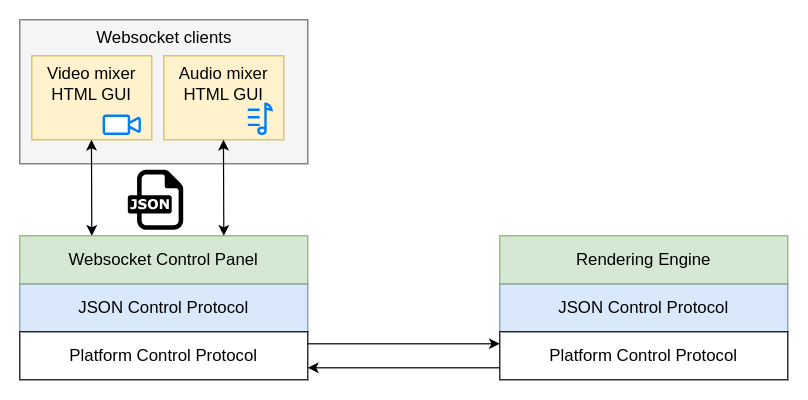
The JSON protocol sits on top of an application-independent platform protocol which transports the JSON payload between the clients and the production.
Control Panel implementation
Note: This section is mainly needed if you plan on implementing a new control panel for the Atelier Live Rendering Engine using the C++ SDK.
Most of the JSON messages described in this document are sent and received by the Websocket Control Panel using the ControlDataSender interface. The interface encapsulates the packing and unpacking of messages to and from the application-agnostic platform protocol. The platform protocol includes the addresses for the sender and receiver(s) of the messages but is unaware of the contents of the packages.
The ControlDataSender interface defines the callbacks that should be used for
handling messages coming from the production.
Response and status messages are received from the production by setting the
mResponseCallback and mStatusMessageCallback, respectively. The data
received in these callbacks are complete JSON messages conforming to the
specification in this document and can be forwarded without changes to the
connected clients. There are however some exceptions to this.
Events
Messages of the type event currently signals that a connection was opened or
closed in the production. Event messages originate in the control panel meaning
that implementing support for this message type is part of making a control
panel using the C++ SDK.
The control panel gets the events from the underlying platform through the
ControlDataSender::Settings::mConnectionEventCallback. By inspecting the
ConnectionEvent provided in the callback, clients connected to the control
panel can be informed about the event. This can be used by other control
panels, implemented using the C++ SDK.
Please see the section about the event message type under “Message types” for
information about the message syntax.
Hop count
Messages of different types need to propagate to different depth of the
production. A hop count in each message determines if it will be relayed
from one Rendering Engine to a possibly chained one behind it.
When receiving a JSON message from a client, the Websocket Control Panel will select a hop count based on the content of the message, before sending the message to the production.
The hop count is marked in the platform layer of the protocol when sending a
message using ControlDataSender::sendRequestToReceivers. It is not visible
in the JSON message.
For each type of message, the hop count used by the Websocket Control Panel is specified in a “Hop count” section within “Message types” below. This hop count should be used when implementing a new C++ control panel.
The state tree
The control API is based around a state tree that makes up the hierarchy of parameters and entities in the Rendering Engine that can be controlled or monitored. The tree is expressed as a JSON structure.
An entity in the tree is addressed by a path consisting of the names of each enclosing object surrounding the entity.
For instance, in the structure below, the path to the g-field of the
rgb_filter would be /video/nodes/rgb_filter/g:
{
    "video": {
        "nodes": {
            "rgb_filter": {
                "r": 0.5,
                "g": 0.4,
                "b": -0.2
            }
        }
    }
}
Message format
JSON syntax is used for all messages. The type and resource fields are
present in all messages and define the type of message and what resource that
is affected by this message.
{
    "type": "...",
    "resource": "..."
}
Message types
All changes that can be made to a production are available in the JSON API
through messages of type set or command.
A parameter that can be changed immediately, without side effects, and that
will keep its state until the next change can be accessed directly with a
set message. In other cases a command is necessary to initiate the change.
A set message might for instance be used for controlling the layer opacity
in an alpha-over node or the gain for an input to the audio mixer whereas a
command is needed to initiate the loading of a media file or a transition
effect spanning over a period of time.
To get the current state of a resource, a get message can be used. A resource
can also be monitored for changes using a subscribe message. When a
sub-resource is added or removed from the monitored resource, a state-add or
state-remove message is sent to the subscriber. Other changes result in a
state-change message.
Parameters that change continuously without any user input, such as the play
position of a media player or the loudness in an audio output, are referred to
as streaming parameters. Streaming parameters are monitored by sending a
sampling-start message to the resource path of the streaming parameter and
providing a time interval stating how often sampling-update messages should
be sent.
Table of message types
| Message type | Description |
|---|---|
get | Get the value of a resource |
get-response | The response to a get message |
set | Change the value of a resource |
set-response | The response to a set message |
subscribe | Subscribe to state changes within a resource |
subscribe-response | The response to a subscribe message |
unsubscribe | Stop monitoring state changes within a resource |
unsubscribe-response | The response to an unsubscribe message |
command | Execute a command in a resource |
command-response | The response to a command message |
state-change | Describes the new state of a resource |
state-add | A sub-resource was added to a resource |
state-remove | A sub-resource was removed from a resource |
subscription-list | List own subscriptions |
subscription-list-response | The response to a subscription-list-response message |
describe | Get a description of a resource |
describe-response | The response to a describe message |
sampling-start | Start sampling a streaming parameter |
sampling-start-response | The response to a sampling-start message |
sampling-stop | Stop sampling a streaming parameter |
sampling-stop-response | The response to a sampling-stop message |
sampling-list | List own streaming parameter subscriptions |
sampling-list-response | The response to a sampling-list message |
sampling-list-all | List all streaming parameter subscriptions |
sampling-list-all-response | The response to a sampling-list-all message |
sampling-update | Describes the latest sampled state of a streaming parameter |
event | Various information. Only sent to clients of the Websocket Control Panel |
All response messages contain the field timestamp. This is the time when the
request message was handled, i.e. the timestamp of the frame processed on that
time.
Each type of message is described in detail below.
get and get-response
A message of type get is used to retrieve the current state of a given
resource within the production.
Required fields for get messages:
| Parameter | Description |
|---|---|
| type | Must be “get” |
| resource | The path to get the current state from |
For instance:
{
    "type": "get",
    "resource": "/video/nodes"
}
The response is a get-response. A successful response contains a body
object with the current state of the resource:
{
    "type": "get-response",
    "resource": "/video/nodes",
    "timestamp": 1731073800720000,
    "body": {
        ...
    }
}
The body has its root where the resource URI points.
An unsuccessful get has no body and contains an error message, for
instance:
{
    "type": "get-response",
    "resource": "/video/nodes",
    "error": "No such resource: /video/nodes",
    "timestamp": 1731073800720000
}
NOTE: Repeatedly calling get is a very inefficient way of monitoring the
state of a production. Please see the subscribe and state-change message
sections for a better way.
Hop count
In a proxy-editing setup, i.e. when there is one pipeline behind another one,
get messages will stop at the first one and the state for that pipeline
will be returned. This is applicable when using a Websocket Control Panel.
When implementing a new control panel using the C++ SDK, set the hop count
to 1 (one) for get messages.
set and set-response
A message of type set is used to change the state of one or more components
located at a specified resource path in the production. This can for instance
be to change the currently selected video source of a transition node or to
change the gain of an audio strip.
set messages are generally only available for changes which are immediate.
Please see the command message section for details about changes that
occur over a period of time.
Required parameters for set messages:
| Parameter | Description |
|---|---|
| type | Must be “set” |
| resource | The path to apply the changes to |
| body | The set of changes to apply |
The body of a set request contains the new values of the fields to change
within the resource path. The structure of the body does not need to be
complete - only the fields that should be updated need to be included.
Example of a set request that changes program and preview within a
node named my_transition_node:
{
    "type": "set",
    "resource": "/video/nodes/my_transition_node",
    "body": {
        "preview": 3,
        "program": 8
    }
}
The body does not need to be an object when setting a single item, just the
value. Here is an example:
{
    "type": "set",
    "resource": "/audio/strips/1/filters/gain/value",
    "body": 8.6
}
The set-response does not contain a body with the set values - instead changes
in the production need to be monitored by subscribing to the affected
resources.
Please see the subscribe message section for details about subscriptions.
If there is an error, a set-response is returned containing an error
message. In this case none of the parameters in the
body of the set message will be applied. If the set was successful the
response will contain a result ok key/value.
Hop count
In a proxy-editing setup, i.e. when there is one pipeline behind another one,
set messages will propagate all the way to the last pipeline while following
the configured alignment delay of each step. This is applicable when using a
Websocket Control Panel.
When implementing a new control panel using the C++ SDK, set the hop count
to -1 (negative one) for set messages.
command and command-response
Commands are used to initiate events in the production which are not immediate
or that do not have a direct relationship to one specific field of the
production state tree. For instance, when starting playback of a media file
there might be a play command. This will start the actual playback but also
change the player state (e.g. from paused to playing) and also start to
periodically update the current playback position field.
Required parameters for command messages:
| Parameter | Description |
|---|---|
| type | Must be “command” |
| resource | The resource receiving the command |
| body/command | The name of the command to execute |
| body/parameters | The set of parameters to the command. If the command takes no parameters, this can be skipped, or passed empty |
Example of a command that starts a fade command on a transition node:
{
    "type": "command",
    "resource": "/video/nodes/my_transition_node",
    "body": {
        "command": "fade",
        "parameters": {
          "duration_ms": 120
        }
    }
}
Example of a command that takes no parameters:
{
    "type": "command",
    "resource": "/video/nodes/my_transition_node",
    "body": {
        "command": "cut"
    }
}
As for set-response messages, the command-response has no body - instead changes in
the production need to be monitored by subscribing to one or more resources.
Please see the subscribe message section for details about subscriptions.
If there is an error, a command-response is returned containing an error
message. If the command was successful the response will contain a result
ok key/value.
Hop count
In a proxy-editing setup, i.e. when there is one pipeline behind another one,
command messages will propagate all the way to the last pipeline while
following the configured alignment delay of each step. This is applicable when
using a Websocket Control Panel.
When implementing a new control panel using the C++ SDK, set the hop count
to -1 (negative one) for command messages.
subscribe and subscribe-response
Subscriptions are used to monitor changes in the production. This can e.g. be useful in order to mirror the controls of different control surfaces that are connected to the same production, detect when new resources appear, or to otherwise visualize different parts of the system.
Required parameters for subscribe messages:
| Parameter | Description |
|---|---|
| type | Must be “subscribe” |
| resource | The path to monitor for changes |
Example of a subscribe message for tracking changes of the resource
/audio/strips/3/compressor:
{
    "type": "subscribe",
    "resource": "/audio/strips/3/compressor"
}
The response is a subscribe-response. A successful response contains a body
object with the current state of the resource, for instance:
{
    "type": "subscribe-response",
    "resource": "/audio/strips/3/compressor",
    "body": {
        "attack": 30,
        "gain": 1,
        "knee": 3.5,
        "ratio": 3.3,
        "release": 2000,
        "threshold": -24,
        "type": "compressor"
    },
    "timestamp": 1731073800720000
}
If there is an error, a subscribe-response is returned containing an error
message instead of a body.
Whenever a monitored resource changes, a state-change, state-add or
state-remove message is sent to all subscribers of that resource. Please see
the state-change, state-add and state-remove message sections for details
about this.
Websocket Control Panel
In a proxy-editing setup, i.e. when there is one pipeline behind another one,
subscribe messages will stop at the first one and it is from this pipeline
that state changes will be reported. This is applicable when using a Websocket
Control Panel.
When implementing a new control panel using the C++ SDK, set the hop count
to 1 for subscribe messages.
unsubscribe and unsubscribe-response
To stop receiving updates when a monitored resource changes, an unsubscribe
message can be used.
Required parameters for unsubscribe messages:
| Parameter | Description |
|---|---|
| type | Must be “unsubscribe” |
| resource | The resource path to stop monitor for changes |
If the unsubscribe message is successful, an unsubscribe-response is
returned:
{
    "type": "unsubscribe-response",
    "resource": "/audio/strips/3/compressor",
    "timestamp": 1731073800720000
}
If there is an error, an unsubscribe-response is returned containing an
error message instead of a body.
Hop count
In a proxy-editing setup, i.e. when there is one pipeline behind another one,
unsubscribe messages will stop at the first receiver of the message. This is
applicable when using a Websocket Control Panel.
When implementing a new control panel using the C++ SDK, set the hop count
to 1 for unsubscribe messages.
state-change
A state-change message describes the new state for a number of fields within
a specified resource. state-change messages are sent from the production
side, i.e. they are only received, never sent, by clients.
state-change messages are sent whenever the internal state of the production
changes, for instance when:
- a client has issued a
setmessage - a command that changes the state is being executed
- an automation changes the state over a period of time
- a component, such as a metering device, has new data to report
To avoid loops or unnecessary updates on the client side, the message includes
an actor field stating whether the receiver of the message or some other
entity caused the change to happen.
actor value | Meaning |
|---|---|
| “self” | The receiver of the message caused the change |
| “other” | Another client caused the change |
| “system” | A change from within the system |
Format of the state-change message:
| Parameter | Description |
|---|---|
| type | Must be “state-change” |
| resource | The resource path that has changed |
| body | The fields that have changed within the resource |
| actor | The entity responsible for the change |
Below is an example state-change message where the client receiving the
message also caused the change to happen:
{
    "type": "state-change",
    "resource": "/audio/strips/3/compressor",
    "actor": "self",
    "body": {
        "gain": 2.5,
        "ratio": 4.0
    }
}
state-add and state-remove
The state-add and state-remove messages are similar to the state-change
message. The top level resource field is the resource the client subscribes to.
In the body of the message there is another resource field telling what
sub-resource has been added or removed.
Examples:
{
  "type": "state-add",
  "resource": "/audio",
  "actor": "system",
  "body": {
    "resource": "/strips/2"
  }
}
{
  "type": "state-remove",
  "resource": "/audio",
  "actor": "system",
  "body": {
    "resource": "/strips/2"
  }
}
subscription-list and subscription-list-response
The subscription-list message is used to list own subscriptions. The response
message shows the client’s subscriptions, located under a given resource point
in the tree.
Required fields for subscription-list messages:
| Parameter | Description |
|---|---|
| type | Must be “subscription-list” |
| resource | The resource path to start looking for subscriptions from |
For instance:
{
    "type": "subscription-list",
    "resource": "/video"
}
The response is a subscription-list-response. A successful response contains a
body object with the current state of the resource:
{
  "type": "subscription-list-response",
  "resource": "/video",
  "timestamp": 1731414140040000,
  "body": {
    "subscriptions": [
      "/nodes/alpha_combine",
      "/nodes/alpha_over"
    ]
  }
}
The body has its root where the resource URI points.
An unsuccessful request has no body and contains an error message, for
instance:
{
  "type": "subscription-list-response",
  "resource": "/video/nodes/over",
  "timestamp": 1731414382900000,
  "error": "Failed to find resource with name 'over'"
}
Hop count
In a proxy-editing setup, i.e. when there is one pipeline behind another one,
subscription-list messages will stop at the first one, and the subscriptions
for that pipeline will be returned. This is applicable when using a Websocket
Control Panel.
When implementing a new control panel using the C++ SDK, set the hop count
to 1 for subscription-list messages.
describe and describe-response
The purpose of these messages is to get a description of some resource in the state tree, like a node in the video mixer component for example. The descriptions will list all commands and parameters which are valid for the resource.
Required fields for describe messages:
| Parameter | Description |
|---|---|
| type | Must be “describe” |
| resource | The path to resource to describe |
This is the description for /video/nodes/fade_to_black:
{
  "type": "describe-response",
  "resource": "/video/nodes/fade_to_black",
  "timestamp": 1731480819600000,
  "body": {
    "children": [],
    "commands": [
      {
        "command": "fade_from",
        "optional_parameters": [],
        "required_parameters": [...],
        ...
      },
      ...
    ],
    "parameters": [
    ...
    ]
  }
}
Hop count
In a proxy-editing setup, i.e. when there is one pipeline behind another one,
describe messages will stop at the first receiver of the message. This is
applicable when using a Websocket Control Panel.
When implementing a new control panel using the C++ SDK, set the hop count
to 1 for describe messages.
sampling-start and sampling-start-response
The sampling-start message is used to start sampling a streaming parameter.
If successful, sampling-update messages will be sent to the subscriber
periodically at the specified time inteval.
Required parameters for sampling-start messages:
| Parameter | Description |
|---|---|
| type | Must be “sampling-start” |
| resource | An expression describing the streaming parameter(s) to start sampling |
| body/interval_ms | The update interval |
An asterisk (*) can be used at any level of the resource expression to
indicate “all components at this level”. If an asterisk is used, no other
characters are allowed at that level of the path.
For instance, "resource": "/audio/mixes/*/input_meter/*" can be used to start
sampling all streaming parameters under input_meter for all audio mixes.
The interval_ms parameter must be greater than or equal to 40.
Example:
{
  "type": "sampling-start",
  "resource": "/audio/mixes/*/input_meter/*",
  "body": {
    "interval_ms": 100
  }
}
If there is an error, a sampling-start-response is returned containing an
error message. If the sampling-start was successful the response will
contain a result ok key/value.
sampling-stop and sampling-stop-response
The sampling-stop message is used to stop sampling a streaming parameter.
Required parameters for sampling-stop messages:
| Parameter | Description |
|---|---|
| type | Must be “sampling-stop” |
| resource | An expression used to start sampling one or more streaming parameters |
The resource parameter must match one used to start sampling exactly.
Example:
{
  "type": "sampling-stop",
  "resource": "/audio/mixes/*/input_meter/*"
}
If there is an error, a sampling-stop-response is returned containing an
error message. If the sampling-stop was successful the response will
contain a result ok key/value.
sampling-list and sampling-list-response
The sampling-list message is used to list the streaming parameter
subscriptions that are registered to the client sending the message.
Required parameters for sampling-stop messages:
| Parameter | Description |
|---|---|
| type | Must be “sampling-list” |
| resource | Must be “/” |
Example:
{
  "type": "sampling-list",
  "resource": "/"
}
If there is an error, a sampling-list-response is returned containing an
error message. If the sampling-stop was successful the response will
contain a list of all the sender’s streaming parameter subscriptions.
Example:
{
    "type": "sampling-list-response",
    "resource": "/",
    "body": {
        "samplings": [
            "/audio/strips/1/pre_filter_meter/*",
            "/audio/mixes/0/input_meter/*"
        ]
    },
    "timestamp": 1736860857880000
}
sampling-update
A sampling-update message describes the latest sampled state of one or more
streaming parameters matching a subscription. The message is sent periodically
to clients that have started subscriptions using sampling-start.
The message contains the resource expression used in sampling-start. If
necessary this can be used to identify the subscription in the client.
The body of the message contains the updated state for all of the streaming
parameters matching the subscription. Note that the body starts at the root of
the state tree, which is different from e.g. get responses or subscriptions
for non-streaming parameters.
Example:
{
    "type": "sampling-update",
    "resource": "/audio/strips/*/pre_filter_meter/*",
    "body": {
        "audio": {
            "strips": {
                "1": {
                    "pre_filter_meter": {
                        "peak": -0.439775225995602234
                    }
                },
                "2": {
                    "pre_filter_meter": {
                        "peak": -0.982362873895602837
                    }
                }
            }
        }
    },
    "timestamp": 1736861180080000
}
event
When connected to a Websocket Control Panel it will act as a proxy in front of
the Rendering Engine. This introduces a message of type event, which is only
used between the Websocket Control Panel and its clients.
Messages of type event contain an event field specifying the type of event.
All clients connected to the Websocket Control Panel will receive events of type
connect whenever a new connection is established between the Websocket Control
Panel and a Rendering Engine. Such a message might look like:
{
    "type": "event",
    "connected_node": "<uuid>",
    "address": "<uuid>:<uuid>:...",
    "event": "connect"
}
where connected_node is the UUID of the newly connected node (Rendering Engine) and
address is a colon separated list of UUIDs, which is the address to the node that
discovered the connection. For connect events this is currently only the Websocket
Control Panel itself, meaning the address is always the Websocket Control Panel’s.
When a connection between a client and a Websocket Control Panel is established,
the client will receive connect events for all Rendering Engines that where
already connected to the Websocket Control Panel, to let the client know it
is connected to a production.
If the connection between the Websocket Control Panel and the Rendering Engine
breaks, whether it is disconnected on purpose or gets disconnected due to a network
outage, the Websocket Control Panel will send an event message to all its clients.
{
    "type": "event",
    "disconnected_node": "<uuid>",
    "address": "<uuid>:<uuid>:...",
    "event": "disconnect"
}
A similar message is also sent to the clients in case the connection between two
Rendering Engines/Pipelines is torn down or lost, such as between a Low Delay
and a High Quality Pipeline. In that case the address parameter will be the UUID
of the Websocket Control Panel followed by the UUID of the LD Pipeline and the
disconnected_node is the UUID of the HQ Pipeline.